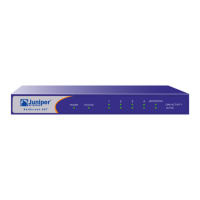
The Front Panel
NetScreen-50 3
The information revealed by each LED is as follows:
LED Purpose Color Meaning
Power Power Status green Power is functioning correctly.
off The device is not receiving power.
Alarm System Alarm red Critical alarm—failure of hardware component or
software module (such as a cryptographic
algorithm)
amber Major alarm:
Low memory (<10% remaining)
High CPU utilization (>90%)
Log memory full
Sessions full
Maximum number of VPN tunnels reached
Firewall attacks detected
off No alarms.
Status System Status blinking green Normal operation.
green Booting up normally.
HA High Availability
(HA)
off No HA activity has been defined.
green Port is a master in a redundancy cluster.
amber Port is a slave in a redundancy cluster.
Session Session
Utilization
amber Session utilization is between 70% and 90%.
red Session utilization is greater than 90%.
off Normal operation.
Flash Compact Flash
(CF) Card Status
green The card is installed.
blinking green Read-write activity is detected.
off CF slot is empty.


 To Next Page