EasyManua.ls Logo

JUNSD JS-702 - Setting Age and Heart Rate Limits; Performing Heart Rate Measurement

JUNSD JS-702
6 pages
Print Icon
To Next Page IconTo Next Page
To Previous Page IconTo Previous Page
Loading...
2
.HEART
RATE MEASUREMENT
When firstly
using
the
pulse
watch,
set
user's age.
Otherwise,
the
heart rate
percentage
would
be
incorrect.
To set
heart rate
limits
to
determine
if
you
are
exercising
within
your
training
zone..
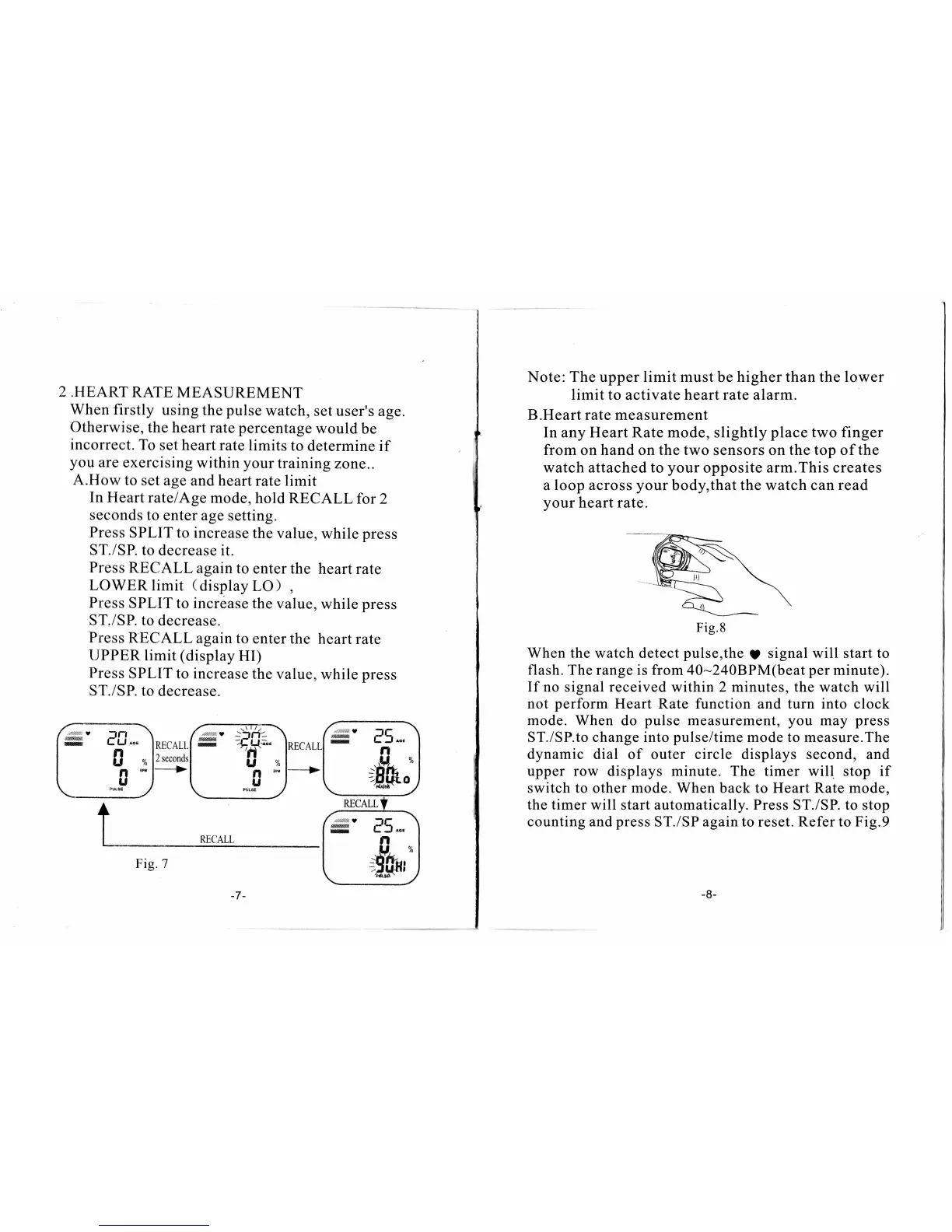
A.How
to
set age and
heart rate limit
In
Heart
ratelAge
mode,
hold
RECALL
for
2
seconds
to
enter
age setting.
Press
SPLIT to
increase
the
value,
while
press
ST./SP.
to decrease
it.
Press RECALL
againto
enter the
heartrate
LOWER
limit
(
display
LO)
,
Press
SPLIT to increase
the value,
while
press
ST./SP. to
decrease.
Press
RECALL
again to enter
the
heartrate
UPPER
limit
(display
HI)
Press
SPLIT to
increase the
value,
while
press
ST./SP.
to
decrease.
Fig.7
Note: The
upper
limit must
be
higher
than
the lower
limit to
activate
heart rate alarm.
B.Heart rate measurement
In
any
Heart
Rate mode, slightly
place
two finger
from
on
hand
on
the two
sensors
on the top
of
the
watch attached to
your
opposite arm.This creates
a
loop
across
your
body,that the watch can read
your
heart rate.
When
the
watch detect
pulse,the
9
signal
will
start to
flash. The range
is from 40-240BPM(beat
per
minute).
If no
signal
received
within 2 minutes,
the
watch will
not
perform
Heart Rate function and
turn
into
clock
mode.
When do
pulse
measurement,
you
may
press
ST./SP.to change into
pulse/time
mode
to measure.The
dynamic dial
of outer
circle
displays second, and
upper row displays minute. The timer will
stop if
switch
to other mode. When back
to Heart
Rate
mode,
the timer will
start
automatically. Press
ST./SP.
to
stop
counting and
press
ST./SP
again to
reset. Refer to Fig.9
Fig.8