EasyManua.ls Logo

JUNSD JS-702 - Recalling Split Times; Heart Rate Measurement; Display Modes

JUNSD JS-702
6 pages
Print Icon
To Next Page IconTo Next Page
To Previous Page IconTo Previous Page
Loading...
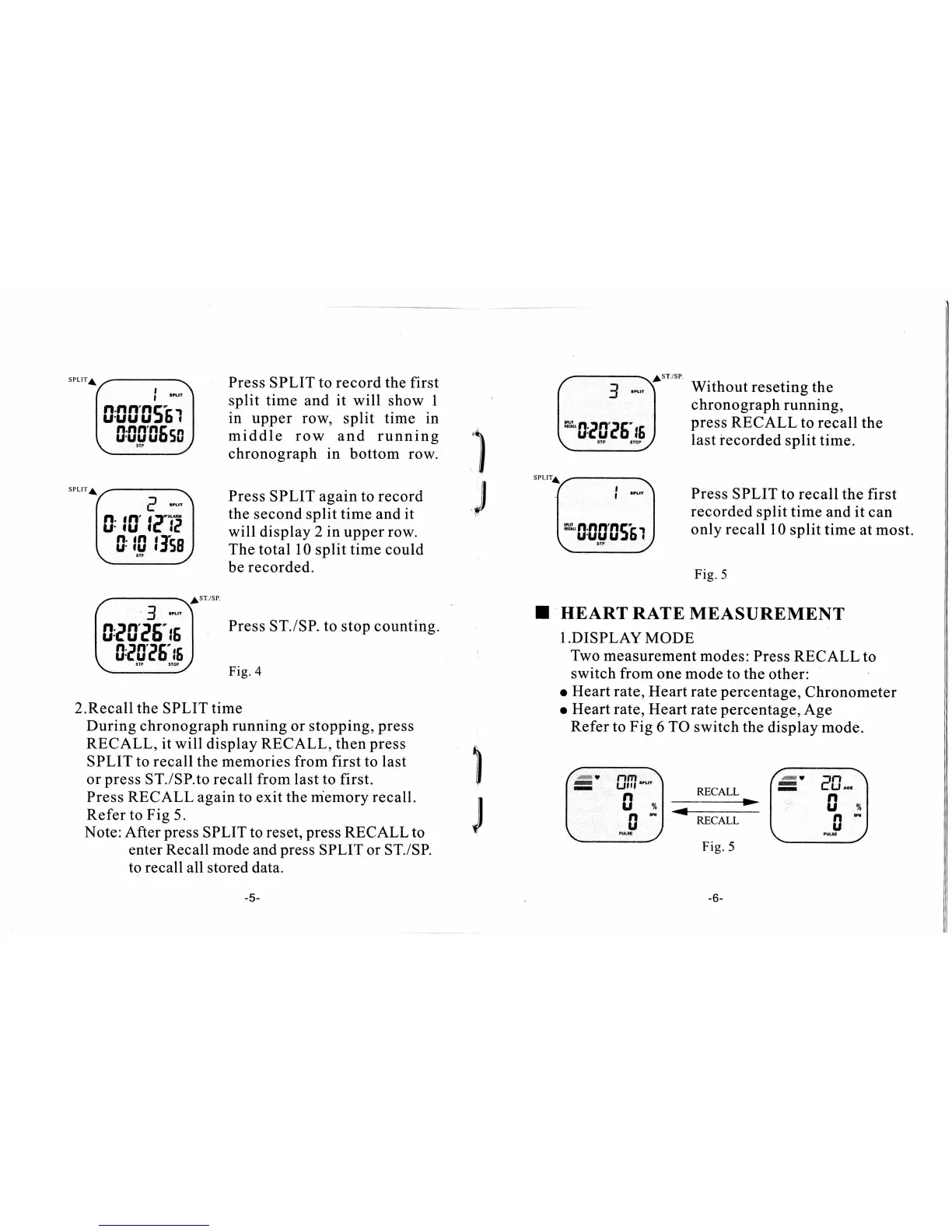
Press
SPLIT to record the first
split time
and
it
will show
I
in upper row,
split
time
in
middle row
and running
chronograph in
bottom row.
Press
SPLIT
againto record
the second split time and it
will display 2
in
upper row.
The total
10 split time could
be
recorded.
sT./sP.
Press
ST./SP.
to stop counting.
Fig.4
2.Recall
the
SPLIT
time
During chronograph running
or stopping,
press
RECALL, it will
display
RECALL,
then
press
SPLIT
to recall the memories from first
to last
or
press
ST./SP.to
recall from last to first.
Press RECALL again to
exit
the memory recall.
Refer to Fig 5.
Note:After
press
SPLIT
to reset,
press
RECALL to
enter Recall mode and
press
SPLIT or ST./SP.
to recall all
stored
data.
l'.-.
[rrrr!;; I
t 00005sc J
\-_-i:-/
?-JT
10,
fC'
le'!P
I
t B't0
lIss
J
\---i"
'
/---tf
ls'ecat-; I
[ggeE9
)
J
"'''f_
fr,rp*d
Without reseting
the
chronograph
running,
press
RECALL
to
recall
the
last recorded
split time.
Press
SPLIT to recall
the first
recorded
split time and it
can
only
recall
10
split time
at most.
I
J
Fig.5
I
HEART
RATE MEASUREMENT
l.DISPLAY
MODE
Two measurement
modes: Press
RECALL
to
switch
from
one mode
to the
other:
o Heart rate,
Heart rate
percentage,
Chronometer
o
Heart rate,
Heart
rate
percentage,
Age
Refer
to
Fig
6 TO
switch the
display mode.
fryt.no"*fsEl
t J*J
-REcALL
|.
"".9^)
\---=-z
Fig.5
u-./