EasyManua.ls Logo

JUNSD JS-702 - Setting Clock, Calendar, and Alarm; Alarm ON;OFF; Chronograph Operation; Using the Chronograph

JUNSD JS-702
6 pages
Print Icon
To Next Page IconTo Next Page
To Previous Page IconTo Previous Page
Loading...
ffi
sr/sP
G'q-n
I
r.r
{-|f,
!e'00c0-il
I
^.
i?{l8rs
J
srsP
t Egy
\_::.-/
Fig.
I
RECALL
2 seconds
----)
Fig. 3
sr./sP.
{vrrNurn
f---Tr)
[
^"
l?{l[lgg
J
\__.-
sr.rsr.
f
6m
t@
sr./sP.
f
or- uou*
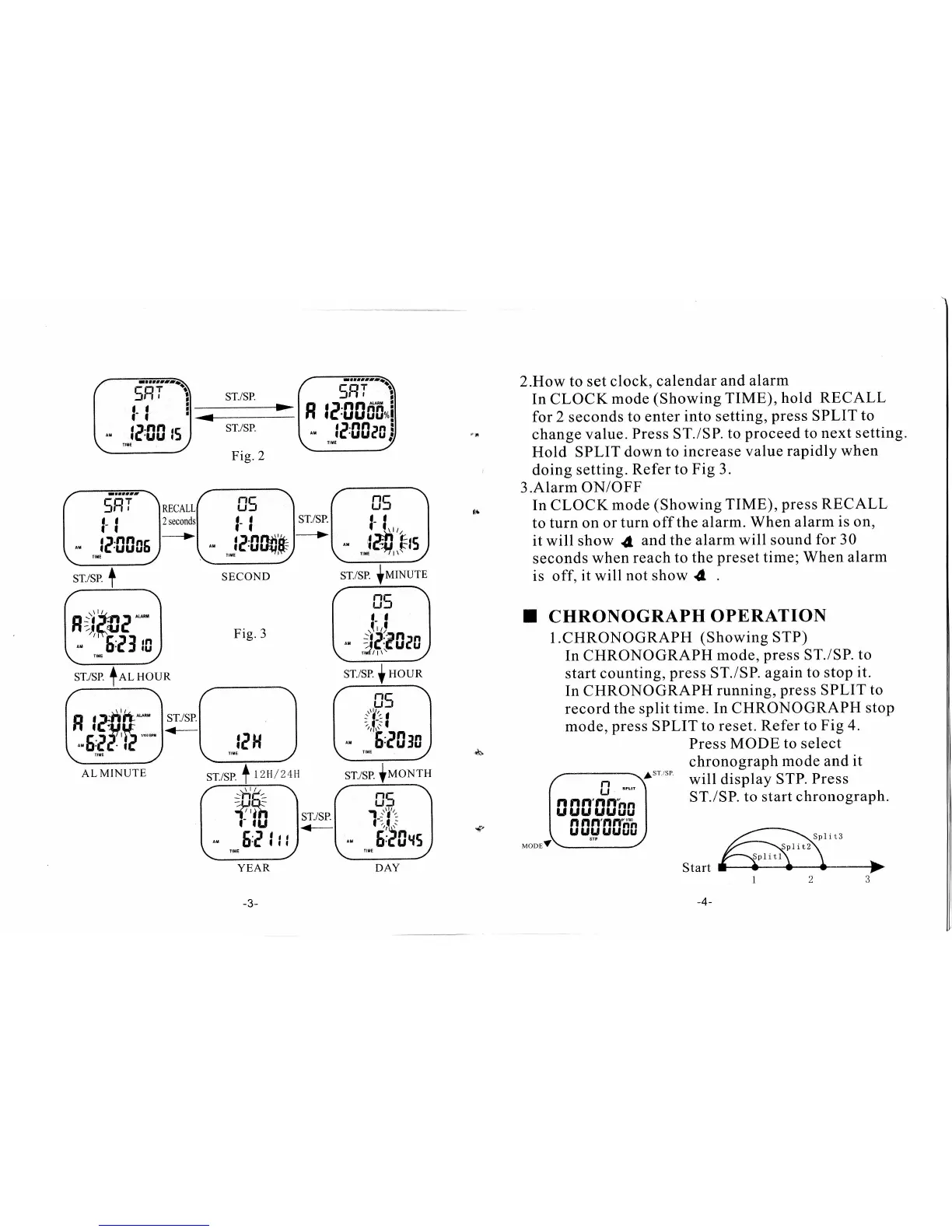
2.How to set
clock, calendar
and alarm
In CLOCK
mode
(Showing TIME), hold
RECALL
for
2
seconds
to enter
into setting,
press
SPLIT
to
change
value.
Press
ST./SP.
to
proceed
to
next setting.
Hold SPLIT
down
to
increase value
rapidly
when
doing
setting.
Refer
to Fig 3.
3.Alarm ON/OFF
In CLOCK
mode
(Showing
TIME),
press
RECALL
to turn
on or
turn off
the alarm.
When
alarm
is on,
it will show
{
and the
alarm will sound
for 30
seconds
when
reach to
the
preset
time;When
alarm
is off,
it will
not show
d
T CHRONOGRAPH
OPERATION
l.CHRONOGRAPH
(Showing
STP)
In CHRONOGRAPH
mode,
press
ST./SP.
to
start counting,
press
ST./SP.
agatn
to stop
it.
In CHRONOGRAPH
running,
press
SPLIT
to
record
the
split
time.
In
CHRONOGRAPH
stop
mode,
press
SPLIT
to reset.
Refer
to Fig
4.
Press MODE to select
chronograph
mode and
it
^sr/sP
will display
STP.
Press
ST./SP.
to start
chronograph.
@*mrru
m-@
YEAR
-3-
sr./sP.
I
Houn
DAY