This document describes the JustSmart Indoor Garden, a hydroponics growing system designed for home and residential use. It comes in four models: GS1 Lite, GS1 Basic, GS1 Plus, and GS1 Max, with the GS1 Max being the subject of the provided image and manual.
Function Description
The JustSmart Indoor Garden is a hydroponics system that allows users to grow plants indoors without soil. It provides controlled lighting, water circulation, and nutrient delivery to support plant growth. The system is designed for ease of use, with features for automatic operation and monitoring.
Important Technical Specifications
The GS1 Max model, as highlighted in the manual, has the following specifications:
- Planting Number: 12
- Planting Height: 30 inches
- LED Performance: 48W
- Timer: 4/8/12/16 hours, with free setting from the APP
- Light Mode: Vegetable Mode, Herbs Mode, Flower and Fruit Mode
- Operation Method: Button/APP
- Screen Size: 3.5 inches
- Water Cycle System: Ultra-Quiet Water Pump
- Water Level Detection: Sensor
- Automatic Fertilization: Yes
- Automatic Watering: Yes
- Ventilation: Yes
- Automatic Keep Warm: Yes
- Product Size: 17.52 x 11.22 x 7.6 inches
- Product Weight: Not specified for GS1 Max, but GS1 Lite is 6.61 pounds.
- Power Input: 100V-240V 50Hz/60Hz
- Power Output: DC 24V 3A
It's important to note that the product number is located on the nameplate at the bottom of the device, and users should not mix the included AC adapter with others.
Usage Features
The JustSmart Indoor Garden offers several user-friendly features:
Easy Installation:
- Insert the large end of the rod into the machine, ensuring it faces the correct direction and is fully inserted.
- Insert the grow lamp on top of the rod, aligning interfaces and pressing gently until fully inserted.
- Release the water level sensor to ensure it moves freely.
- Connect the power cord to an outlet and then to the power inlet on the machine.
Easy Planting:
- Open the water-filling cap and add water to the "FULL" mark. Add water-soluble fertilizer according to instructions.
- Soak seeds and plant sponges in advance. Place 2-3 seeds into a planting sponge, then put the sponge into a planting basket. Install the planting basket into the holes on the water tank.
- Place a germination cover on top of the planting basket to improve germination. Remove the cover when seeds sprout to about 1.2 inches.
Control Panel (Button/APP Operation):
- Power Button: Touch once to turn on the screen, displaying running time, real-time water level, water pump status, light mode, and timing settings.
- Mode Button:
- Default is Vegetable Mode (vegetable icon).
- Touch again for Herbs Mode (herb icon).
- Touch again for Flower and Fruit Mode (flower and fruit icon).
- For GS1 Plus & Max: Press for 3 seconds to turn on/off automatic watering (icon displays/disappears).
- Time Button:
- Default lighting is 4 hours (4H icon).
- Each press increases lighting time by 4 hours, up to a maximum of 16 hours.
- For GS1 Max: Press for 3 seconds to turn on/off automatic keep warm function (icon displays/disappears).
- Light Button:
- Default brightness is 100% (4 sun icons).
- Each press decreases brightness by 25% (one sun icon disappears).
- All sun icons disappear when the grow light turns off.
- For GS1 Plus & Max: Press for 3 seconds to turn on/off automatic fertilization (icon displays/disappears).
- Pump Button:
- Water pump runs in a cycle of 30 minutes on/30 minutes off while the grow light is on (pump icon always on).
- Press once for standby mode (pump stops for 12 hours, icon flashes).
- Press again for shutdown mode (pump stops, icon off).
- Warning: Turning off the water pump may cause plants to die.
- Pump frequency can be adjusted in the app settings.
Display Settings (GS1 Max):
- Running Time: Recounts from 00 after reaching 99 days.
- Brightness: Shows current brightness (OFF/25%/50%/75%/100%).
- Wi-Fi Status: Flash for pairing, always on for connecting, no display for not connected (Except GS1 Lite).
- Timer: Displays selected lighting duration (4H, 8H, 12H, 16H).
- Water Level Status: Displays FULL, MIDDLE, or LOW. All functions temporarily turn off when the water level is low.
- Automatic Keep Warm (GS1 Max only): Always on for running, no display for off. APP settings allow adjustment of min/max temperature.
- Automatic Ventilation (GS1 Max only): Always on for running, no display for off.
- Automatic Fertilization (GS1 Plus & Max): Always on for running, no display for off. APP settings allow adjustment of fertilization interval and rate. Note: Add nutrient solution to the fertilization tank first.
- Automatic Watering (GS1 Plus & Max): Always on for running, no display for off. Note: Connect the water source first.
Wi-Fi Pairing (Except GS1 Lite):
- Download and open the APP.
- Enable mobile phone Wi-Fi, Bluetooth, and Location. (Wi-Fi must be 2.4G network).
- Connect power, press the Power button to turn on the device.
- Press the water pump button for 3 seconds to enter Wi-Fi pairing mode (Wi-Fi icon flashes).
- Search and add devices in the APP.
APP Panel Settings (Except GS1 Lite):
The APP allows for detailed control and monitoring, including:
- Work on/off time for the system.
- Pump on frequency (adjustable from 1min to 60min).
- Planting information (growth time, water level, temperature for GS1 Max).
- Planting operation modes (Veg, Fruit, Herb).
- Fertilization settings (interval days, dosage).
- For GS1 Max: Watering, Ventilation, Heating controls, and temperature range settings (Maximum/Lowest).
Maintenance Features
- Cleaning: Turn off the power to prevent electric shock. Separate wet and dry parts, being careful not to spill water on the socket. The water tank cannot be cleaned in the dishwasher. When cleaning, disconnect the power supply and protect the power interface and control box from water.
- Water Level Monitoring: The system alarms when the water level is low, and the plant light turns off temporarily, entering standby mode. Users must add an appropriate amount of water and nutrients to the tank.
- Sponge Reuse: The sponge can be reused by pulling out the plant stem, but it is not recommended due to potential adverse effects.
- Plant Transplant: Plants and sponges can be removed from the planting basket and transplanted into a garden, taking care to protect the plant roots.
Important Safety Instructions
- Children must be accompanied by an adult when using the machine.
- Keep children away from plants to avoid accidental ingestion.
- Turn off power before cleaning.
- Do not use accessories not recommended by the manufacturer.
- Separate wet and dry parts; avoid spilling water on the socket.
- Cut off power immediately if electric shock is possible.
- Do not operate if the power cord or plug is damaged, not working properly, or dropped in water. Contact support if these situations occur.
- Not intended for use by individuals with physical, sensory, or mental impairments or lack of experience/knowledge unless supervised or trained.
- Do not use outdoors.
- Intended for home and residential use only; not approved for commercial use.

 Need help?
 General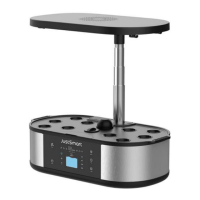

 To Next Page