EN 5
Connecting to PC
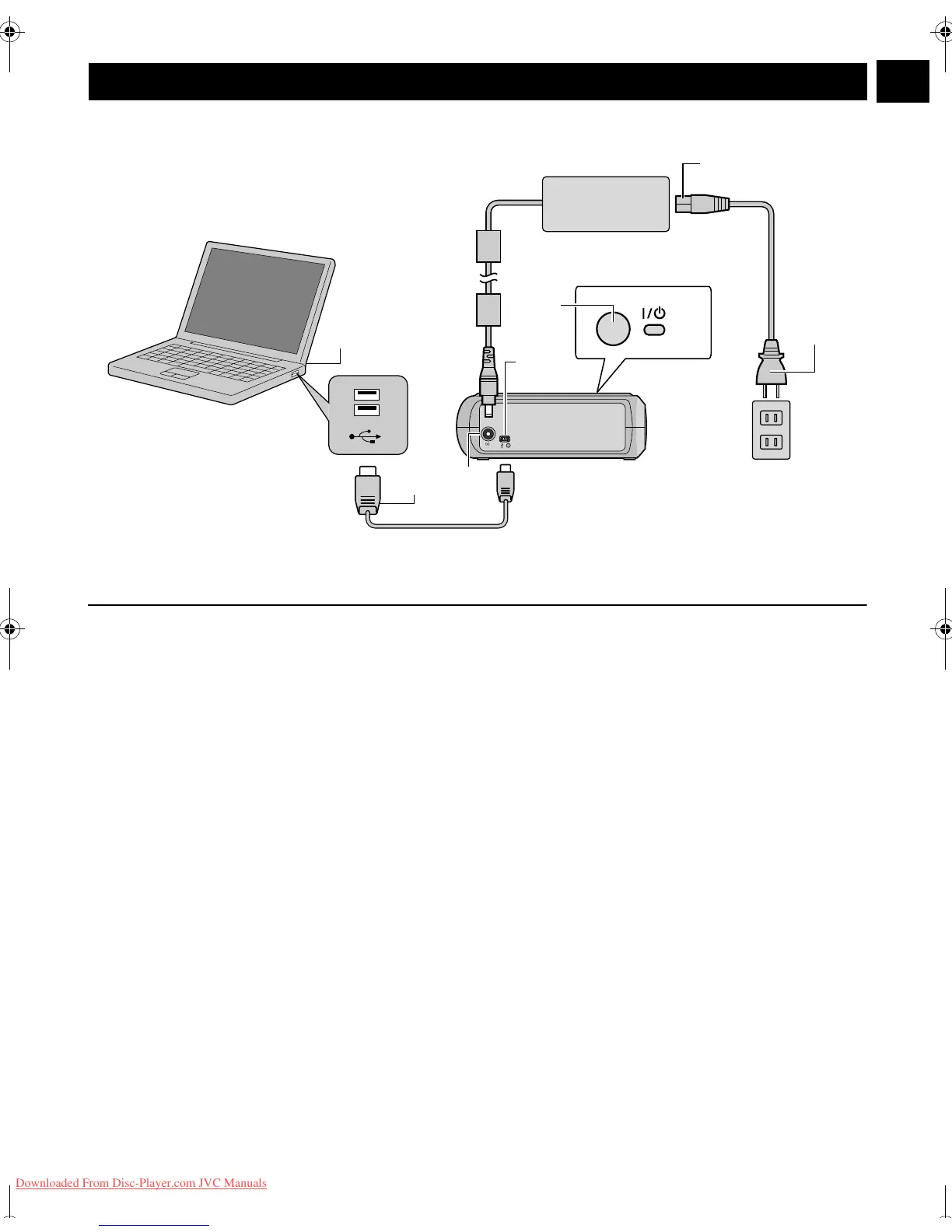
A Connect the AC adapter to the burner.
B Connect the power cord to the AC adapter.
C Connect the power cord to an AC outlet.
D Press the power button (C/B) on the front to turn on the burner.
The power lamp lights in green.
E Turn on the PC.
F Connect the burner to the PC with the USB cable.
NOTE:
To connect the burner to a PC, use the USB cable provided with the camera.
Connections
A
B
C
F
E
D
F
USB Cable (provided for the camera)
AC Adapter
(provided for the burner)
Power Cord
(Provided)
To AC Outlet
To USB Connector
Rear of burner
PC
CU-VD20.book Page 5 Thursday, March 1, 2007 5:55 PM
Downloaded From Disc-Player.com JVC Manuals


 To Next Page