GETTING STARTED
8 EN
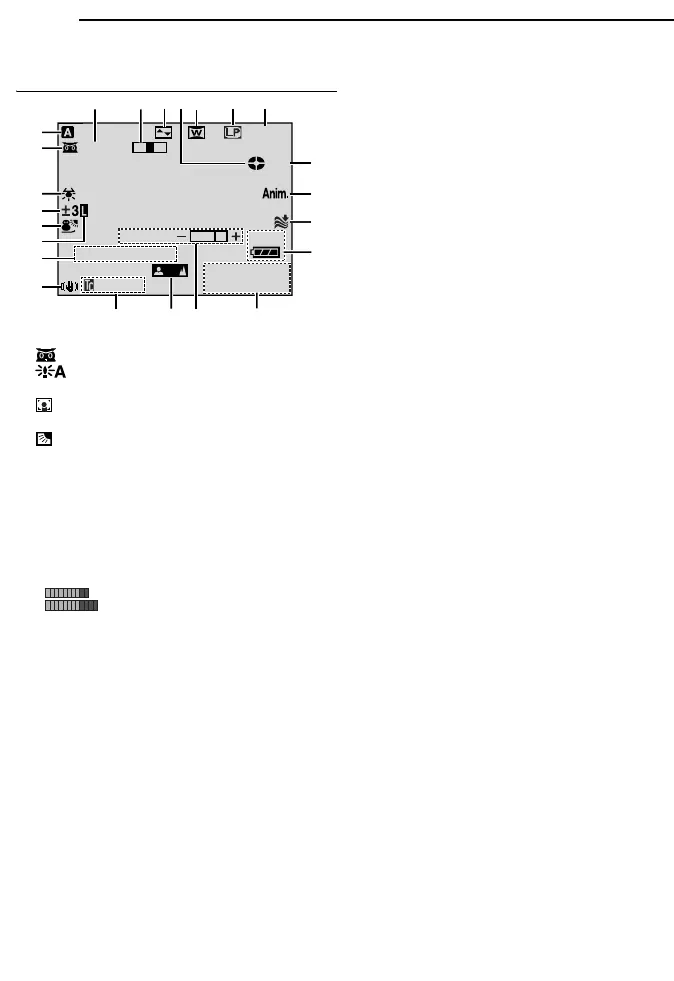
LCD Monitor/Viewfinder Indications
During Video Recording
a Operation Mode (墌 pg. 13)
B : Night-Scope Indicator (墌 pg. 28)
: Gain Up Mode (墌 pg. 23)
C White Balance Indicator (墌 pg. 32)
D : Spot Exposure Control Indicator
(墌 pg. 31)
: Backlight Compensation Indicator
(墌 pg. 31)
±: Exposure Adjustment Indicator (墌 pg. 30)
E Selected Program AE With Special Effects
Indicator (墌 pg. 34)
F Iris Lock Indicator (墌 pg. 30)
G SOUND 12BIT/16BIT: Sound Mode Indicator
(墌 pg. 23) (Appears for approx. 5 seconds
after turning on the camcorder.)
: Auxiliary Microphone Level
Indicator
(Appears when an optional microphone is
connected. 墌 pg. 26, “AUX MIC” )
H Digital Image Stabiliser (“DIS”) (墌 pg. 24)
I Approximate Zoom Ratio (墌 pg. 18)
J Zoom Indicator (墌 pg. 18)
K Selected Wipe/Fader Effect Indicator
(墌 pg. 33)
L Tape Running Indicator (墌 pg. 17)
(Rotates while tape is running.)
M Selected Wide Mode Indicator (墌 pg. 24)
N Recording Speed Mode (SP/LP) (墌 pg. 23)
O Tape Remaining Time (墌 pg. 17)
P REC: (Appears during recording.) (墌 pg. 17)
PAUSE: (Appears during Record-Standby
mode.) (墌 pg. 17)
O: (Appears when taking Snapshot.)
(墌 pg. 29)
Q 5S/Anim.: Displays the 5-Second Recording
mode or Animation recording mode.
(墌 pg. 24)
R Wind Cut Indicator (墌 pg. 24)
S Battery Remaining Power Indicator
(墌 pg. 40)
T Date/Time (墌 pg. 14)
U Brightness Control Indicator (LCD monitor/
Viewfinder) (墌 pg. 15)
V Manual Focus Adjustment Indicator
(墌 pg. 29)
W Time Code (墌 pg. 26, 27)
50m
1
0
1
1
1
0
.
:
0
0
5
0
.
25
x
W
T
BRIGHT
SOUND
12
BIT
1h40m
15:55
REC
4
5
6
1
2
3
90
p
as
8
qwe t
y
u
i
o
r
7
d
L
R



 To Next Page