EasyManua.ls Logo

JVC GR-D850U - User Manual

JVC GR-D850U
104 pages
Print Icon
To Next Page IconTo Next Page
Loading...
LYT1803-001A
ESPAÑOLENGLISH
EN SP
INSTRUCTIONS
MANUAL DE INSTRUCCIONES
DIGITAL VIDEO CAMERA
VIDEOCÁMARA DIGITAL
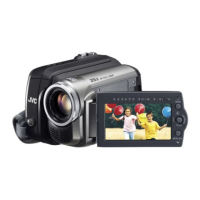
GR-D850U
GR-D870U
Dear Customer,
Thank you for purchasing this
digital video camera. Before
use, please read the safety
information and precautions
contained in pages 4 – 6 to
ensure safe use of this product.
Estimado cliente:
Gracias por comprar esta
videocámara digital. Antes de
usarla, lea la información de
seguridad y las precauciones
contenidas en las páginas 4 – 6
para garantizar un uso seguro
de este producto.
For Customer Use:
Enter below the Model No. and
Serial No. which is located on
the bottom of the camcorder.
Retain this information for future
reference.
Model No.
Serial No.
The camcorder illustrations appearing in this
instruction manual are of the GR-D870.
Las ilustraciones de la videocámara que aparecen este
manual de instrucciones son para el modelo GR-D870.
GR-D850&870US_EN.indb 1GR-D850&870US_EN.indb 1 11/12/2007 2:47:47 PM11/12/2007 2:47:47 PM

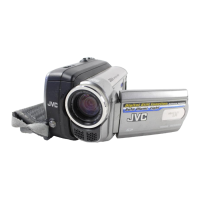
Table of Contents

Questions and Answers

  • S
    Sheila CooperAug 12, 2025
    Why is my JVC GR-D850U Camcorder not turning on?
    • T
      Timothy GatesAug 13, 2025
      If your JVC Camcorder isn't powering on, there could be a few reasons. First, ensure the AC adapter is securely connected. If you're using a battery, make sure it's firmly attached; try detaching and re-attaching it. Finally, the battery might be dead, so try replacing it with a fully charged battery.
  • D
    Dorothy RoseAug 16, 2025
    Why is there no picture on my JVC GR-D850U LCD monitor?
    • A
      ayerskathleenAug 16, 2025
      If there's no picture on your JVC Camcorder's LCD monitor, the brightness setting might be too dark, so try adjusting the brightness. Also ensure that if the monitor is tilted upward 180 degrees, open the monitor fully.
  • J
    Jasmine HaleyAug 20, 2025
    Why is my JVC Camcorder tape moving but no picture is displayed?
    • M
      martinsydneyAug 20, 2025
      If the tape in your JVC Camcorder is moving but there's no picture, first ensure your TV is set to the correct video mode or channel for playback. Also, check that the cassette holder cover is closed.
  • R
    Ryan White Jr.Aug 25, 2025
    What to do if my JVC GR-D850U is not recording?
    • E
      estradacourtneyAug 25, 2025
      If your JVC Camcorder isn't recording, check these potential causes: The tape's erase protection tab might be set to “SAVE”; if so, set it to “REC”. Also, if “TAPE END” appears, replace the cassette with a new one. Finally, make sure the cassette holder cover is closed.
  • A
    allenaliciaAug 28, 2025
    How to fix autofocus on JVC Camcorder?
    • R
      rebecca43Aug 28, 2025
      If the focus on your JVC Camcorder isn't adjusting automatically, first check if the focus is set to Manual mode and switch it to Auto mode. Also, the lens might be dirty or covered with condensation. In this case, clean the lens and check the focus again.
  • S
    sheenabutlerAug 31, 2025
    Why are the images on my JVC GR-D850U LCD monitor dark or whitish?
    • G
      Grace SmithAug 31, 2025
      If images on your JVC Camcorder's LCD monitor appear dark in low temperatures, this is due to the characteristics of the LCD monitor and is not a malfunction. Try adjusting the brightness and angle of the LCD monitor.
  • N
    Nina StoneSep 4, 2025
    How to correct slow shutter speed look on JVC GR-D850U Camcorder?
    • D
      dgreerSep 4, 2025
      If the image on your JVC Camcorder looks like the shutter speed is too slow, especially when shooting in the dark, it might be because “GAIN UP” is set to “AUTO,” making the unit highly sensitive to light. If you want the lighting to look more natural, set “GAIN UP” to “AGC” or “OFF”.
  • R
    Ronnie JonesSep 8, 2025
    Why does the snapshot color look strange on my JVC GR-D850U?
    • C
      Cindy SmithSep 8, 2025
      If the color of snapshots looks strange on your JVC Camcorder, it could be because the light source or the subject does not include white, or there are various different light sources behind the subject. Find a white subject and compose your shot so that it also appears in the frame.

Summary

Easy Start Guide

Preparation

Steps for preparing the camcorder, including battery attachment and charging.

Video Recording

Instructions on how to start and perform video recording.

Playing Back Recordings

Guidance on how to play back recorded video content.

Important Initial Information

Read This First!

Crucial information and precautions before initial use.

Safety Precautions

Detailed safety instructions to prevent hazards and ensure proper operation.

General Cautions

Important notes and warnings for safe handling and usage.

Getting Started

Regarding This Manual

Guidance on how to effectively use the instruction manual.

Accessories

List of included and optional accessories for the camcorder.

Controls and Indicators

Identification and function of camcorder buttons, levers, and indicators.

Power Management

Instructions for charging and using the battery pack and AC adapter.

Settings and Adjustments

Language and Date;Time

How to adjust display language and set the date/time.

Display and Cassette Handling

Adjusting display brightness and loading/unloading cassettes.

16:9 Wide Mode

Selecting the recording aspect ratio for wide screen video.

Recording and Playback

Basic Recording Procedures

Step-by-step guide for performing basic video recording.

Tape Management

Information on tape remaining time and quick review feature.

Playback Operations

How to play back recordings and control playback.

Search Functions

Using variable shuttle search and blank search features.

Digital Still Camera (DSC) Operations

Snapshot Feature

How to use the camcorder for taking still digital photos.

Image Playback and Management

Viewing, auto-playing, and organizing stored still images.

File Protection and Memory Cards

Protecting files, deleting files, and handling memory cards.

Detailed Menu Settings

Menu Navigation

How to access and change various camcorder settings via menus.

Recording Menus

Detailed settings available for video recording modes.

Display and Playback Menus

Settings related to screen display and playback options.

Recording Features

Illumination and Slow Motion

Using the LED Light and Live Slow features for recording.

Focus and Exposure Control

Manual focus adjustment and exposure control settings.

White Balance and Effects

Adjusting white balance and applying video effects.

Connections and Editing

TV;VCR Connections

How to connect the camcorder to a TV or VCR for playback.

Dubbing Methods

Instructions for dubbing video to VCR or via DV connector.

Computer Connectivity

Connecting the camcorder to a PC via USB or DV cable.

Troubleshooting

Problem Identification and Remedies

Common problems and their solutions for the camcorder.

Warning Indicators

Meaning and remedies for various warning messages displayed by the camcorder.

Cautions and Warnings

AC Adapter and Battery Safety

Important safety precautions for AC adapters and battery packs.

Device Handling and Storage

Guidelines for safe handling, storage, and care of the camcorder.

Media and Environmental Cautions

Precautions for using memory cards and handling environmental factors.

User Maintenance

Cleaning Procedures

Instructions for cleaning the camcorder's exterior, LCD, and lens.

Compliance Information

Declaration of conformity and regulatory compliance statements.

Technical Specifications

General and Camera Specs

General technical details, dimensions, weight, and camera specifications.

Connectivity and Power Specs

Specifications for connectors, AC adapter, and power requirements.

JVC GR-D850U Specifications

General IconGeneral
BrandJVC
ModelGR-D850U
CategoryCamcorder
LanguageEnglish

Related product manuals