ENGLISH
8
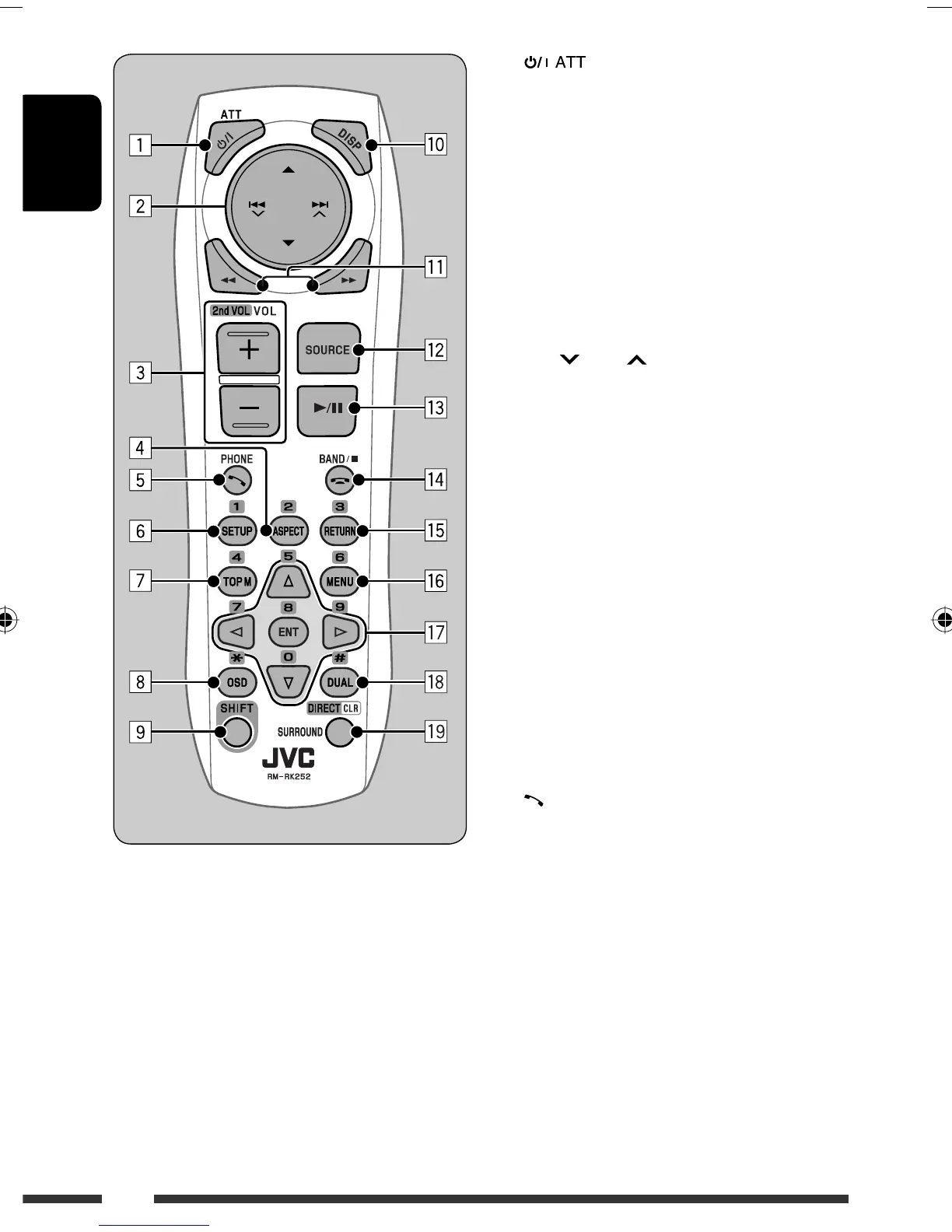
1 button
• Turns the power on if pressed briefly or
attenuates the sound when the power is on.
• Turns the power off if pressed and held.
2 5/∞ buttons
• FM/AM: Selects the preset stations.
• DISC:
– DVD-Video: Selects the title.
– DVD-VR: Selects the program/playlist.
– DivX/MPEG Video/MP3/WMA/WAV: Selects
the folders if included.
4 / ¢ buttons
• FM/AM:
– Searches for stations automatically if pressed
briefly.
– Searches for stations manually if pressed and
held.
• DISC:
– Reverse skip/forward skip if pressed briefly.
– Reverse search/forward search if pressed and
held.
3 VOL (volume) + / – buttons
• Adjusts the volume level.
2nd VOL (volume) buttons
• Not applicable for this unit.
4 * ASPECT button
• Not applicable for this unit.
5 PHONE button
• Not applicable for this unit.
6 * SETUP button
• Enters disc setup menu (during stop).
7 * TOP M (menu) button
• DVD-Video/DivX: Shows the disc menu.
• DVD-VR: Shows the Original Program screen.
• VCD: Resumes PBC playback.
8 * OSD (on-screen display) button
• Shows the on-screen bar.
9 SHIFT button
• Functions with other buttons.
EN06-13_DV4402_001A_f.indd 8EN06-13_DV4402_001A_f.indd 8 12/12/07 11:56:41 AM12/12/07 11:56:41 AM


 To Next Page