ENGLISH
OPERATIONS
9
w • Shows the on-screen bar.
• Also function as the
/TITLE button
when pressed with SHIFT button (see
pages 15 and 16).
e*
1
• DVD-Video/DivX: Shows disc menu.
• VCD: Starts PBC playback.
r*
1
• Makes selection/settings.
• @ / #: DivX: Searches for index during
play.
• DISC +/– buttons: Changes discs when
the source is “CD-CH.”
t*
1
RETURN button
y • DVD-Video: Selects audio language
(
), subtitles ( ), angle ( ).
• DivX: Selects audio language (
),
subtitles (
).
• VCD: Selects audio channel (
).
*
1
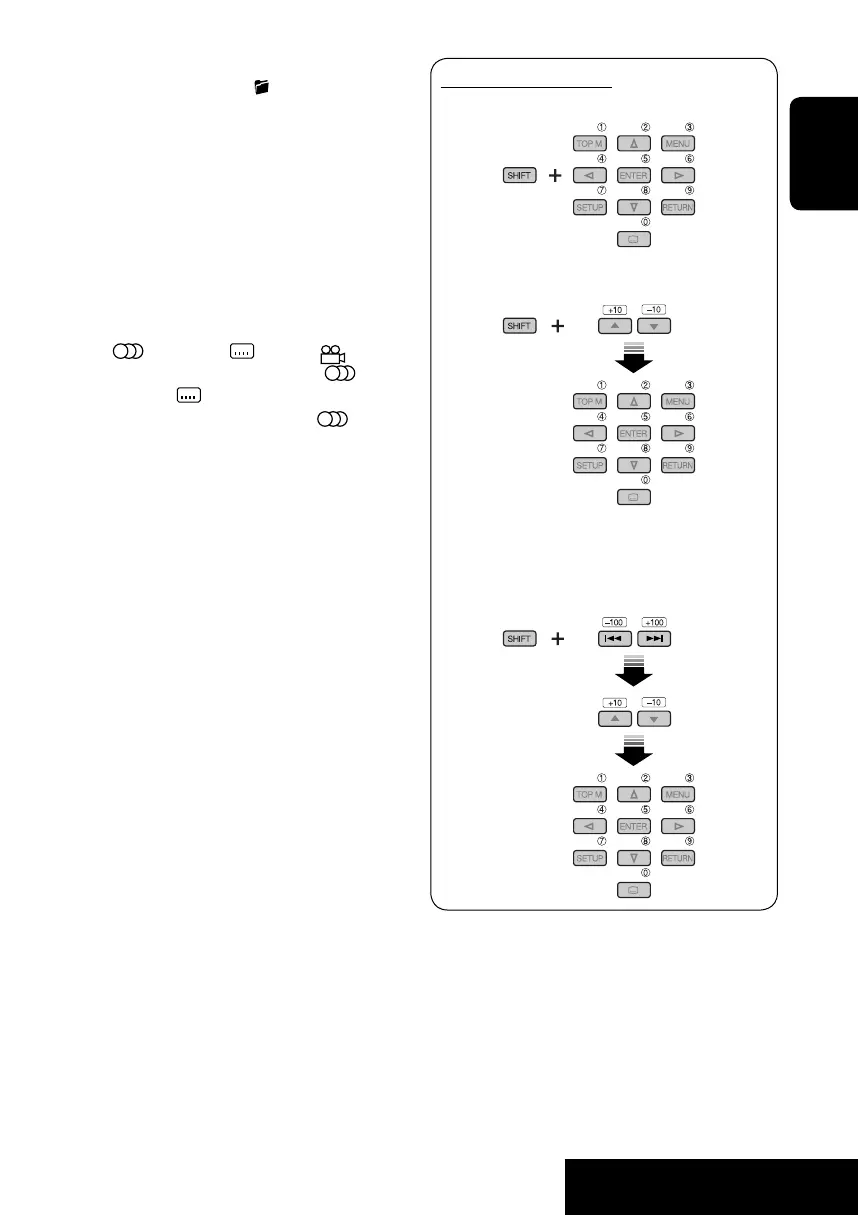
Functions as number buttons when pressed
with SHIFT button.
–
FM/AM/DAB: Selects preset stations/
services.
–
DISC: Selects chapter/title/folder/track.
*
2
Functions as +10/–10/+100/–100 buttons
when pressed with SHIFT button.
*
3
5 : Returns to the previous menu.
∞ : Confirms the selection.
How to select a number
To select a number from 0 – 9:
To select a number greater than 9:
To select a number greater than 99 (for
searching DivX/MPEG Video/MP3/WMA/
WAV tracks):
EN06-13_DV6202_001A_f.indd 9EN06-13_DV6202_001A_f.indd 9 12/22/05 5:24:46 PM12/22/05 5:24:46 PM


 To Next Page