19
ENGLISH
Playing a CD Text
In a CD Text, some information about the disc
(its disc title, performer and track title) is recorded.
You can show these disc information on the display.
Select text display mode while playing a
CD Text.
Each time you press the button, the display changes
as follows:
Notes:
• The display shows up to 8 characters at one time
and scrolls if there are more than 8 characters.
See also “To select the scroll mode – SCROLL” on
page 26.
Some characters or symbols will not be shown (and
be blanked) on the display.
(Ex. “ABCå!d#” ]“ABCA D ”)
• When you press DISP (display) while playing a
conventional CD, “NO NAME” appears for the disc
title/performer and the track title.
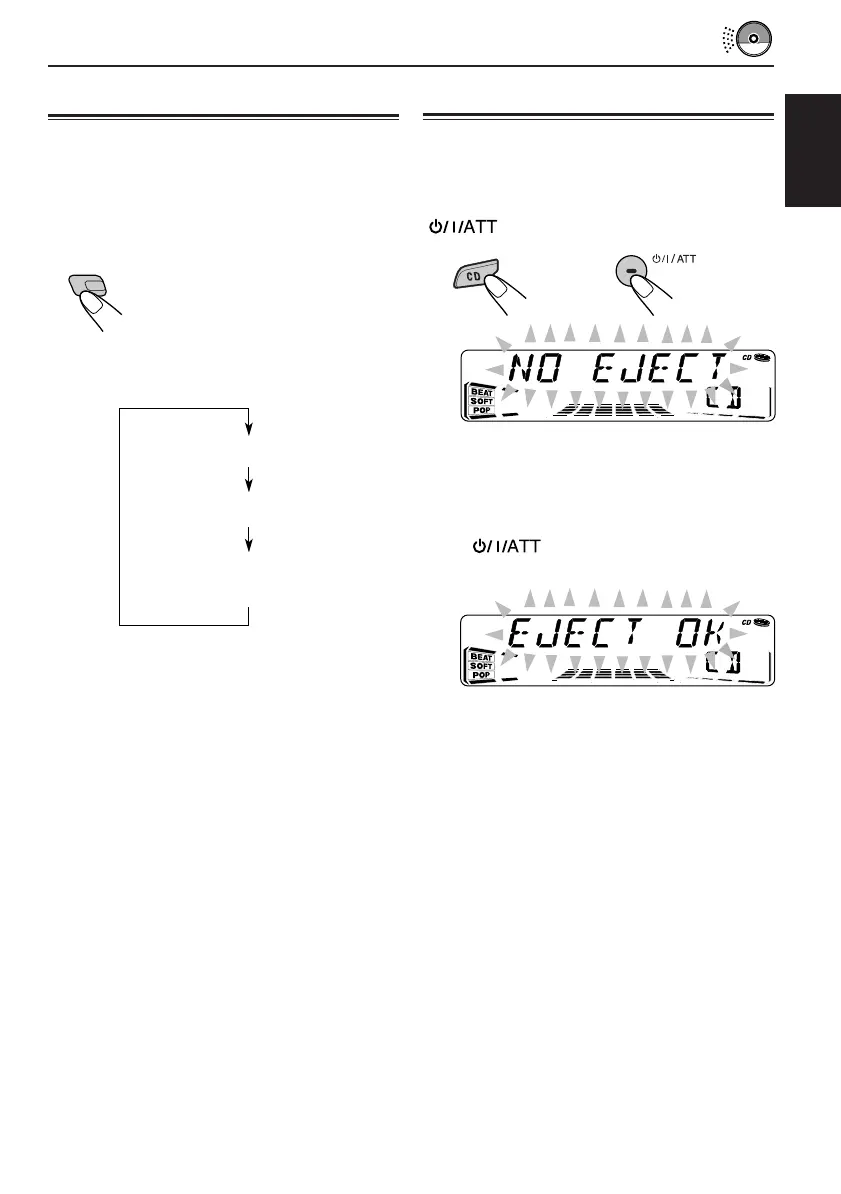
Prohibiting CD ejection
You can prohibit CD ejection and can lock a CD
in the loading slot.
While pressing CD, press and hold
for more than 2 seconds.
“NO EJECT” flashes on the display for about 5
seconds, and the CD is locked and cannot be
ejected.
To cancel the prohibition and unlock the CD,
press again for more than 2 seconds,
while pressing CD.
“EJECT OK” flashes on the display for about 5
seconds, and the CD is unlocked.
DISP
Disc Title / Performer
Track Title
Current track no. and
Elapsed playing time
EN17-19.KD-SX991R&911R[E]f 12/18/00, 3:47 PM19


 To Next Page
 Loading...