13
KV-M65 (EN)
TQBX0223[J]
ENGLISH
ESPAÑOLFRANÇAIS
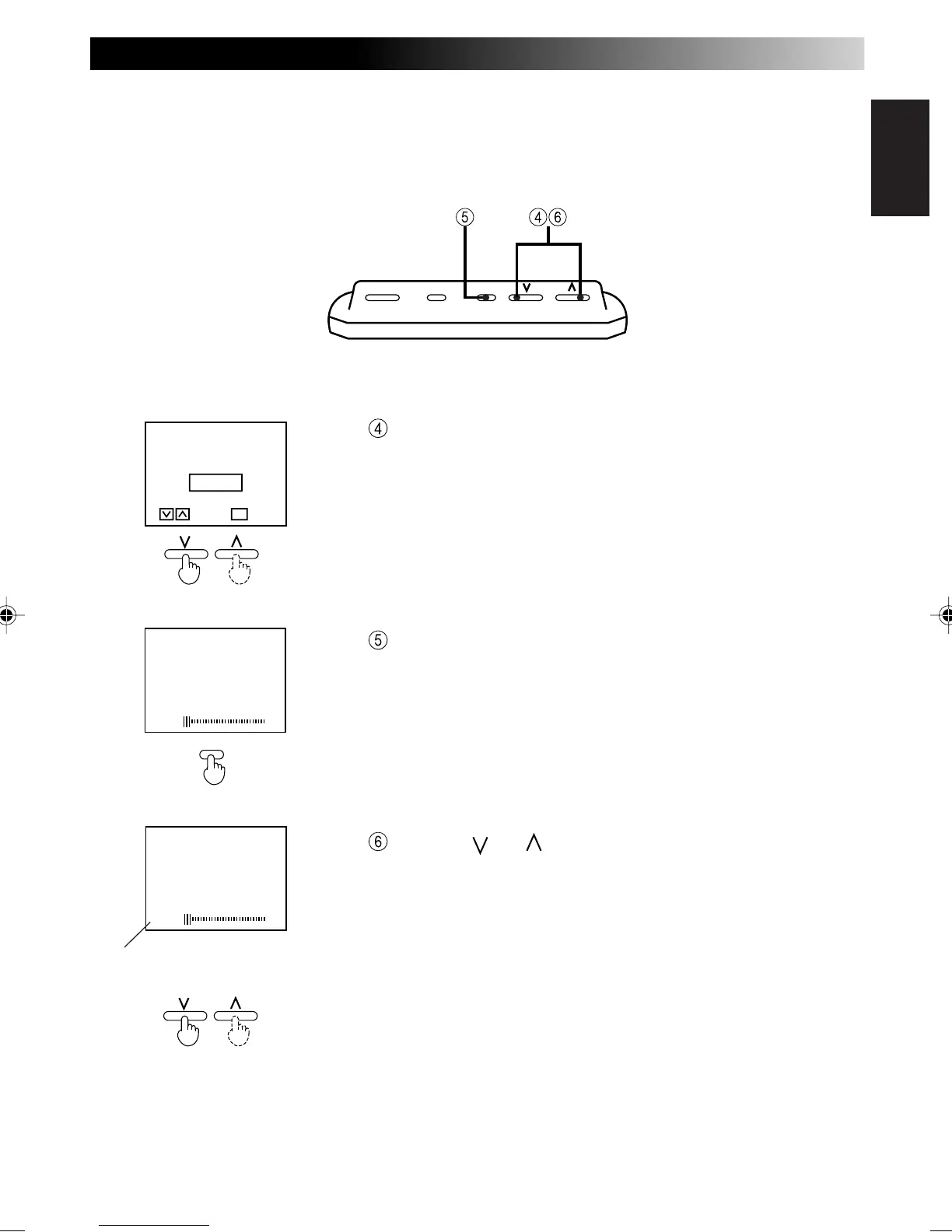
Select AUTO.
After the DIMMER MODE disappears (occurs after about
10 seconds), press the MENU button for less than 2 sec-
onds and show the automatic dimmer (darkness level) dis-
play.
Use the [ ] or [ ] button to adjust brightness to the best
visibility at night.
Note
• When the adjustment is made to the best visibility at night, the
system automatically adjusts the level between the maximum
brightness and the brightness for the best visibility at night (mini-
mum brightness).
(It is recommended that the setting be put between –40 and –60).
• When 0 is set, the value is fixed to the maximum level and the
brightness does not change.
When set to 0, the brightness
does not change.
POWER MODE MENUPOWER MODE MENU
[ DI
MM
ER
M
ODE ]
AUTO
M
ANUAL
ENTERSELECT
M
ENU
DI
MM
ER LEVEL
-55
MENU
DI
MM
ER LEVEL
-55



 To Next Page