Operation buttons
[~
1
Displays
the
audio/video
file list.
(See
below.)
[~]
Selects
repeat
playback
mode.
•
~SONGS:
Functions
the
same
as
//Repeat
One.~~
•
~ALL:
Functions
the
same
as
//Repeat
All."
[.I.
t1
Selects
random
playback
mode.*
1
[
....
,
..
]
·
.1.
t
SONGS:
Functions
the
same
as
//Shuffle
Songs."
.1.
t
ALBUMS:
Functions
the
same
as
//Shuffle Albums."
Starts/pauses
playback.
[~] [~]
• Selects
an
audio/video
file.*
2
(Press)
•
Reverse/forward search.
(Hold)
[Mode]
Changes
the
settings
for
iPod/iPhone
playback
on
the
<Mode>
screen.
(Page
14)
[HOME]
Displays
the
<HOME>
screen.
*
1
To
cancel
random
mode,
press
the
button
repeatedly
until
the
indicator
disappears.
*
2
Resume
playback
is
unavailable
for
video
files.
0 Selecting an audio/video
file from the
menu
1
16
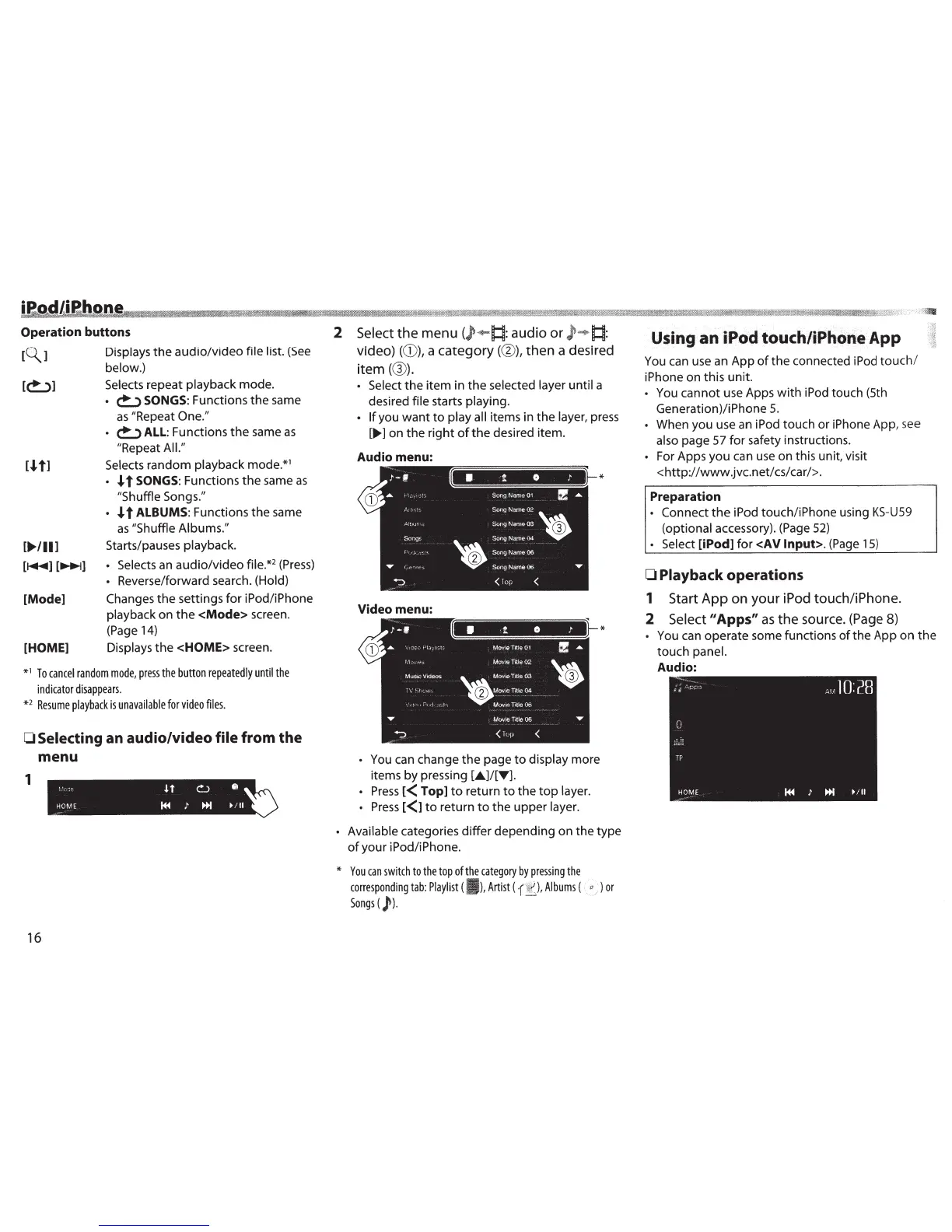
2
Select
the
menu
(
)•
!:~:
audio
or
!:~:
video)
((D),
a
category(@),
then
a desired
item(@).
• Select
the
item in
the
selected layer until
a
desired
file
starts
playing.
• If
you
want
to
play all
items in
the
layer,
press
[..,..]
on
the
right
of
the
desired item .
Audio menu:
Video menu:
•
You can change
the
page
to
display
more
items
by
pressing
[•]/[T].
•
Press
l<
Top]
to
return
to
the
top
layer.
•
Press
l<1
to
return
to
the
upper
layer
.
*
*
• Available
categories
differ
depending on the type
of
your iPod/iPhone.
*
You
can
switch
to
the top
of
the
category
by
pressing
the
corresponding
tab:
Playlist
(I
),
Artist
(
Albums
(
"~'
)
or
Songs
(
)'
).
Using
an
iPodtouchliPhorteApp
You can use an App
of
the
connected iPod
touch/
iPhone on this unit.
You cannot use Apps
with
iPod touch (5th
Generation)/iPhone
5.
When you use
an
iPod touch or iPhone App, see
also
page 57 for safety instructions.
•
For Apps
you
can use on this unit, visit
<http://www.jvc.net/cs/car/>.
Preparation
•
Connect
the
iPod touch/iPhone using
KS-U59
(optional
accessory). (Page
52)
• Select
[iPod]
for
<AV
Input>.
(Page
15)
0
Playback operations
1
Start
App
on
your
iPod
touch/iPhone.
2
Select
11
Apps"
as
the
source. (Page 8)
••
•
You can operate some functions
of
the
App on
the
touch
panel.
Audio:



 To Next Page
 Loading...







