(No.MB282)1-11
3.1.5 Removing the rear panel
(See Figs.8 to 11)
• Prior to performing the following procedures, remove the metal
cover.
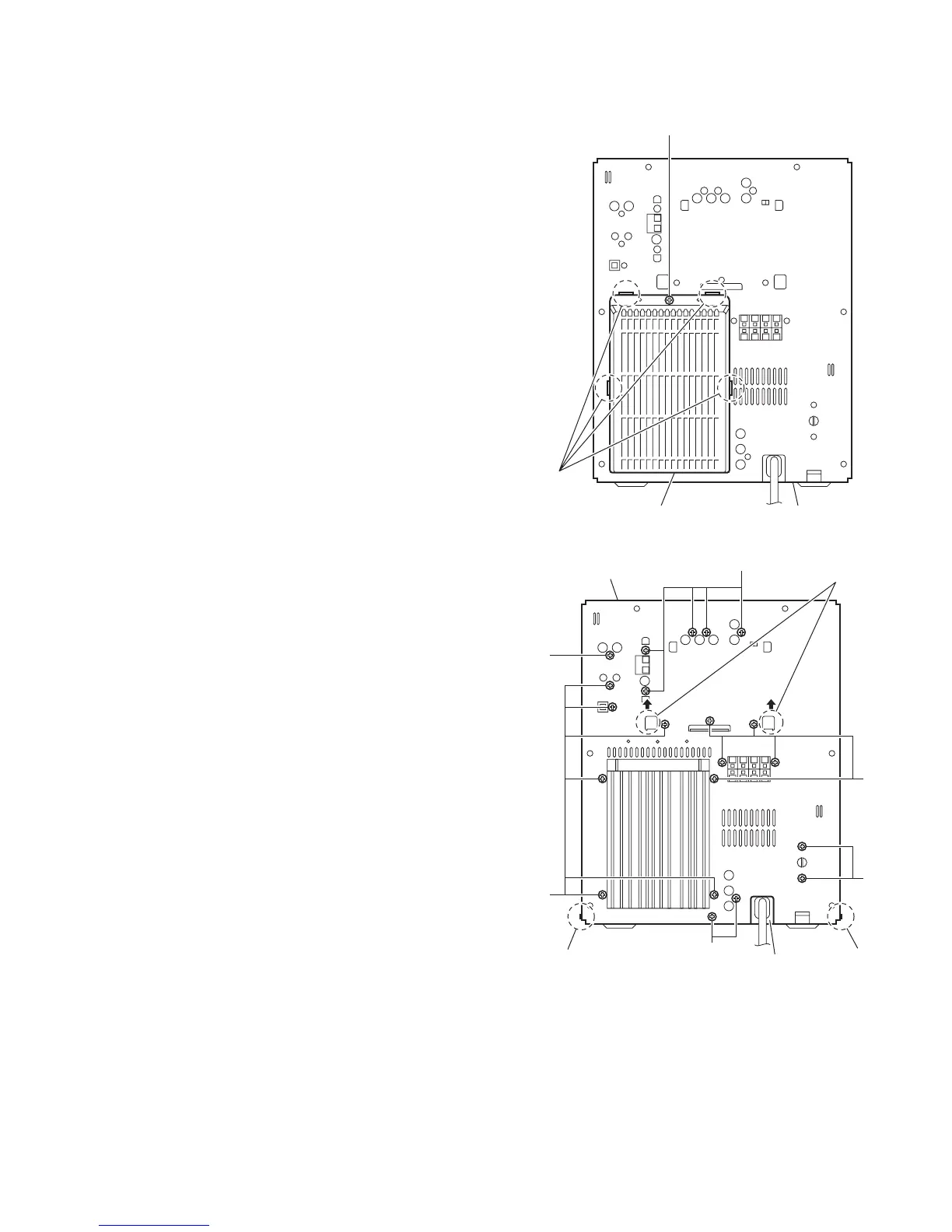
(1) From the back side of the main body, remove the screw J
attaching the rear cover. (See Fig.10.)
(2) Release the sections c and remove the rear cover from the
rear panel. (See Fig.10.)
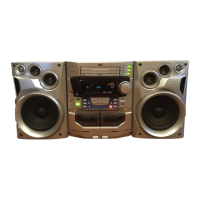
(3) Remove the two screws K and eighteen screws L attaching
the rear panel. (See Fig.11.)
(4) Remove the screw L’ attaching the rear panel.(See
Fig.11.) [US/UX/UN version only]
Reference:
Remove the tuner and video board as required. (See
Figs.8 and 9.)
(5) From the both sides of the main body, release the sections
d of the center chassis in the direction of the arrow and re-
lease the joints e attaching the rear panel to the bottom
chassis. (See Fig. 11.)
Fig.10
Fig.11
Rear panelRear cover
J
c
Bottom chassis
Rear panel
L
L
K
L
L
e e
d
L'


 To Next Page