EasyManua.ls Logo

JVC RA-D38H - User Manual

JVC RA-D38H
32 pages
Print Icon
To Next Page IconTo Next Page
Loading...
Instruction Manual
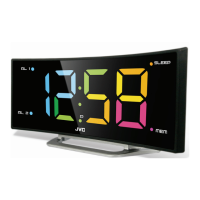
DAB Clock Radio
RA-D38B / RA-D38H
RA-D38x_IB_Final180424.indd 1 24/4/18 11:11 am
Question and Answer IconNeed help?

Do you have a question about the JVC RA-D38H and is the answer not in the manual?

Summary

Safety Warnings

Damage

Inspect unit for damage after unpacking. Do not operate if damaged.

Location of Unit

Place on flat surface, avoid vibrations, keep away from water.

Temperature

Avoid extreme temperatures, keep away from heat sources.

Naked Flames

Keep flames away from the product.

Moisture

Do not expose to rain, moisture, or liquids.

Ventilation

Ensure adequate ventilation, keep vents clear.

Electrical Safety and Usage

Interference

Avoid placing unit near appliances causing electromagnetic interference.

Supervision

Children should be supervised. Do not insert objects into openings.

Product Overview

Front View

Identifies and labels the controls on the front of the unit.

Rear View

Identifies and labels the connections on the rear of the unit.

Connections

Using Earphones

Instructions on how to connect and use earphones, and safety warning.

First Time Setup

Basic Operation

Switching ON;OFF

How to turn the unit on and off using the Standby button.

Selecting Modes

How to switch between DAB and FM modes using the Alarm/Mode button.

System Settings

Alarm Functions

Factory Reset and Backlight

Factory Reset

Restores the radio to its default settings, erasing all custom configurations.

DAB Operation

FM Operation

Maintenance

Troubleshooting

Product Specifications

Summary

Safety Warnings

Damage

Inspect unit for damage after unpacking. Do not operate if damaged.

Location of Unit

Place on flat surface, avoid vibrations, keep away from water.

Temperature

Avoid extreme temperatures, keep away from heat sources.

Naked Flames

Keep flames away from the product.

Moisture

Do not expose to rain, moisture, or liquids.

Ventilation

Ensure adequate ventilation, keep vents clear.

Electrical Safety and Usage

Interference

Avoid placing unit near appliances causing electromagnetic interference.

Supervision

Children should be supervised. Do not insert objects into openings.

Product Overview

Front View

Identifies and labels the controls on the front of the unit.

Rear View

Identifies and labels the connections on the rear of the unit.

Connections

Using Earphones

Instructions on how to connect and use earphones, and safety warning.

First Time Setup

Basic Operation

Switching ON;OFF

How to turn the unit on and off using the Standby button.

Selecting Modes

How to switch between DAB and FM modes using the Alarm/Mode button.

System Settings

Alarm Functions

Factory Reset and Backlight

Factory Reset

Restores the radio to its default settings, erasing all custom configurations.

DAB Operation

FM Operation

Maintenance

Troubleshooting

Product Specifications

JVC RA-D38H Specifications

General IconGeneral
BrandJVC
ModelRA-D38H
CategoryClock Radio
LanguageEnglish

Related product manuals