EasyManua.ls Logo

JVC TK-1280E - Page 46

JVC TK-1280E
82 pages
Print Icon
To Next Page IconTo Next Page
To Previous Page IconTo Previous Page
Loading...
TK-1280E/-N180E/-1281EG
|
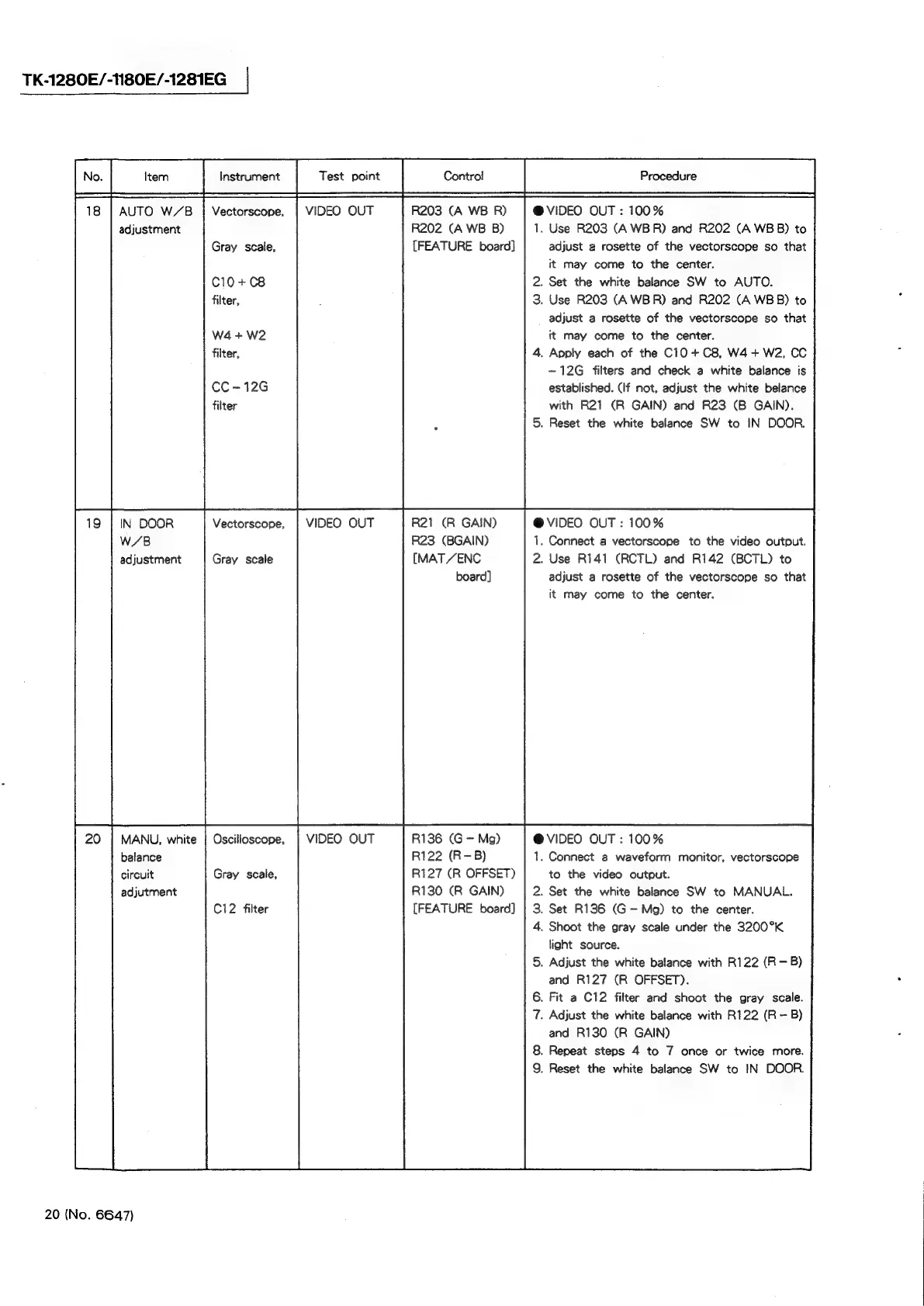
18
|
AUTO
W/B
adjustment
Vectorscope,
Gray
scale,
C10+C8
filter,
W4
+
W2
filter,
CC
~12G
filter
IN
DOOR
W/B
adjustment
Vectorscope,
Gray
scale
MANU,
white
|
Oscilloscope,
balance
circuit
Gray
scale,
adjutment
Ci2
filter
20
(No.
6647)
VIDEO
OUT
VIDEO
OUT
VIDEO
OUT
R203
(A
WB
R)
R202
(A
WB
B)
{FEATURE
board]
R21
(R
GAIN)
R23
(BGAIN)
[MAT
/ENC
board]
R136
(G
Mg)
R122
(R-B)
R127
(R
OFFSET)
R130
(R
GAIN)
[FEATURE
board]
@
VIDEO
OUT:
100%
1.
Use
R203
(A
WBR)
and
R202
(A
WB
B)
to
adjust
a
rosette
of
the
vectorscope
so
that
it
may
come
to
the
center.
.
Set the
white
balance
SW
to
AUTO.
.
Use
R203
(A
WBR)
and
R202
(A
WBB)
to
adjust
a
rosette
of
the
vectorscope
so
that
it
may
come
to
the
center.
.
Apply
each
of
the
C10
+
C8,
W4+W2,
CC
~12G
filters
and
check
a
white
balance
is
established.
(If
not,
adjust
the
white
belance
with
R21
(R
GAIN)
and
R23
(B
GAIN).
.
Reset
the
white
balance
SW
to
IN
DOOR.
@VIDEO
OUT:
100%
1.
Connect
a
vectorscope
to
the
video
output.
2.
Use
R141
(RCTL)
and
R142
(BCTL)
to
adjust
a
rosette
of
the
vectorscope
so
that
it
may
come
to
the
center.
@VIDEO
OUT:
100%
1.
Connect
a
waveform
monitor,
vectorscope
to
the
video
output.
.
Set the
white
balance
SW
to
MANUAL.
.
Set
R136
(G—
Mg)
to
the
center.
.
Shoot
the
gray
scale
under
the
3200°K
light
source.
.
Adjust
the
white
balance
with
R122
(R
—B)
and
R127
(R
OFFSET).
.
Fit
a
C12
filter
and
shoot
the
gray
scale.
.
Adjust
the
white
balance
with
R122
(R
-
B)
and
R130
(R
GAIN)
.
Repeat
steps
4
to
7
once
or
twice
more.
.
Reset
the
white
balance
SW
to
IN
DOOR.