EasyManua.ls Logo

JVC TK-1280E - Page 48

JVC TK-1280E
82 pages
Print Icon
To Next Page IconTo Next Page
To Previous Page IconTo Previous Page
Loading...
TK-1280E/-180E/-1281EG
|
fo.
|
tem
|
instrument
iss
pont
@
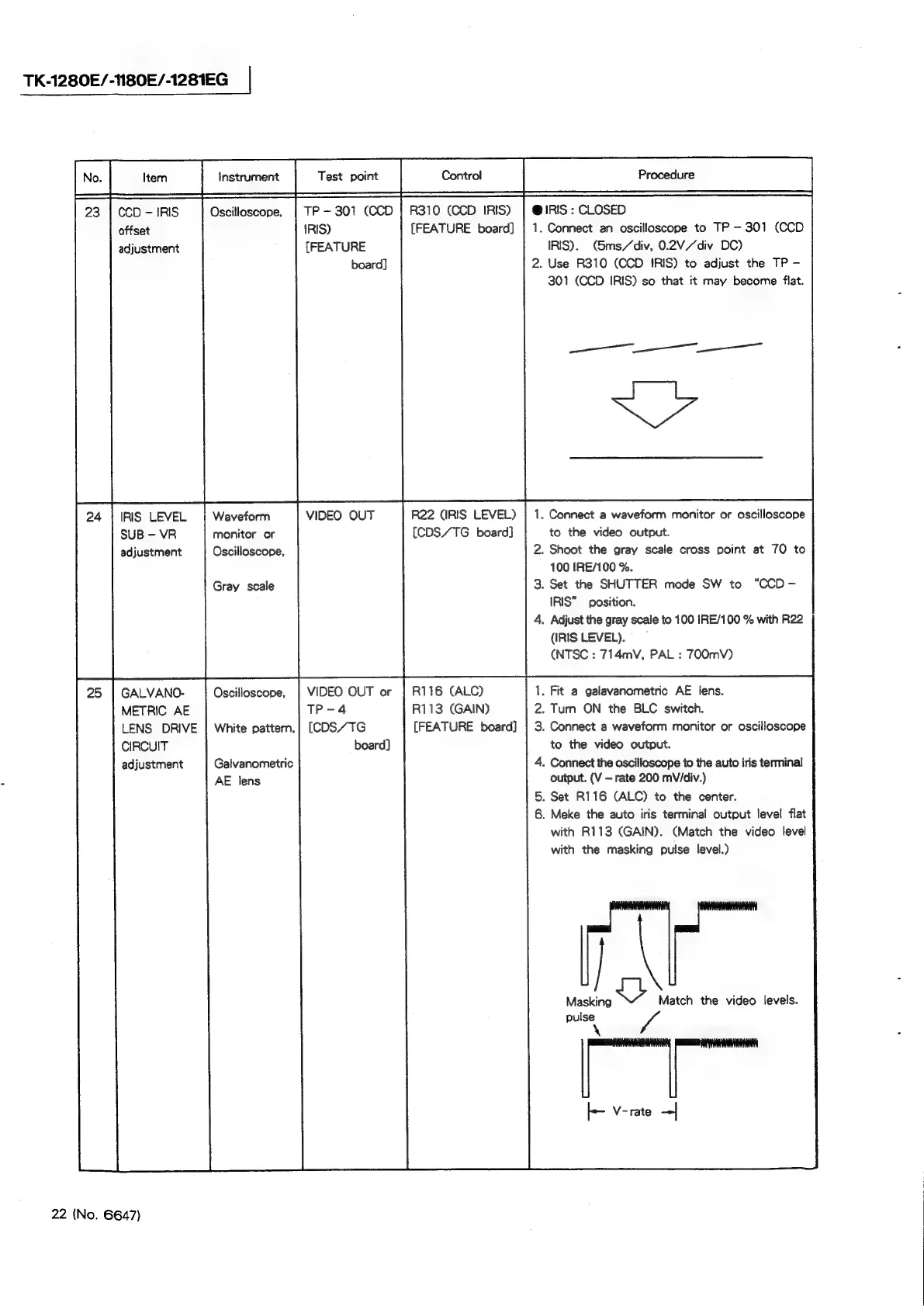
IRIS
:
CLOSED
23
|
CCD
-IRIS
offset
adjustment
IRS
LEVEL
SUB
-
VR
adjustment
GALVANO-
METRIC
AE
LENS
DRIVE
CIRCUIT
adjustment
22
(No.
6647)
Oscilloscope,
Waveform
monitor
or
Oscilloscope,
Gray
scale
Oscilloscope,
White
pattern,
Galvanometric
AE
lens
TP
—~
301
(CCD
}
R310
(CCD
IRIS)
IRIS)
(FEATURE
board)
{FEATURE
board]
VIDEO
OUT
R22
(IRIS
LEVEL)
{CDS/TG
board]
VIDEO
OUT
or
TP-4
(CDS/TG
board]
R116
(ALC)
R113
(GAIN)
(FEATURE
board]
Ais
2.
.
Set
the
SHUTTER
mode
SW
to
Connect
an
oscilloscope
to
TP
301
(CCD
IRIS).
(5ms/div,
0.2V/div
DC)
Use
R310
(CCD
IRIS)
to
adjust
the
TP
—-
301
(CCD
IRIS)
so
that
it
may
become
flat.
.
Connect
a
waveform
monitor
or
oscilloscope
to
the
video
output.
.
Shoot
the
gray
scale
cross
point
at
70
to
100
IRE/100
%.
“CCD
-
IRIS”
position.
.
Adjust
the
gray
scale
to
100
IRE/100
%
with
R22
(IRIS
LEVEL).
(NTSC
:
714mV,
PAL
:
70O0mV)
.
Fit
a
galavanometric
AE
lens.
.
Turn
ON
the
BLC
switch.
.
Connect
a
waveform
monitor
or
oscilloscope
to
the
video
output.
.
Connect
the
oscilloscope
to
the
auto
iris
terminal
output.
(V
rate
200
mV/div.)
.
Set
R116
(ALC)
to
the
center.
.
Meke
the
auto
iris
terminal
output
level
flat
with
R113
(GAIN).
(Match
the
video
level
with
the
masking
pulse
level.)
Masking
S
Match
the
video
levels.
pulse
‘a