EasyManua.ls Logo

JVC TK-C600 - Page 13

JVC TK-C600
53 pages
Print Icon
To Next Page IconTo Next Page
To Previous Page IconTo Previous Page
Loading...
¢
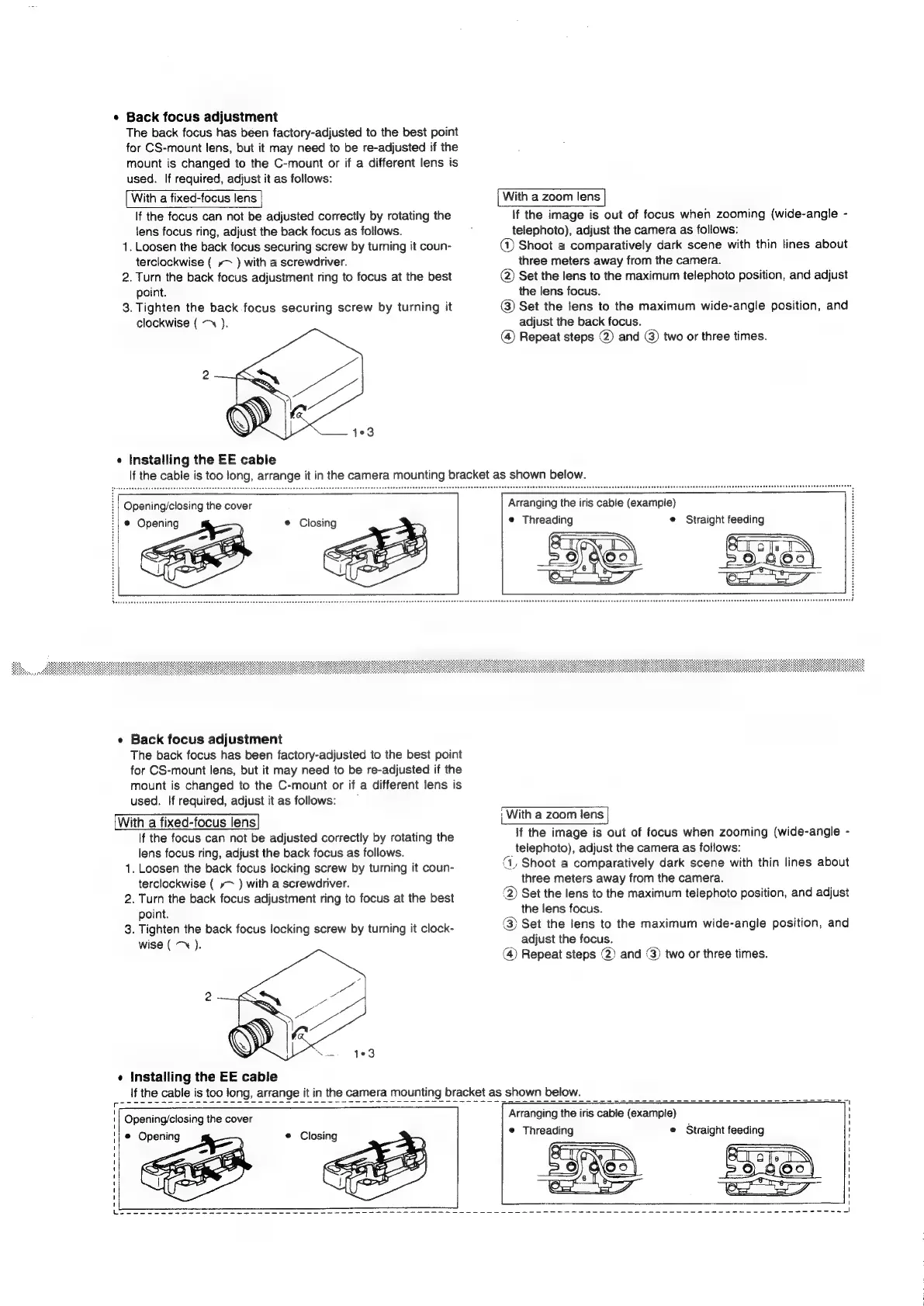
Back
focus
adjustment
The
back
focus
has
been
factory-adjusted
to
the
best
point
for
CS-mount
lens,
but
it
may
need
to
be
re-adjusted
if
the
mount
is
changed
to
the
C-mount
or
if
a
different
lens
is
used.
If
required,
adjust
it
as
follows:
With
a
fixed-focus
lens
If
the
focus
can
not
be
adjusted
correctly
by
rotating
the
lens
focus
ring,
adjust
the
back
focus
as
follows.
1.
Loosen
the
back
focus
securing
screw
by
turning
it
coun-
terclockwise
(
»~
)
with
a
screwdriver.
2.
Turn
the
back
focus
adjustment
ring
to
focus
at
the
best
point.
3.
Tighten
the
back.focus
securing
screw
by
turning
it
clockwise
(
~~
).
403
¢
Installing
the
EE
cable
With
a
zoom
lens
If
the
image
is
out
of
focus
when
zooming
(wide-angle
-
telephoto),
adjust
the
camera
as
follows:
@
Shoot
a
comparatively
dark
scene
with
thin
lines
about
three
meters
away
from
the
camera.
@)
Set
the
lens
to
the
maximum
telephoto
position,
and
adjust
the
lens
focus.
@)
Set
the
lens
to
the
maximum
wide-angle
position,
and
adjust
the
back
focus.
(@
Repeat
steps
@)
and
@)
two
or
three
times.
If
the
cable
is
too
long,
arrange
it
in
the
camera
mounting
bracket
as
shown
below.
Opening/closing
the
cover
|
©
Opening
e
Back
focus
adjustment
The
back
focus
has
been
factory-adjusted
to
the
best
point
for
CS-mount
lens,
but
it
may
need
to
be
re-adjusted
if
the
mount
is
changed
to
the
C-mount
or
if
a
different
lens
is
used.
If
required,
adjust
it
as
follows:
With
a
fixed-focus
lens
If
the
focus
can
not
be
adjusted
correctly
by
rotating
the
lens
focus
ring,
adjust
the
back
focus
as
follows.
1.
Loosen
the
back
focus
locking
screw
by
turning
it
coun-
terclockwise
(
»~
)
with
a
screwdriver.
2.
Turn
the
back
focus
adjustment
ring
to
focus
at
the
best
point.
3.
Tighten
the
back
focus
locking
screw
by
turning
it
clock-
wise
(
).
¢
Installing
the
EE
cable
Arranging
the
iris
cable
(example)
e
Threading
e
Straight
feeding
G
fie
a=
:
With
a
zoom
lens
If
the
image
is
out
of
focus
when
zooming
(wide-angle
-
telephoto),
adjust
the
camera
as
follows:
(1,
Shoot
a
comparatively
dark
scene
with
thin
lines
about
three
meters
away
from
the
camera.
@)
Set
the
lens
to
the
maximum
telephoto
position,
and
adjust
the
lens
focus.
(3)
Set
the
lens
to
the
maximum
wide-angle
position,
and
adjust
the
focus.
(4)
Repeat
steps
(2)
and
(3)
two
or
three
times.
If
the
cable
is
too
long,
arrange
it
in
the
camera
mounting
bracket
as
shown
below.
Opening/closing
the
cover
@
Opening
®
Closing
Arranging
the
iris
cable
(example)
©
Threading
e
Straight
feeding

Related product manuals