EasyManua.ls Logo

JVC TK-C600 - Page 21

JVC TK-C600
53 pages
Print Icon
To Next Page IconTo Next Page
To Previous Page IconTo Previous Page
Loading...
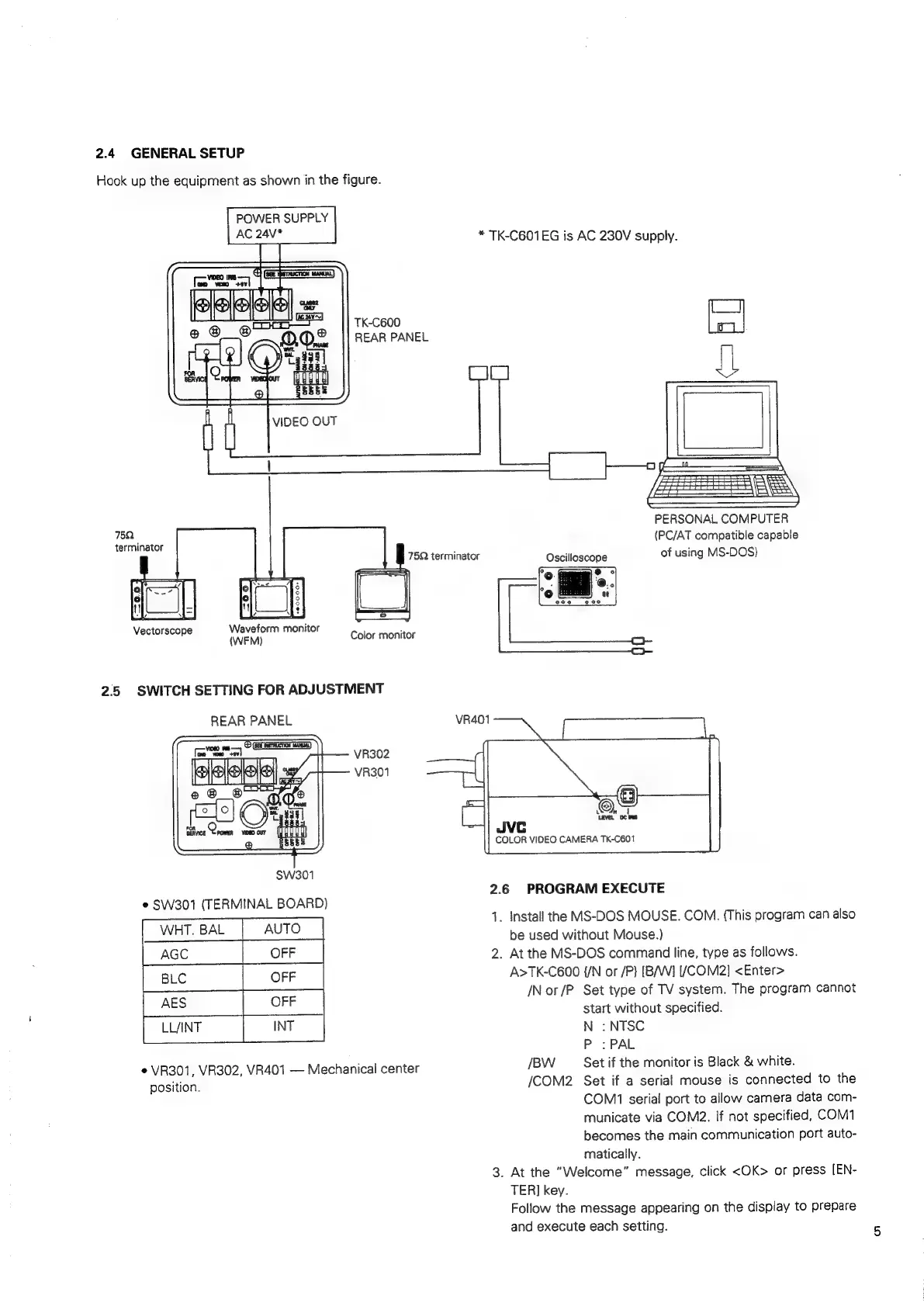
2.4
GENERAL
SETUP
Hook
up
the
equipment
as
shown
in
the
figure.
75Q
terminator
Vectorscope
POWER
SUPPLY
AC
24V*
|
Waveform
monitor
*
TK-CB01EG
is
AC
230V
supply.
TK-C600
REAR
PANEL
VIDEO
OUT
PERSONAL
COMPUTER
(PC/AT
compatible
capable
75Q
terminator
Oscilloscope
of
using
MS-DOS)
Color
monitor
2.5
SWITCH
SETTING
FOR
ADJUSTMENT
REAR
PANEL
VR401
VR302
VR301
©,
LEVEL
Jvc
COLOR
VIDEO
CAMERA
TK-C601
SWw301
2.6
PROGRAM
EXECUTE
e
SW301
(TERMINAL
BOARD)
1.
Install
the
MS-DOS
MOUSE.
COM.
(This
program
can
also
be
used
without
Mouse.)
2.
At
the
MS-DOS
command
line,
type
as
follows.
A>TK-C600
{/N
or
/P}
[B/W]
[/COM2]
<Enter>
/N
or
/P
Set
type
of
TV
system.
The
program
cannot
start
without
specified.
N
:
NTSC
P
:PAL
*
VR301,
VR302,
VR401
Mechanical
center
/BW
Set
if
the
monitor
is
Black
&
white.
position.
/COM2
Set
if
a
serial
mouse
is
connected
to
the
COM1
serial
port
to
allow
camera
data
com-
municate
via
COM2.
If
not
specified,
COM1
becomes
the
main
communication
port
auto-
matically.
3.
At
the
“Welcome”
message,
click
<OK>
or
press
[EN-
TER]
key.
Follow
the
message
appearing
on
the
display
to
prepare
and
execute
each
setting.

Related product manuals