EasyManua.ls Logo

K-TOR POWER BOX - User Manual

K-TOR POWER BOX
9 pages
Print Icon
To Next Page IconTo Next Page
Loading...
SurvivalSuppliesAustralia.com
Information is correct as of the 5.10.2021 and subject to change without notice.
1
POWER BOX 50 WATT PEDAL
GENERATOR INSTRUCTION
MANUAL
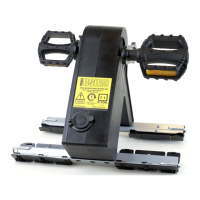
Attach Support Leg
Remove main body and support leg from the box. Remove locking pin
from main body. Slide support leg in place. Replace locking pin.
Attach Feet
Remove the feet from the enclosed section on the side of the box. Pull
back the pins. Seat the holes in the generator legs with the holes in the
feet, click into place. Insert the feet pins to lock in place. Placing the

Other manuals for K-TOR POWER BOX

Question and Answer IconNeed help?

Do you have a question about the K-TOR POWER BOX and is the answer not in the manual?

Summary

Generator Assembly

Attach Support Leg

Guide to attaching the generator's support leg securely.

Attach Feet

Instructions for attaching the feet to the generator's legs.

Attach Pedals

Steps for attaching the right and left pedals to the generator.

Secure Pedals

Instructions for screwing and tightening the pedals in place.

Operating the Generator

Setup and Connection

Instructions for generator setup, plugging in devices, and readying for operation.

Spinning for Power

Guidance on spinning the generator in a forward motion to achieve optimal RPM.

Product Information and Support

Compatibility

Details on compatible devices and power output specifications.

Warranty and Disclaimer

Information on the product warranty and liability disclaimers.

Hardware Included

List of components and accessories provided with the generator.

K-TOR POWER BOX Specifications

General IconGeneral
BrandK-TOR
ModelPOWER BOX
CategoryPortable Generator
LanguageEnglish

Related product manuals