
 Need help?
Do you have a question about the K2 Scientific K205ULT and is the answer not in the manual?
Highlights important operating, maintenance, and hazard warnings including electrical, hot/cold surfaces, and protective clothing.
Details safety guidelines for qualified personnel, intended use, ventilation, damaged cords, explosive substances, and defrosting.
Instructions for unpacking, removing protective film, and positioning the appliance on a level surface for proper door seal and drainage.
Ensures clear and unobstructed ventilation from the entire surface area of the front grille for proper operation.
Details the display, buttons (SET, RST), and their functions for setting and adjusting parameters and alarms.
Describes the power switch, battery backup, and dry alarm contacts for unit operation and monitoring.
Explains the meaning of various symbols and status indicators for compressor, heating, alarms, and power.
Lists adjustable temperature parameters, their ranges, units, and default values for precise control.
Procedure for adjusting the main temperature setpoint using the SET and UP/DOWN keys.
Steps to enter the administrator section, including password entry and parameter modification using arrow keys.
Guides for resolving issues like the appliance not working, temperature deviations, or unusual noises.
Lists alarm codes and their corresponding fault descriptions, such as sensor failures or temperature alarms.
Information on using NIST calibrated data loggers for pre-form field validation tests and product protection.
Provides contact methods including chat, email, and phone for questions and service needs.
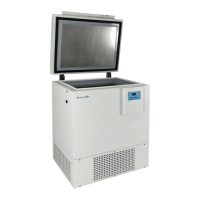
This document serves as the Ultra Low Temperature Freezer Manual, providing comprehensive instructions for the setup, operation, and maintenance of the K205ULT model. It is designed to guide users through the essential aspects of managing their freezer, ensuring optimal performance and longevity.
The K205ULT is an Ultra Low Temperature (ULT) freezer designed for the precise and stable storage of sensitive materials, such as vaccines, requiring extremely cold environments. Its primary function is to maintain a consistent ultra-low temperature, crucial for preserving the integrity and efficacy of stored products. The freezer is equipped with a sophisticated temperature controller that allows for accurate temperature setting and monitoring. It features a direct cooling system and operates in a manual defrost mode, emphasizing the user's role in maintaining its optimal condition. The unit is designed to be CFC-Free, aligning with environmental responsibility.
Upon receiving the K205ULT, users are instructed to place the unit in its desired location and plug it in. It is crucial to allow the freezer to cool and stabilize for a minimum of 24 hours before logging any temperatures or stocking products. This initial stabilization period ensures that the internal environment reaches and maintains the set ultra-low temperature consistently.
The manual highlights the importance of proper installation and operation. For assembly, users must remove the appliance from its packaging and peel off any protective film from all surfaces. Ensuring the product is positioned on a level surface is vital for the door(s) to shut and seal correctly, and to allow proper drainage from the evaporator tray, preventing any overflow. Adequate ventilation is also critical; all models require clear and unobstructed ventilation from the entire surface area of the front grille.
The temperature controller is a central feature, allowing users to set and monitor the internal temperature. The controller displays the current temperature in Celsius. To set the temperature, users press the "SET" key for 3 seconds, which displays the code "St." Pressing "SET" again displays the temperature SETPOINT, which can then be modified using the UP or DOWN keys.
The controller also includes various indicator lights that provide status updates:
The freezer is equipped with dry alarm contacts, a battery backup, and a power ON/OFF switch, enhancing its reliability and user convenience. The controller allows for clearing alarms by pressing the "RST" button, which also activates a mandatory cooling mode for 10 seconds.
A critical warning is issued regarding changing advanced parameters. Users are strongly advised that altering certain controller parameters can damage the unit or result in product loss. K2 Scientific will not be held responsible for losses due to unauthorized parameter changes. It is recommended to contact K2 Scientific for assistance with special parameters or to utilize video tutorials available on their website for guidance. While some K2 units can be switched between Celsius and Fahrenheit, the manual advises against changing the unit to Fahrenheit, as the controller's operational parameters rely on Celsius data for proper function.
The manual also details various parameters that can be adjusted, categorized into a "User menu" and an "Administrator menu." The "User menu" primarily allows setting the cabinet temperature point ("St"). The "Administrator menu" provides access to more advanced settings, protected by a password (default 55). These include probe calibrations for cabinet, condenser, ambient, and high-temperature evaporator probes, minimum and maximum set temperatures for the cabinet, and maximum temperature for the high-temperature evaporator when the low-temperature compressor is off. Other parameters include cycle and working times for the capillary heating wire, maximum delay time for capillary heating, alarm output delays, alarm ringback times, ambient over-temperature alarm settings, door switch controls (whether to cancel the door switch or alarm when open), and whether a buzzer response is required when the door is open.
The manual emphasizes that all internal adjustments and maintenance must be performed by qualified service personnel. Users are warned not to use mechanical devices or other means to accelerate the defrosting process. Before attempting any cleaning, cover removal, or maintenance work, the main power supply must be disconnected.
The document includes a troubleshooting guide that lists common faults, their probable causes, and recommended actions. This guide covers issues such as the appliance not working, turning on but with high or low temperatures, LED lights not working, or unusual noise.
For instance, if the appliance is not working, probable causes include incorrect plugging, damaged plug/lead, power supply issues, or internal wiring faults. Recommended actions range from checking the plug connection to calling a qualified technician.
If the appliance turns on but the temperature is too high or low, probable causes include a blocked filter or condenser, improperly shut doors, proximity to a heat source, interrupted airflow to the condenser, high ambient temperature, insufficient airflow to fans, overloading, or adjusted factory default parameters. Solutions include cleaning the filter/condenser, checking door seals, relocating the appliance, increasing ventilation, removing blockages, reducing stored product, or calling a technician.
If LED lights are not working, the probable cause is led light short leaded damage, requiring a technician. If the appliance is unusually loud, it might be touching a neighboring object or not installed on a level/stable surface, necessitating a check and adjustment of its position.
The manual also provides a list of alarm codes and their descriptions, such as:
For temperature logging, especially when storing vaccines, the manual notes that a field validation test may be required. A NIST calibrated external data logger can be used for this purpose, providing an added layer of protection for the product load in case of a temperature excursion. K2 Scientific offers NIST calibrated data loggers to match the unit at an affordable rate.
Finally, the manual provides contact information for K2 Scientific's service department, encouraging users to reach out for questions or service needs. Users are advised to have their four-digit order number or model number ready to expedite the process. Contact methods include a chat feature on their website, email, or phone.
 General
| Model | K205ULT |
|---|---|
| Type | Ultra Low Temperature Freezer |
| Power Supply | 115V, 60Hz |
| Defrost Type | Manual |
| Lockable | Yes |
| Door Lock | Yes |
| Capacity | 5 cu ft |

 To Next Page