09 WOLF KING GTR user manual
WOLF KING GTR user manual
10
H
——
o
—
w
—
t
—
o
——
u
—
s
—
e
—
t
—
h
—
e
—
i
—
n
—
s
—
tr
—
u
—
m
——
e
—
n
—
t
—
p
—
a
—
n
—
e
—
l
———————————————————
I
—
n
—
st
—
ru
—
m
—
e
—
n
—
t
—
s
—
et
—
ti
—
ng
————————————————————————————
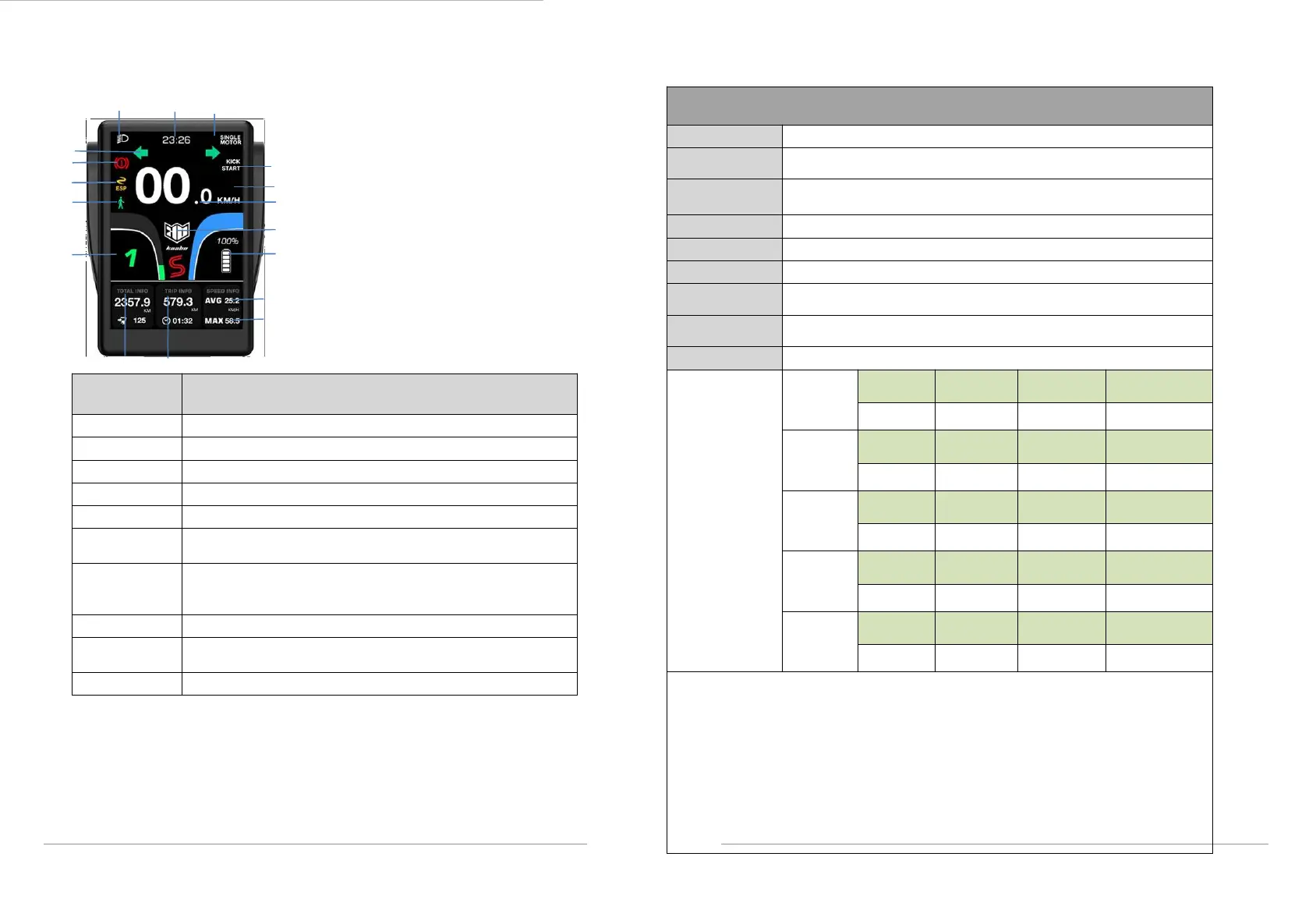
1.
Speed
2.
Gear(ECO model, P mode, speed mode)
3.Battery power
4.Voltage
5.RTC clock
6.Single/dual motor
7.Cruise mode
8.Kick start
9. Total mileage
10. Trip mileage
11.Average speed
12.Maximum speed
13.Left and right turn signal
14.Turn red when S gear open
15.Brake power sign
16. Anti-skid mode open identification
17.
Pedestrian mode sign
Switch between km and mile, and the system setting is km
Screen brightness, five gears to choose
Auto sleep,optional 5 / 10 / 20 / 30 minutes
Open and close S-gear mode
,
only on dual motor mode
Power on password, can set whether to open, and change
the password
In the setting interface, customers manually open and close,
open the display,the sign is shown. open "S" gear,this
function will be closed.
See the table below for more details
Pedestrian mode
: Press the M key " twice to enter pedestrian mode, switch the gear
and return to the state before entering the pedestrian mode, the display show pedestrian
model when scooter enter this model, and the maximum speed is kept within 6km / H,
and the side light flashes at 0.5 HZ until remove the mode;
P mode(packing mode):Short press "↑"button or pinch the brake to remove the "P
gear", the setting will maintain as the state of the last time the scooter is shutdown;
Note: For a detailed description of the TFT display, see the TFT display specification.
The range that can be set is: 8-14, the setting of this scooter is 12
To limit the speed, the range can be set is: 0-100%, the setting of this
scooter is: 100%
Pole logarithmic setting, please do not change, the setting of this scooter
is: 30
Anti-lock braking system, which can be switched on or off
Kick start, which can be switched on or off
Cruise Control, which can be switched on or off
Temperature protection, please do not change, the setting of this scooter
is: 120℃
The system voltage can be set to 48V / 60V / 72V, please do not change
it, the setting of this scooter is : 72V
Minimum voltage, please do not change, the setting of this scooter is : 58V
Assist Ant Mode
(Please operate
under the
guidance of a
professional
person)
Cruise Control:Cruise control allows you to maintain your driving speed automatically without
continuing to hold down the accelerator. In order to enter Cruise Control, First, you need to turn
on cruise control or long press the ↓button to turn on cruise control.
While driving:keep the accelerator steady for 3-5 seconds until Cruise Control kicks in and
scooter travels at a constant speed without driver holding down the accelerator. When you
activate the brakes, Cruise Control will be canceled.
CAUTION: Ride in a position where you can immediately access the brake to cancel Cruise
Control if necessary.



 To Next Page