EasyManua.ls Logo

Kaiser Baas TV Stick - User Manual

Kaiser Baas TV Stick
18 pages
Print Icon
To Next Page IconTo Next Page
Loading...
TVStick
User Manual
Question and Answer IconNeed help?

Do you have a question about the Kaiser Baas TV Stick and is the answer not in the manual?

Summary

TVStick Connection Details

USB 2.0 Connector

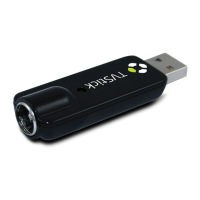
The TVStick features a USB 2.0 connector for connection to a PC.

Antenna Input

The TVStick includes an antenna input for receiving TV signals.

Connecting the TVStick

Connect Antenna to TVStick

Connect an antenna to the TVStick for signal reception.

Connect TVStick to Computer

Plug the USB connector of the TVStick into a USB port on your computer.

Remote Control Functions

Mute and Snapshot Features

Controls for muting sound and taking screen snapshots.

Screen Toggle and Media Launch

Switch between screen views and launch TotalMedia software.

Channel Navigation and Volume

Keys for navigating channels and adjusting audio volume levels.

Playback and Recording Controls

Buttons for pausing, playing back recorded content, and stopping.

Software Installation

Driver Installation Process

Install device drivers by connecting the TVStick, inserting the CD, and following the wizard.

TotalMedia Software Installation

Install TotalMedia software from the CD by selecting it and entering user details.

Setting Up the Software

Access TotalMedia Setup Menu

Select 'Setup' from the TotalMedia 3.5 main menu to configure settings.

Configure TV Viewing Settings

Navigate to and select the 'TV' option within the settings menu.

Region and Channel Scan Setup

Choose your region and initiate a channel scan for TV reception.

Complete Channel Scanning

Finish the channel scanning process to prepare for watching TV.

Summary

TVStick Connection Details

USB 2.0 Connector

The TVStick features a USB 2.0 connector for connection to a PC.

Antenna Input

The TVStick includes an antenna input for receiving TV signals.

Connecting the TVStick

Connect Antenna to TVStick

Connect an antenna to the TVStick for signal reception.

Connect TVStick to Computer

Plug the USB connector of the TVStick into a USB port on your computer.

Remote Control Functions

Mute and Snapshot Features

Controls for muting sound and taking screen snapshots.

Screen Toggle and Media Launch

Switch between screen views and launch TotalMedia software.

Channel Navigation and Volume

Keys for navigating channels and adjusting audio volume levels.

Playback and Recording Controls

Buttons for pausing, playing back recorded content, and stopping.

Software Installation

Driver Installation Process

Install device drivers by connecting the TVStick, inserting the CD, and following the wizard.

TotalMedia Software Installation

Install TotalMedia software from the CD by selecting it and entering user details.

Setting Up the Software

Access TotalMedia Setup Menu

Select 'Setup' from the TotalMedia 3.5 main menu to configure settings.

Configure TV Viewing Settings

Navigate to and select the 'TV' option within the settings menu.

Region and Channel Scan Setup

Choose your region and initiate a channel scan for TV reception.

Complete Channel Scanning

Finish the channel scanning process to prepare for watching TV.

Kaiser Baas TV Stick Specifications

General IconGeneral
BrandKaiser Baas
ModelTV Stick
CategoryTV Tuner
LanguageEnglish