EasyManua.ls Logo

Kaiweets KC602 - Frequency and Duty Cycle; Measuring Frequency and Duty Cycle

Kaiweets KC602
24 pages
Print Icon
To Next Page IconTo Next Page
To Previous Page IconTo Previous Page
Loading...
Frequency
or
duty
cycle
measurements
(Hz%)
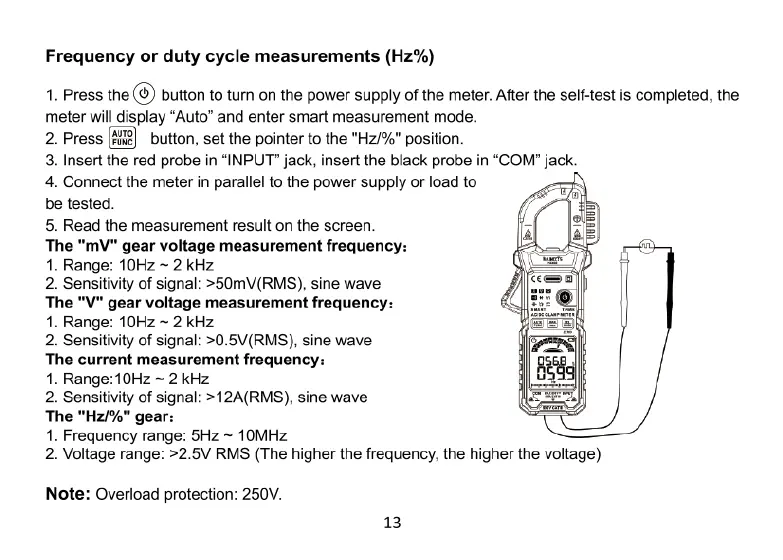
1.
Press
the
(®)
button
to
turn
on
the
power
supply
of
the
meter.
After
the
self-test
is
completed,
the
meter
will
display
“Auto”
and
enter
smart
measurement
mode.
2.
Press
button,
set
the
pointer
to
the
"Hz/%"
position.
3.
Insert
the
red
probe
in
“INPUT”
jack,
insert
the
black
probe
in
“COM”
jack.
4.
Connect
the
meter
in
parallel
to
the
power
supply
or
load
to
be
tested.
5.
Read
the
measurement
result
on
the
screen.
The
"mV"
gear
voltage
measurement
frequency:
1.
Range:
10Hz
~
2
kHz
2.
Sensitivity
of
signal:
>50mV(RMS),
sine
wave
The
"V"
gear
voltage
measurement
frequency:
1.
Range:
10Hz
~
2
kHz
2.
Sensitivity
of
signal:
>0.5V(RMS),
sine
wave
The
current
measurement
frequency:
1.
Range:10Hz
~ 2
kHz
2.
Sensitivity
of
signal:
>12A(RMS),
sine
wave
The
"Hz/%"
gear:
1.
Frequency
range:
5Hz ~
10MHz
2.
Voltage
range:
>2.5V
RMS
(The
higher
the
frequency,
the
higher
the
voltage)
Note:
Overload
protection:
250V.
13