Need help?
Do you have a question about the Kalawen EM3388-WWVB and is the answer not in the manual?
Explains screen behavior, RCC activation, and manual control during reception.
Troubleshooting outdoor temperature display, horizontal lines, and data inconsistencies.
Confirms the alarm clock functions during power outages when using batteries.
Lists primary functions like WWVB time, calendar, alarms, and displays.
Details measurement ranges and unit options for barometric pressure and humidity.
Covers indoor/remote temperature ranges, unit options, and frost alerts.
Describes sensor mounting, frequency, and transmission range.
Specifies battery and adapter requirements for the station and sensor.
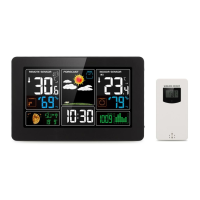
Identifies and describes all elements shown on the main LCD screen.
Details the function of each button and power-related sockets on the station.
Labels and describes the parts of the wireless outdoor sensor.
Steps for inserting batteries and establishing sensor connection.
Covers automatic and manual reception of radio-controlled time signals.
Procedure for setting time, date, time zone, and DST.
Step-by-step guide for setting and confirming daily alarm times.
Instructions for stopping the alarm signal and using the snooze function.
Features for lunar phase display and switching temperature units (°C/°F).
Explanation of the indoor comfort level calculation and its 5-level display.
How trends for temperature, humidity, and pressure are displayed.
Process of receiving and displaying data from the wireless remote sensor.
Guidelines for connecting and switching between multiple wireless sensors.
Viewing and resetting maximum and minimum recorded temperature/humidity.
Setting upper and lower temperature alert thresholds for the remote sensor.
Activating alerts for temperature thresholds and frost conditions.
Explanation of how the station calculates and displays weather forecasts.
Visual indication of changes in barometric pressure.
Adjusting backlight brightness and activation methods for battery/adapter power.
Provides contact details for customer support and product inquiries.
The Kalawen EM3388-WWVB Weather Station is a comprehensive device designed to provide users with detailed weather information and timekeeping functionalities. It serves as a personal weather station, offering both indoor and outdoor environmental data, along with a range of convenient features for daily use.
The core function of the Kalawen Weather Station is to provide accurate and up-to-date weather forecasts and environmental readings. It incorporates a WWVB Radio Control Time function, which automatically calibrates the time for precision. This feature ensures that the clock is always accurate, adjusting for any deviations. The station includes a perpetual calendar that extends up to the year 2099, supporting both 12-hour and 24-hour time formats.
Beyond timekeeping, the device offers a daily alarm function with an automatic snooze feature, making it a reliable alarm clock. It also displays moon phases, adding an astronomical element to its utility.
For weather monitoring, the station measures barometric pressure, displaying trends over 24 hours through a histogram. It provides indoor and remote humidity readings, as well as indoor and remote temperature measurements. A remote thermometer and frost alert system are integrated to warn users of potential freezing conditions. The device also tracks minimum and maximum values for air humidity and temperature, allowing users to monitor fluctuations over time.
The weather forecasting function is a key aspect, predicting weather conditions for the next 12 hours based on barometric pressure trends. While not a professional weather service, it offers a useful approximation of local weather developments. The station displays various weather symbols to indicate sunny, slightly cloudy, cloudy, rainy, heavy rainy, and snowy conditions. It also shows barometric pressure trends, indicating whether it is rising, remaining constant, or falling.
The wireless remote sensor is an integral part of the system, transmitting outdoor temperature and humidity data to the main station. It can be wall-mounted or placed on a table, and it operates on a 433.92MHz RF transmitting frequency with a transmission range of up to 200 feet in open areas. The weather station can connect to up to three wireless sensors, allowing for monitoring of different outdoor locations.
The Kalawen Weather Station is designed for user-friendly operation with a clear LCD display and intuitive controls.
Initial Setup: Upon powering on, the weather station initiates an RCC (Radio-controlled automatic time-calibration) process, during which the display may temporarily turn off to minimize interference. After approximately 7 minutes, the screen will light up, and the RCC process will continue. Manual RCC activation is also possible by holding the " " button for 2-3 seconds.
To ensure proper outdoor temperature display, users should first power on the weather station, then the remote sensor. It's crucial to confirm that both devices are set to the same channel. If a connection fails, users can reset the data by holding the " " button for 2-3 seconds and then pressing the "TX" button on the back of the sensor to re-establish the connection. If only one sensor is used, automatic channel switching can be deactivated by pressing "▼" until the "loop" mark disappears.
Time Setting: The clock automatically searches for the WWVB signal after any restart or battery change. Manual time setting is also available. Users can switch between calendar and second display by pressing the " " button. To set the time, users hold the " " button for 2 seconds, then use the " " and " " buttons to adjust the 12/24 hour mode, time zone (PST, MST, CST, EST), DST (Daylight Saving Time) setting, hour, minute, month/date display format, year, month, and date. The device automatically exits setting mode after 20 seconds of inactivity.
Alarm Setting: The daily alarm can be set by pressing the "Q" button. Holding it for 2 seconds allows users to set the alarm hour and minute using the " " and " " buttons. The alarm function can be toggled on or off using the alarm shift switch on the back of the product. The alarm sounds for 2 minutes and has a rising volume (crescendo) over 4 stages.
Snooze Function: When the alarm sounds, touching the "/zZ" field or pressing the "/zZ" button activates the snooze mode, silencing the alarm for approximately 5 minutes before it sounds again.
Temperature Display: Users can switch between Celsius (°C) and Fahrenheit (°F) temperature displays by briefly pressing the " " button.
Comfort Display: The indoor comfort level is calculated based on indoor temperature and humidity, displayed in five levels ranging from "Comfortable" to "too cold or too hot."
Maximum/Minimum Data: The "MEM" button allows users to cycle through maximum, minimum, and current temperature and humidity data for both indoor and remote sensors. Holding the "MEM" button for 2 seconds resets these recorded values.
Remote Temperature Alert: Users can set high and low temperature alerts for the remote sensor. Holding the " " button for 2 seconds allows setting the upper and lower limits using the " " and " " buttons. The alert icon flashes when activated, and the alarm sounds if the temperature exceeds the set range.
Frost Alert: The station includes a frost alert, which activates when the remote sensor temperature is between -1°C and +3°C (30°F and 37°F), indicated by a flashing snowflake symbol.
Low Battery Indicator: A battery symbol appears on the display when the remote sensor batteries are low, prompting replacement.
Background Lighting: When powered by batteries, touching the "--/zZ" field illuminates the backlight for 15 seconds. If powered by the adapter, the backlight remains continuously bright. The brightness can be adjusted through five states (four brightness levels and off) by pressing the " " button.
The Kalawen Weather Station is designed for ease of maintenance, primarily focusing on battery replacement and signal re-establishment.
Battery Replacement: The weather station and wireless remote sensor both require AA batteries. Users should open the battery compartments and replace batteries, observing the correct polarity. The low battery indicator on the display signals when the remote sensor's batteries need replacement.
Signal Re-establishment: If the weather station fails to receive a signal from the remote sensor (indicated by "--" on the LCD), users can manually re-establish the connection by holding the " " button for 3 seconds. This prompts the base station to re-receive the wireless signal. If multiple wireless sensors are used, ensuring each is on a different channel is important for optimal signal reception. If a sensor has no channel selection, it defaults to channel 1.
Troubleshooting: The manual provides guidance for common issues, such as the screen turning off during RCC or the outdoor temperature not displaying. These issues are often resolved by following the correct power-on sequence, ensuring consistent channels, or re-establishing the signal. The device is designed to automatically attempt synchronization with the WWVB signal multiple times if initial attempts are unsuccessful.
Environmental Considerations: For optimal radio signal reception, it is recommended to place the weather station at least 8 feet away from sources of interference like televisions or computer monitors. In rooms with concrete walls or in cellars, placing the system closer to a window can improve reception. During RC receive mode, only the " " button functions; other operations require exiting this mode by pressing the "▲" button.
The Kalawen Weather Station is a versatile and user-friendly device that combines essential timekeeping, alarm, and weather monitoring functions into a single unit, providing convenient environmental information for daily life.
 General
| Radio Controlled Clock | Yes |
|---|---|
| Time Signal | WWVB |
| Humidity Range | 20% to 95% |
| Power Source (Main Unit) | 2 x AA batteries |
| Power Source (Remote Sensor) | 2 x AAA batteries |
| Display Type | LCD |
| Power Source | Battery |
| Indoor Temperature Range | 0°C to 50°C |
| Outdoor Temperature Range | -20°C to 60°C |

 To Next Page