Need help?
Do you have a question about the Kalawen PT3388 and is the answer not in the manual?
Explains why the screen turns off and the Radio-Controlled time calibration (RCC) function.
Addresses problems with outdoor temperature display, horizontal lines, and data inconsistencies.
Clarifies if the alarm works on battery power during outages and screen behavior.
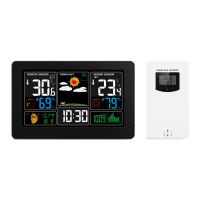
Identifies and describes the elements shown on the main LCD screen (A1-A12).
Details the function of the side buttons (B1-B12) and power connections on the main unit.
Identifies and describes the parts of the wireless outdoor sensor (C1-C7).
Guides through the first-time setup and battery insertion for the weather station and sensor.
Explains how the station synchronizes with the WWVB radio signal for accurate time.
Provides instructions on manually setting the time, date, and time zone.
Details the process for setting the daily alarm hours and minutes.
Explains how to switch alarms on/off, stop the alarm, and use the snooze function.
Describes the display of lunar phases and tide information.
Explains how to switch between °C/°F and how indoor comfort is displayed.
Shows how trends for temperature and humidity are displayed.
Details how data from the remote sensor is received and displayed.
Explains how to view and reset maximum and minimum temperature/humidity data.
Covers setting high/low temperature alerts for the remote sensor.
Details activation of temperature and frost alarms based on sensor readings.
Explains the low battery symbol and when to replace batteries.
Describes how the station calculates and displays weather forecasts based on barometric pressure.
Explains how to adjust or turn off the backlight when powered by batteries or adapter.
 General
| Brand | Kalawen |
|---|---|
| Model | PT3388 |
| Category | Weather Station |
| Language | English |

 To Next Page