Operating instructions
Basic Operation
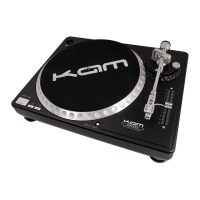
1. Place a record on the slip mat (4) which sits on the platter (2).
2. Select the desired speed by depressing the 33 or 45 speed selector (16) button.
3. Turn the power (13) switch to the “ON” position, at which point the target light (14) will light up, target lights
(14) are an optional accessory available at your local retailer.
4. Remove the stylus protector (if applicable to your cartridge).
5. Release the arm clamp (10) found on the arm rest (11).
6. Push the start/stop (15) button. The turntable platter (2) will start to spin.
7. Carefully position the tone arm (7) over the desired position over the record. Lower the tone arm (7) slowly,
while letting go of the tone arm (7) over the record where you want to play.
8. When play is over, raise the tone arm (7), move it onto the arm rest (11), and secure it with the arm clamp
(10).
9. You now have the option of turning off the power by turning the Power (13) switch to the “OFF” position, or
stopping the platter (2) by pushing the start/stop (15) button.
Interrupting play
1. Pushing the start/stop (15) button will cause the record to stop exactly when the start/stop (15) button is
pressed while playing.
2. Press the start/stop (15) button again to start play- back with a short delay effect.
Adjusting the pitch control
1. The turntable is equipped with a pitch control (17). When the pitch control is in the center position, the speed
will be 33 or 45 depending on which speed selector (16) button is pushed.
2. When the pitch control (17) is positioned off center, the pitch can vary ±10% depending on the position of the
pitch control (17).


 To Next Page