Need help?
Do you have a question about the KAM LED PARTYBAR V2 and is the answer not in the manual?
Instructions on preventing electrical shock, fire hazards, and proper handling of the unit.
Advice on ventilation, power cable, voltage, location, unpacking, and serial number recording.
Lists and briefly describes the five working modes: Auto, Manual, Audio, DMX512, and Foot Switch.
Details on using the MENU, UP, DOWN, ENTER buttons to select and confirm modes and settings.
Describes how to receive DMX512 controller and slave data for external control.
Explains the 12 auto modes and how to set running speed for each.
Details direct RGB control, strobe speed, and brightness adjustments.
Instructions for adjusting audio sensitivity and the four available modes.
Notes the 20 modes available, including 12 internal auto programs.
Details DMX channel assignments for RGB control, internal programs, and audio modes.
Instructions for connecting and setting up multiple units without a DMX controller.
Guidelines for controlling units individually or collectively using a DMX controller.
Explains how to select and use the 3-channel DMX controller mode for basic RGB control.
Troubleshooting steps for when the product does not work or is dimmed.
Guidance on resolving issues related to DMX signal input.
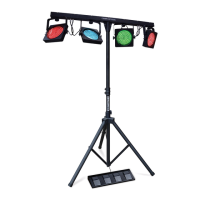
The Kam LED Partybar V2 is a versatile lighting system designed for creating superb color wash effects, suitable for both stand and floor-mount applications. This comprehensive kit includes four fully positional par cans, a lighting stand, a footswitch controller, and rig bags for convenient transport and setup. The lights themselves are compact, slimline, and low-profile, making them easy to integrate into various event setups.
The LED Partybar V2 offers five distinct working modes, providing flexibility for different control preferences and lighting scenarios:
The LED Partybar V2 is designed for ease of use and versatility. The control functions are accessed via a built-in control menu with MENU, UP, DOWN, and ENTER buttons. Users select the desired mode and confirm with ENTER. The product also features a memory function, meaning that after an initial selection, the unit will power on in the mode it was previously set to.
For multi-unit setups, the Partybar V2 supports both DMX controller operation and stand-alone master/slave configurations.
The adjustable lighting stand allows for flexible positioning, and the fully positional par cans enable users to direct light precisely where needed. The built-in auto and sound-activated programs offer dynamic lighting effects without complex programming.
The manual emphasizes several key maintenance and safety guidelines to ensure the longevity and safe operation of the LED Partybar V2:
The manual also includes a troubleshooting section to address common issues such as no output, dimmed LEDs, or no DMX input. This section provides a checklist of potential problems and corresponding solutions, such as checking power connections, ambient temperature, DMX cable polarity, and ensuring correct DMX mode or master/slave settings.
 General
| Product color | Black |
|---|---|
| Wall mountable | Yes |
| Lamp type | LED |
| Lamps quantity | 81 lamp(s) |
| Power source | AC |
| Input voltage | 100 - 240 V |
| Input frequency | 50/60 Hz |
 Weight and Dimensions
| Depth | 76 mm |
|---|---|
| Width | 900 mm |
| Height | 240 mm |
| Weight | 11000 g |
| Ball diameter | - \ |

 To Next Page