8
Quick Start Guide
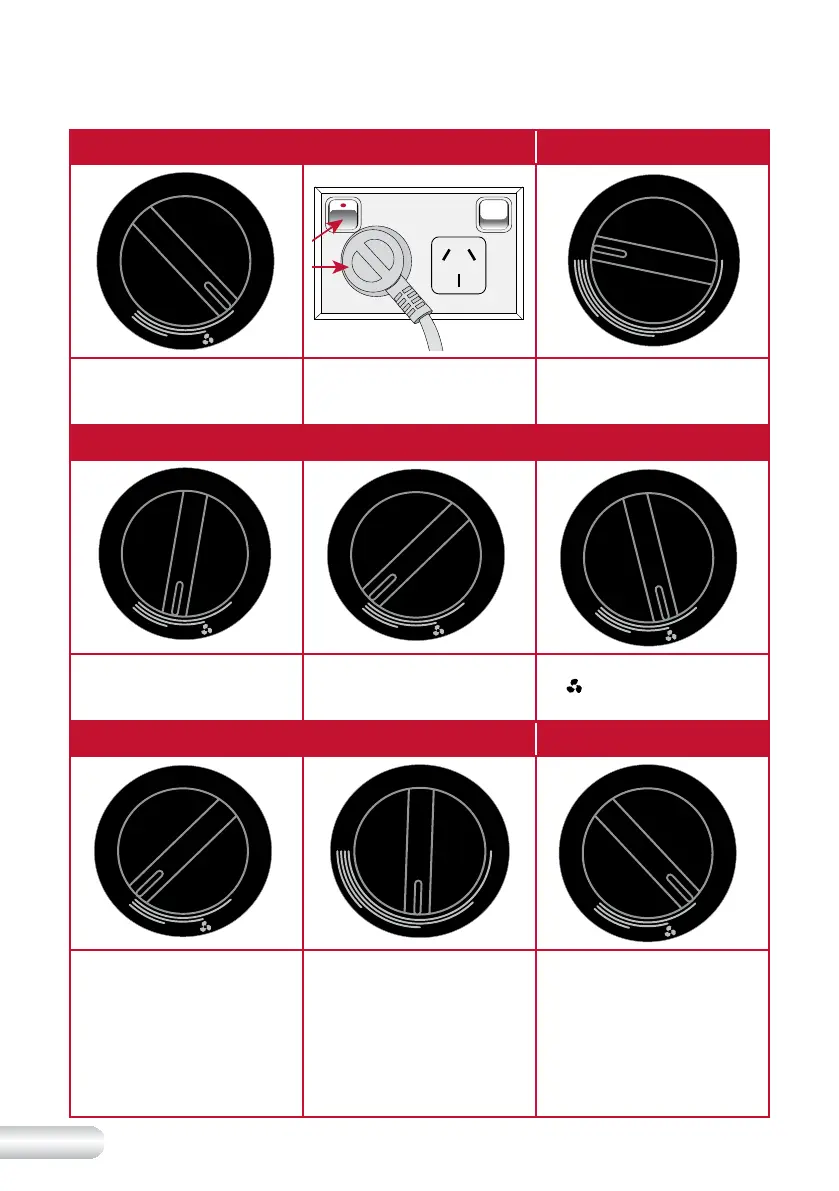
Turning the heater on Setting the heating mode
O
F
F
1
2
M
O
D
E
T
H
E
R
M
O
S
T
A
T
M
A
X
M
I
N
Ensure that the heat control
dial is set to the 'OFF' position.
Plug the cord into a 230V
or 240V power point and
switch on.
Turn the thermostat control to
the maximum position.
Setting the heating mode (continued)
O
F
F
1
2
M
O
D
E
T
H
E
R
M
O
S
T
A
T
M
A
X
M
I
N
O
F
F
1
2
M
O
D
E
T
H
E
R
M
O
S
T
A
T
M
A
X
M
I
N
O
F
F
2
M
O
D
E
Turning the heat settings control
to ‘1’ position will set the heater
into low heat mode (900 watts).
Turning the heat settings control
to setting ‘2’ will set the heater
to high heat mode (1800 watts).
Turning the heat settings control
to (
) position will set the fan
only mode.
Setting the variable thermostat control Turning heater off
O
F
F
1
2
M
O
D
E
T
H
E
R
M
O
S
T
A
T
M
A
X
M
I
N
O
F
F
1
2
F
A
N
S
P
E
E
D
T
H
E
R
M
O
S
T
A
T
M
A
X
M
I
N
O
F
F
1
2
M
O
D
E
To use the variable thermostat,
turn the heat control to setting
‘2’ and turn the thermostat
control to the
‘MAX’ position
to set the heater into high
heat mode.
Once a comfortable room
temperature has been
reached, slowly turn the
thermostat control towards the
‘MIN’ setting until a click sound
is heard. The heater will now
cut in and out to maintain room
temperature.
To turn the heater off, turn
the heat control to the ‘OFF’
position, turn off at the power
outlet and unplug from
the outlet.








 To Next Page