Need help?
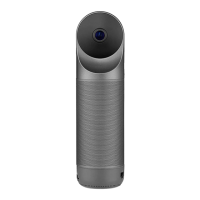
Do you have a question about the KANDA QooCam EGO and is the answer not in the manual?
Information on documents provided for users and recommended reading.
Instructions and QR code for downloading the QooCam mobile application.
Diagrams identifying the camera's buttons, ports, and features.
Details on the battery slot, micro SD card slot, and Type-C charging port.
Description and images of magnetic viewer, lock clips, and selfie mirror.
Safety precautions regarding magnets, water resistance, light exposure, and microphone obstruction.
Instructions on connecting the USB-C cable for charging and battery level indicators.
Guide on selecting language, setting date/time/timezone, and downloading the QooCam App.
Explanation of the functions of the Power, Record, and Playback buttons.
How to navigate the preview screen and understand its interface elements.
Operations, controls, and menu options for playing back photos and videos.
Accessing and adjusting system settings via the drop-down menu.
Information on microSD card capacity, insertion, and important usage cautions.
Explanation of different LED light patterns for power, charging, camera status, and storage.
Steps to connect the app and an overview of the camera interface within the app.
Transferring files, editing videos, and adjusting convergence settings.
Process for sharing recorded content and exporting files to other platforms or devices.
Guide on re-calibrating the camera for better convergence correction effects.
Instructions for updating firmware via microSD card or the QooCam App.
Recommendations for cleaning the camera lens and keeping it away from dust.
Tips to maximize battery life, including recording settings and power management.
Advice on avoiding extreme temperatures, proper storage, and battery care.
Guidelines for safely disposing of rechargeable lithium-ion batteries.
General statements and important instructions for using the camera.
Warnings about handling, power, lens care, temperature, and product usage as a toy.
Prohibitions on unauthorized monitoring, extreme conditions, lens protection, and environmental disposal symbol.
Technical details of the camera lens, FOV, sensor, resolutions, formats, and touch screen.
Specifications related to exposure compensation, exposure mode, and white balance.
Details on color, weight, size, Wi-Fi, connection ports, storage, microphone, and battery.
Information on how to visit the website for service, warranty, and contact email/working hours.
 General
| Brand | KANDA |
|---|---|
| Model | QooCam EGO |
| Category | Digital Camera |
| Language | English |


 To Next Page