Need help?
Do you have a question about the KANDA QooCam and is the answer not in the manual?
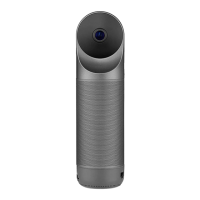
Remove the lens protective cover, which can be used as a camera holder. Reattach after shooting.
Rotate the upper part of the camera 180° to switch between different shooting modes.
Press the power button for 2 seconds to turn the camera on or off.
Press the shutter button for 2 seconds to start recording; press again to stop.
Press the shutter button to capture a photo.
Supports UHS-I and exFAT Micro SD cards up to 256GB. Content is stored on the memory card.
Long videos will be divided into 8-minute clips for storage.
 General
| Model | QooCam |
|---|---|
| Brand | KANDA |
| Connectivity | Wi-Fi, Bluetooth |
| Lens | Dual fisheye lenses |
| ISO Range | 100-3200 |
| Type | 360° Camera |
| Video Resolution | 4K at 30fps |
| Field of View | 360 degrees |
| Stabilization | 6-axis gyroscope |
| Battery Life | Approximately 60 minutes |
| Storage | MicroSD card |


 To Next Page