SETUP
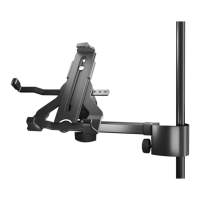
19791 Tablet PC holder
- Effective and flexible - the Tablet Holder comes with an arm and clamp prisma
- Write, read, surf, look at pictures or watch videos - made easy
- Equally suited for the stage, home and studio
- For tablets of all manufacturers - not bound to a specific brand
- Screen sizes (Width: 222 - 334 mm, Height: 128 - 232 mm)
- Helpful settings for quick setup and adjustments
- Provides any number of adjustments:
- Tablet Size, Adjustment Angle, Direction, Portrait/Landscape
SAFETY NOTES
Thank you for choosing this product. The instructions provide directions to all
of the important setup and handling steps. We recommend you keep these
instructions for future reference.
When mounting the Tablet PC ensure that it is property
placed and secured according to the instructions. K&M
is not liable in the case of improper use and associated
consequences i.e. damages!
- The following applies to the Micro or Music
- Desk Stands
- -prior to placing the tablet ensure that the
--stands are stable
- -do the tube diameters fit?: min.11- max. 30 mm
- -be sure that the surface is suitable and level
- Place the Tablet PC carefully in position and
- tighten the screws, then check that the Tablet PC
- is securely in place
- Handle the holder with care, in particular when
- adjusting the settings (angle, direction, format)
FIRST TIME PLACEMENT of the Tablet (2-9)
ATTACH Tablet to the STAND (1-2)
* Scale settings are only examples (Selection of various Tablets see
* Supplementary Sheet)
ATTACH Tablet to the STAND (1-2)
1 The Tablet holder consists of two
1 component groups
1 a. Support arm with a clamp,
1 b. Tablet holder with a joint-connection
1 c. Both components are connected with the finger
1 c. screw (3/8" x 33 mm) and a rubber disc that is
1 c. placed between the components.
2 The clamp is place around the tube and affixed
2 with a knurled screw 2.a.
FIRST TIME PLACEMENT of the Tablet (3-10)
3 First open the three knurled pins until there
3 is enough depth to place the tablet
4 a. Release the upper support arm,
4 b. extend it out as far as it goes and
4 c. tighten the clamping screw
5 a. Release the side support arms and...
5 b. ...with the help of the scale symmetrically
5 b. extend to a rough position,
5 c. tighten both clamping screws
6 Place the table into the corner supports to
6 ensure that it fits
6 a. Tablet is too narrow: Retract the support
6 a. arms a bit (symmetrically) until it fits.
6 b. Tablet is too wide: Extend the support arms
6 b. (symmetrically) until it fits.
6 c. Tablet fits, if the corner supports do not show any
6 c. space between the tablet and the holder when
6 c. looking at it from the side.
7 a. Place the tablet in both corner supports...
7 b. ...and hold the tablet
8 Retract the upper support arm
8 a. Release the clamp screw and retract the
8 support arm...
8 b. ...until the tablet is securely held in place.
8 c. Tighten the clamping screw
9 Gently clamp the tablet into the corner
9 supports by tightening the three knurled pins
10 Your Tablet should be securely positioned now.
10 Please ensure that this is the case.
10 a. Does the Tablet sit securely in the holder without any play?
10 b. Are the three knurled handles properly tightened?
10 c. Are the three plastic finger screws properly tightened?
If this is not the case, please refer to points 3-9.
fits fits
fits
Tab too narrow Tab too wide Tab fits
0
stand tube

 Need help?
 General

 To Next Page