Home
Kano
Desktop
PC
Page 13
Kano PC - Page 13
54 pages
Manual
Save Page as PDF
To Next Page
To Next Page
To Previous Page
To Previous Page
Loading...
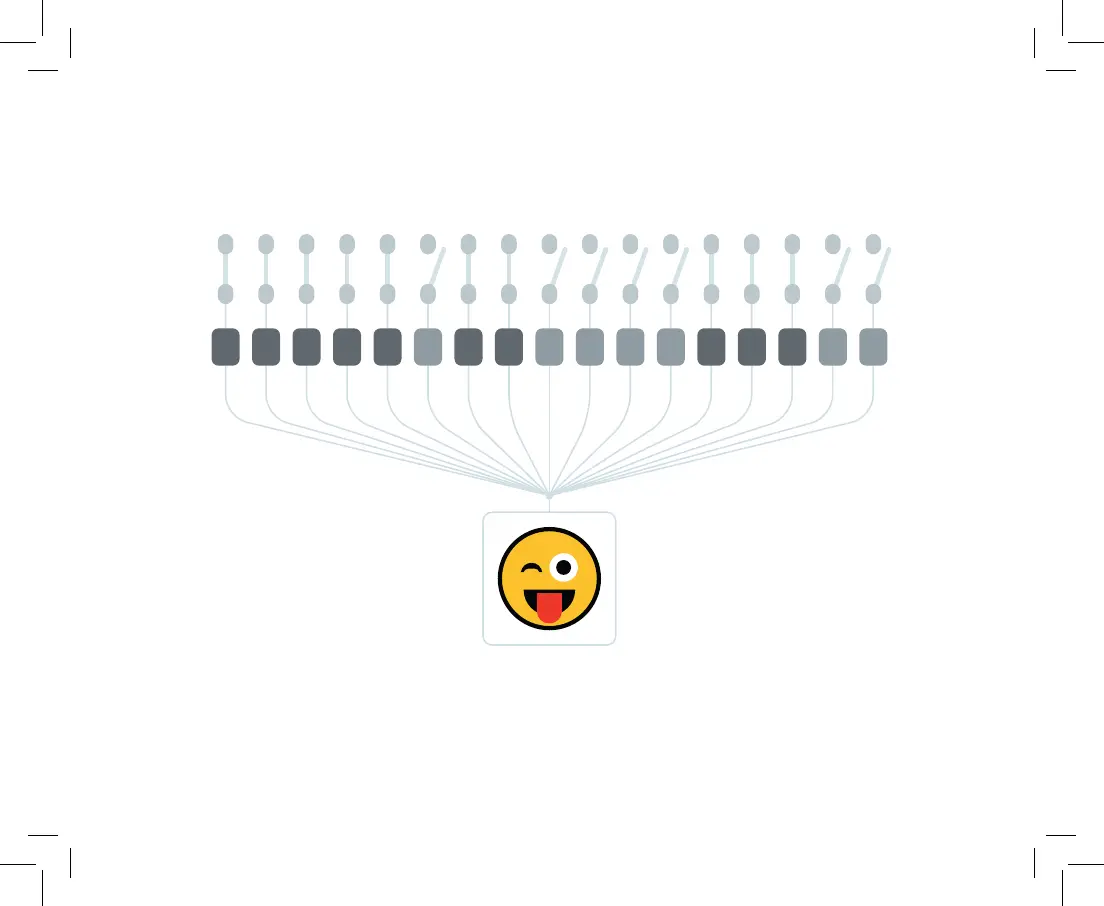
0
1
1
1
1
1
1
1
0
0
0
1
1
1
0
0
0
If a switch is on,
that means 1
. If it's off
,
that means 0
Y
our comp
uter turns specific sequences of 0s and 1s -
called binar
y code - into words
,
pictures,
and logical rules
11
12
14
Table of Contents
Main Page
Safety First
2
Power Supply Unit
5
Battery
5
Power Cable
5
Magnifying Glass
5
Lay It Screen-Down Onto the Black Foam Sheet
7
How Computers Work
30
Kano Code
31
Make Art
32
Microsoft Store
33
Cool Things to Do
34
Hey Cortana
35
Your Keyboard Has Hidden Powers
44


 To Next Page