4
WARNING
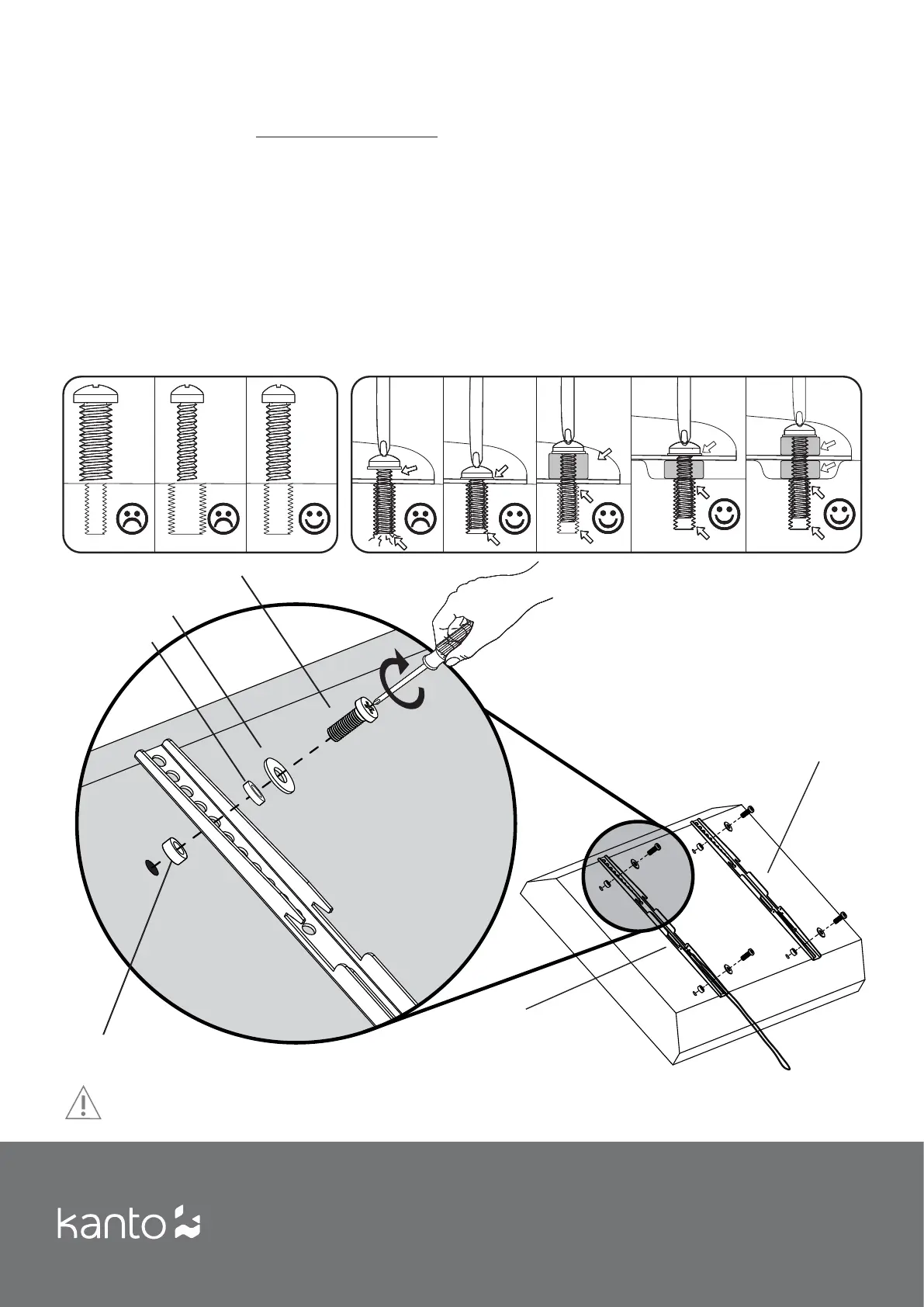
Never over-tighten a bolt into the back of your fl at panel TV.
Do not lay the TV face down on its glass front. Use a TV stand or lean against a wall.
Step 1: Attach TV Brackets
Step 1.1 Determine the correct size of bolt.
Kanto provides 3 bolt diameters (Metric sizes M5, M6
and M8) in various lengths.
Part items: A, B, C, D, E, F or G
Select the correct diameter bolt and hand tighten into
the back of the TV to determine the correct length. If
your TV has a curved back or the mounting holes are
recessed, you can use spacer (K) to ensure a proper fi t.
You can use spacers inside or outside the bracket arm,
as shown in Diagram A.
Step 1.2 Attach TV Bracket Arms to the back of the TV
Now that you have selected the correct bolt length,
attach the Bracket Arms to the TV. Use the Quick-Lock
TV Bracket Arm on the side of the TV that will be less
accessible when mounted.
Use the washers (H) for bolts A-D (sizes M5 and M6).
The washer will work for both bolt sizes.
The washer is not required for M8 size bolts (E, F & G).
Diagram A
Quick-Lock
TV Bracket Arm (Q)
Washer (H) used with
Bolts A thru D
5 mm Spacer ( J)
Bolts (A thru G)
There are a wide variety of TVs available that require diff erent bolt sizes. We provide a selection of mounting
bolts to fi t most TVs. If you have any concerns about this mounting hardware or installation call us direct at
1-888-848-2643 or email at support@kantoliving.com.
Locking TV
Bracket Arm (R)
10 mm Spacer (K), if
necessary for curved
TVs


 To Next Page