4
5
3
6a
6
4
2
1
Parte traseira / Back side
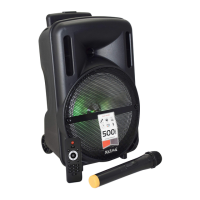
1. BOTÃO DE ON/OFF
2. ENTRADA AUX
Pode ligar aqui uma fonte externa através de um jack
stereo de 3,5mm.
3. ENTRADA USB
Ligue aqui uma pen USB com faixas Mp3. Deve
estar formatada em FAT32.
4. ENTRADA DE CARTÃO
Insira nesta entrada um cartão microSD com faixas
em Mp3. Deve estar formatada em FAT32.
5. ENTRADA MIC
Ligue o microfone incluído na entrada própria (5).
Pode agora amplicar a voz ou cantar por cima de
uma música que esteja a ser reproduzida nas
entradas USB / micro SD / Bluetooth usufruindo do
efeito echo.
6. ENTRADA PARA CARREGAMENTO
Ligue o cabo USB incluído à entrada micro USB do
equipamento e espere que o led (6a) se desligue.
Durante o funcionamente, se a carga não for
suciente a coluna emite um aviso sonoro, antes de
se desligar automaticamente para salvaguardar a
bateria.
7. LED
Pressione repetidamente para seleccionar um dos 3
efeitos de luzes. Mantenha presssionado para
desligar o led.
1.
ON/OFF BUTTON
2.
AUX SOCKET
You can connect here an external source through
3,5mm jack stereo connector.
3.
USB SOCKET
Connect here a USB stick with Mp3 tracks.
It must be in FAT32 format.
4.
TF SOCKET
Insert into this slot a microSD card with MP3
tracks. It must be in FAT 32 format.
5.
MIC SOCKET
Connect the inclued microphone to the socket
(5). You can now amplify your voice or sing over
a song played via USB / micro SD / Bluetooth,
using the echo effect that will enhance your
performance.
6.
CHARGING PORT
Connnect the included USB cable to the xture’s
micro USB charging port and wait for the led
(6a) to turn off. During operation, if the charge
is not sufcient, the speaker will emit a warning
note, before automatically turning off to save the
integrity of the battery.
7.
LED
Press it repeatedly to select on of the 3 light
effects. With a long press you will disable the leds.


 To Next Page