12
WIRELESS VACUUM CLEANER
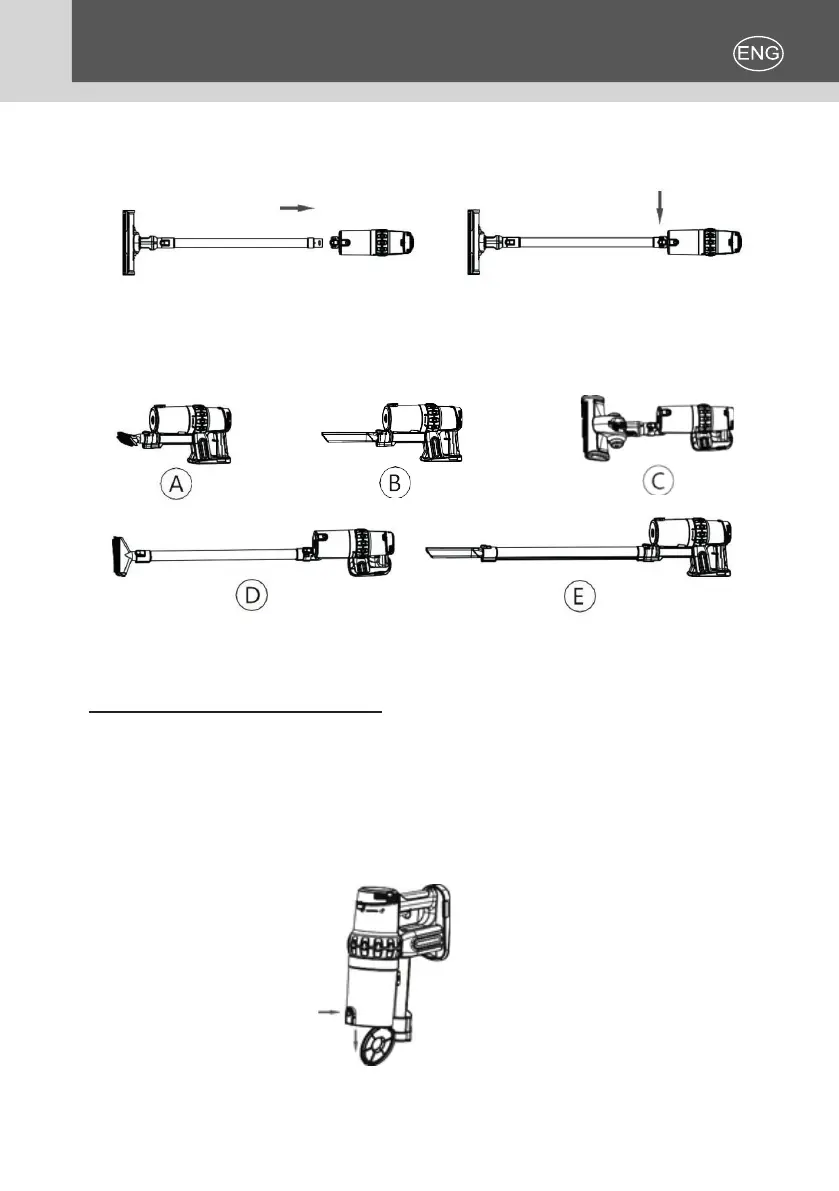
3. Install the housing motor: as shown in gure 6, install the brush into the
motor housing and lock it. After installed, the status is shown as in gure 7.
(gure6) (gure7)
4. Use of accessories: choose the most appropriate attachment according to
the purpose of its usage and install it as shown below.
5. All the accessories that have been installed can be removed. Just hold
down the host lock.
CLEAN UP THE DUST CUP
During use, the vacuum cleaner picks up the dirt that accumulates in the dust
cup. At this time, it should be cleaned timely: press and hold the dust cup
lock to open the lower lid (see gure 8) and empty the dust cup directly in the
trash. After cleaning, lock the dust cup lid to use it again. It is recommended to
empty the dust cup every time after use!
(gure8)


 To Next Page