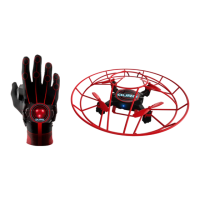
The Glove Controller won’t turn on.
Charge the Glove Controller battery using the USB charger provided in the box. Carefully connect the
fully charged battery on the Glove Controller. Resume flying as per the instructions in the User Manual.
The drone won’t turn on.
Charge the drone battery using the USB charger provided in the box. Carefully connect the fully charged
battery to the drone and resume flying as per the instructions in the User Manual.
The drone doesn’t lift well or auto-hover after take-off.
The drone battery may be low. If the light of the drone is flashing slowly while connected to the Glove
Controller, the battery is low. Charge the drone battery using the USB charger provided in the box.
Carefully connect the fully charged battery to the drone and resume flying as per the instructions in the
User Manual.
The sensors may be adjusting to your environment. Wait 5-10 seconds after take-off to allow the
drone to stabilize at the auto-hover height before flying.
One or more propeller(s) may be missing. Try to locate the propeller(s) in the rooms you have been
flying the drone in. Gently press fit the propeller(s) back in in the correct place on the drone, A to A and
B to B. If you have run out of extra propellers, please contact GestureBotics AuraTM Customer Service
for repair & replacement options.
One or more propeller(s) may be damaged. Replace the propeller(s) with the corresponding extra
propeller(s) that came with your product. Gently press fit the propeller(s) back in the correct place on
the drone, A to A and B to B. If you have run out of extra propellers, please contact GestureBotics
AuraTM Customer Service for repair & replacement options.
The drone may need to be calibrated again. Place the drone on a VERY FLAT surface. While the Glove
Controller and drone are on and connected, hold the take/off landing button for 3-4 seconds. The Glove
Controller lights will flash blue. The drone light should also flash blue quickly. Once the lights return to
solid green (ready state), operate the drone and observe if the flight performance has returned to
normal.
In extreme cases, the shafts of one or more motors may have bent or fractured from the impact of a
collision during flight. In such cases, please contact GestureBotics AuraTM Customer Service to get help
about the out of warranty repair & replacement service options.

 Need help?
 General

 To Next Page