11
How to Use /
ԃդٺҢ
A)
Before Use /
ٺҢࠉ
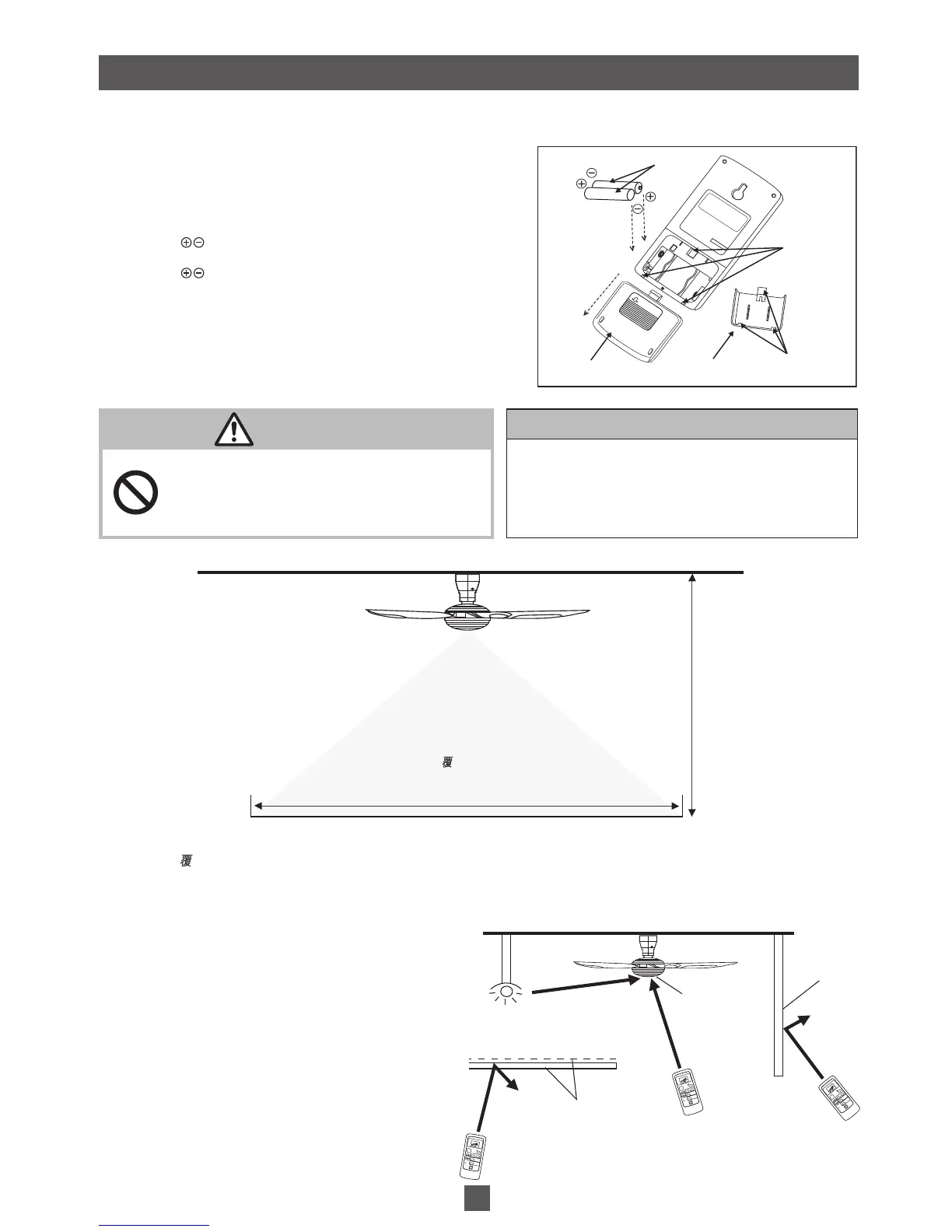
Insert 2 pieces AAA, R03, LR03 size Batteries and make sure the polarity direction is as shown in fi gure below.
插入
2
枚
AAA
、
R03
、
LR03
尺寸的電池, 並確保極性方向如下圖所示。
1. Remove the cover
• Push “Open” mark downwards (follow the arrow).
打開蓋子
•
將“
Open
"標記往下按(順看箭頭)。
2. Insert the Battery (2 pieces: AAA, R03, LR03)
• Position should match.
插入電池
(2
枚
: AAA, R03, LR03)
•
位置必須對稱。
3. Close the Cover
• Insert the protruding part (3 positions) into the Remote Control
(3 holes), and push the cover upwards.
蓋好蓋子
•
將突出的部分(
3
個位置)插入遙控器(
3
個洞孔),然後將蓋子
往上推。
ATTENTION /
ཎ
• Please remove all Batteries before disposing the
Remote Control.
• The life spend of Battery is about one year for normal
usage.
•
棄置遙控器之前請取出所有電池。
•
正常使用情況下的電池壽命約為
1
年。
WARNING /
ឌ֙
Do not insert any metal items in the Battery area with the
Battery.
Can cause fi re, explosion, short circuit and electrical shock.
切勿把任何金屬物體與電池一起放入電池置放處。
這可導致火災、爆炸、短路和電擊。
B)
Remote Control Coverage /
ልᏢ᙭ᇐ
3~4 m
3~4
米
Coverage Area
蓋範圍
8 m /
8
米
The fi gure above shows the best coverage area. The ideal ceiling height is 3~4 m. The Remote Control must be pointed to the
direction of the Ceiling Fan when in use.
上圖顯示最佳 蓋範圍。最佳天花板高度是
3 ~ 4
米。使用時,遙控器必須指向吊扇的方向。
There might be situations that will interfere with the signal from the Remote Control; such as the Remote Control being blocked
by an obstacle or light sources at the product receiver area. As shown in the fi gure. Avoid the following situations:
有可能發生遙控器的信號被干擾的情形;例如在產品的接收器區域遙控器被障礙物或光源阻礙。 如圖所示。避免以下的情形:
• Obstacles such as walls or glass between the product
receiver and Remote Control can cause signal
transmission failure.
•
在產品接收器和遙控器之間如牆壁或玻璃的障礙物可能導致
信號傳送故障。
• Netting and glass can reduce signal power or refl ect
the infrared signal from the Remote Control.
•
網和玻璃會減低信號功率或反射自遙控器的紅外信號。
• Lighting effect generated by fl uorescent lighting systems
directly onto the product receiver area can affect the signal
transmission.
•
熒光照明系統產生的照明效果直射在產品接受器區域上會影響
信號傳送。
OPEN
B
A
C
Cover /
蓋子
Cover (back view) /
蓋子(後視圖)
Battery /
電池
Push to open /
推開
Protruding part
(3 positions) /
突出部分
(
3
個位置)
3 Holes /
3
個洞孔
MAX
CEILING
F
AN
TIMER
MODE
MIN
SPEED
h
ON
SLEEP
OFF/ON
YUR
A
G
I
CANCEL
SET
OFF
TIMER
SELECT
SLEEP MODE
LIGHT MODE
SPEED
RESET
MAX
CEILING
F
AN
TIMER
MODE
MIN
SPEED
h
ON
SLEEP
OFF/ON
YUR
A
G
I
CANCEL
SET
OFF
TIMER
SELECT
SLEEP MODE
LIGHT MODE
SPEED
RESET
MAX
CEILING
FAN
TIMER
MODE
MIN
SPEED
h
ON
SLEEP
OFF/ON
YUR
A
G
I
CANCEL
S
ET
OFF
TIMER
SELECT
SLEEP MODE
LIGHT MODE
SPEED
RESET
Flourescent Lighting System /
熒光照明系統
Netting & Glass /
網和玻璃
Signal Receiver /
信號接收器
Obstacles /
障礙物


 To Next Page