
 Need help?
Do you have a question about the Kedacom DSJ-U1-LPN and is the answer not in the manual?
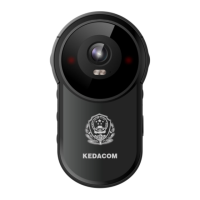
Details the physical dimensions and design of the body worn camera.
Explains the back panel buttons, indicators, and the touch screen interface.
Describes the side buttons, PTT, power, volume, and USB interface functions.
Details the procedure for powering on the device and system startup time.
Describes the main screen display, status bar, and quick settings access.
Explains the information bar, viewing frame, and access to settings and file management.
Instructions on starting, stopping, marking important videos, and auto-segmentation.
Details on using the IMP button and connecting the camera to a VMS.
Instructions for starting, stopping, and marking audio recordings as important.
Explains how to mark audio files as important and notes on the IMP button.
How to take single photos and adjust resolution settings.
Details on continuous shooting and snapshot capabilities.
Information regarding text overlays on recorded media.
How to scan QR codes to import parameters and configure the device.
Displaying and scanning the device's own QR code for settings.
Enabling automatic recording triggers based on case events.
Configuration for mobile data, APN, VPN, and traffic monitoring.
Detailed steps for setting up APN access points and VPN profiles.
VPN connection process and traffic threshold management.
Advanced settings for video parameters like resolution, bitrate, and frame rate.
Setting resolution, compression, bitrate, and frame rate for video streams.
Configuring network protocols for device integration.
Setting up GB protocol parameters for VMS 2.0 integration.
Steps for adding the device to VMS via PMC and configuring its parameters.
Querying device info and configuring GB protocol details like ID and channel.
Setting VMS GB ID, VMS IP, and VMS port for GB protocol communication.
Configuring settings to upload data to VIID for analysis.
Detailed VIID access configuration including IP, port, and user credentials.
Enabling auto upload and local backup for face, video, and audio data.
Enabling auto upload and local backup for Picture and GPS data.
Configuring the ONVIF protocol for network video compatibility.
Adjusting various other display and operational settings like signal bar and OSD.
Selecting the desired audio compression format for communication.
Enabling audio mixing for calls, which requires ADPCM compression.
Setting the device's timezone manually or automatically.
Setting the default video format to MP4.
Setting the default audio format to M4A.
Setting the resolution for captured snapshot pictures.
Configuring the quantity of pictures taken in continuous shooting mode.
Customizing notification sounds for various device events.
Adjusting the brightness level of the device's screen.
Setting automatic screen lock timers or disabling the feature.
Configuring screen unlock methods like pattern or PIN.
Setting the maximum duration for individual video or audio files.
Configuring Infrared lamp settings for night vision.
Enabling pre-recording to capture footage prior to an event.
Activating hidden features by tapping the software version.
Options for USB Mode and High Temperature Alarm settings.
Enabling location services for VLine and VMS integration.
Configuring upload speed and viewing location/satellite status.
Configuring WLAN and Hotspot for network connectivity.
Adding and connecting to WiFi networks, viewing network details.
Enabling Bluetooth for pairing with devices like headsets.
Enabling face recognition and setting filter levels for clearer images.
Uploading files via wireless network using the iMMS client.
Configuring upload server and managing upload lists, including disconnected videos.
Managing VLine account info and call notification settings.
Viewing and managing VLine storage usage on the device.
Options for deleting VLine data by group or by module.
Enabling the feature to unlock the screen using any button.
Viewing detailed device information, software, and hardware versions.
Accessing and managing chat conversations and recent chat lists.
Step-by-step guide to creating and managing group chats.
How to engage in group chats, send voice messages, and manage group settings.
Accessing contact lists, organizations, departments, and groups.
Understanding the different types of groups within VLine.
Making and managing private voice calls with contacts.
Viewing, searching, and uploading face images and snapshots.
Browsing, searching, and uploading photo files and snapshots.
Viewing, searching, and uploading video files.
Viewing, searching, and uploading audio files.
 General
| Video Resolution | 1920x1080 |
|---|---|
| Storage | 128G |
| Aperture | F2.0 |
| Digital Noise Reduction | 3D digital noise reduction |
| Video Compression | H.264/H.265 |
| Bitrate | 32 Kbps |
| Power Supply | DC5V |
| Operating Conditions | -30°C |

 To Next Page