Need help?
Do you have a question about the Keeley HALO and is the answer not in the manual?
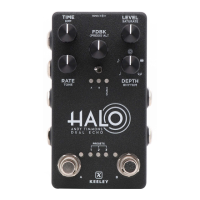
Sets the length of delay from 5ms to 1500ms.
Sets the level of the delay.
Sets regeneration (repeats); pressing enters 'Preset Mode'.
Sets modulation rate of the delay from 0.1Hz to 10Hz.
Sets the amount of modulation of the delay.
Advances through the HALO's 4 Preset Banks.
Turns on or off Side A of the HALO.
Turns on or off Side B of the HALO.
Indicates knob position and engaged sides; LEDs mirror stomp switches.
Press and hold FDBK to access secondary controls.
Sets cutoff frequency for high pass filter in feedback loop (0Hz-300Hz).
Acts as tape compression/saturation; mimics vintage tape delay grit.
Controls tone of delayed signal (1000Hz-8750Hz).
Sets delay subdivision: Quarter, Dotted Eighth, Halo, BBD, Tape Delay.
Tap to activate each side; alternate tap for alternate sound in Preset Bank.
Hold both Side A and B stomps for 1/3 sec to advance through presets 1-4.
Tap FDBK, hold A or B stomp for 1 sec to save settings to desired side.
Control bypass switches remotely via TRS cable; momentary/latching modes.
Use external switch for tap tempo via expression jack; holds down for max feedback.
Hold active side's stomp switch for 1 sec, then tap to set tempo.
Freeze sound by holding the inactive side's stomp switch.
Activate/deactivate trails (spillover) by holding both stomps during power-up.
Toggle dry signal on/off by holding Side A stomp and FDBK knob during power-up.
Advance through Preset Banks by holding both stomps or using mini toggle.
Tap FDBK, cursor with A/B stomps, press both stomps to select bank.
Tap FDBK, cursor with A/B stomps, hold A or B stomp to save settings.
Hold FDBK, set pedal heel/toe, turn knob, hold FDBK to save.
Hold FDBK, set pedal heel/toe, turn knob slightly to unassign, hold FDBK to save.
Requires TRS (stereo) expression pedal; defaults to BLEND control.
Enter Expression Mode, hold SIDE A footswitch to clear all settings.
Unplug power, hold FDBK and both stomps, plug in power, release to reset.
Factory presets for Side A (Andy's Halo) and Side B (Dotted Eighth).
Factory presets for Side A (Quarter) and Side B (Slapback).
Factory presets for Side A (Vintage Multi Tap) and Side B (Halo Reverb).
Factory presets for Side A (Rackman BBD) and Side B (Long Quarter).
Brief overview of TIME, LEVEL, FDBK, RATE, DEPTH, TOGGLE SWITCH, and STOMP SWITCHES.
Brief overview of FDBK ALT, HPF, SATURATE, TONE, and RHYTHM.
How to select and save presets.
Activating Infinite Hold and Tap Tempo features.
How to activate Trails mode by holding both stomps during power-up.
Details on default preset, power, impedance, modulation rate, HPF, and tone range.
 Power
Power| DC supply voltage | 9V |
|---|---|
| current consumption | 160mA |
 Electrical Impedance
| input impedance | 1M |
|---|---|
| output impedance | 10K |
Modulation and Filtering| modulation rate | 0.1Hz - 10Hz |
|---|---|
| high pass filter range | 0Hz - 300Hz |
| delay tone range | 1000Hz - 8750Hz |

 To Next Page