Need help?
Do you have a question about the KEEN Ranger PT and is the answer not in the manual?
Explains the behavior of the status LED light and its meaning in different states.
Guides on initial camera setup, including unboxing and component identification.
Instructions for activating and preparing the SIM card before inserting it into the camera.
Details the physical process of inserting the SIM card into the camera.
Explains how to power on the camera and what to expect regarding initial network connection status.
Provides solutions for common network connection errors and SIM card recognition problems.
Guides on initiating the camera addition process within the mobile application.
Instructions for setting a password, naming the camera, and entering unique device identifiers.
Steps to select installation scene and finalize the camera setup process in the app.
Best practices for camera placement, orientation, and height for optimal performance.
Step-by-step instructions for attaching the camera mount securely to a wall.
Instructions for using the loop strap to attach the camera to a surface like a tree.
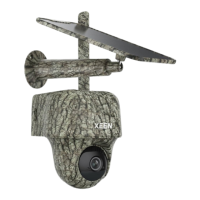
The Keen Ranger PT is a sophisticated trail camera designed for hunters and wildlife observers, offering high performance and a range of features for comprehensive monitoring. This device is capable of providing a 360-degree view, allowing users to cover extensive areas. Its pan-tilt functionality enables manual adjustment of the camera's angle via a mobile application, ensuring that users can capture exactly what they want to see with just a few clicks.
The Keen Ranger PT operates as a trail camera, primarily used for capturing images and videos of wildlife in remote or outdoor settings. It is equipped with a built-in PIR sensor that detects motion, triggering the camera to record events. This motion detection capability is crucial for conserving battery power, as the camera is not designed for continuous 24/7 recording. Instead, it wakes up only when motion events are triggered or when accessed remotely via the client or app. The camera also features a speaker and a built-in microphone, suggesting potential for two-way audio communication or audio recording capabilities, enhancing its utility for monitoring. Its 940nm IR LEDs indicate night vision capabilities, allowing for clear recording in low-light conditions without visible light emissions that could disturb wildlife. The presence of a lens and a daylight sensor further optimizes image capture based on ambient light conditions.
Setting up the Keen Ranger PT involves a straightforward process, beginning with the activation and installation of a SIM card. The camera supports WCDMA and FDD LTE SIM cards, which must be activated on a smartphone or with a network carrier prior to insertion. Users are advised to disable any PIN codes on the SIM card using a smartphone before inserting it into the camera. The SIM card slot is located above the Micro SD card slot, and proper orientation of the gold contacts (facing down for SIM, facing up for SD) is essential for correct insertion. After inserting the SIM card and Micro SD card, the rubber cover must be firmly pressed to ensure waterproof performance.
Once the SIM card is installed, the camera can be powered on. A red LED will illuminate solid for a few seconds, indicating the camera is starting up, and then turn off. Subsequently, a blue LED will flash briefly and then turn solid, accompanied by a voice prompt "Network connection succeeded," signifying a successful connection to the network. The device's status light provides visual cues for various operational states: a solid red LED followed by flashing indicates an unrecognized SIM card or a PIN code issue; a solid red LED followed by slow flashing suggests the camera cannot register with the mobile carrier network; a quick flash of the red LED (about 3 times in 1 second) means a data call failed or requires APN input; a red LED followed by a blue LED flashing and then turning off completely indicates a network connection failure; and a red LED followed by a blue LED flashing and then turning solid signifies a successful network connection. Troubleshooting steps are provided for common issues, such as checking SIM card orientation, ensuring full insertion, disabling PIN codes, activating the SIM card, checking signal strength, and verifying data plans or APN settings.
The camera is managed through the Reolink App. Initial setup involves tapping the '+' icon in the app to add the camera, scanning the QR code on the back of the device, or manually entering the 16-digit UID number. Users then create a login password and name their camera. The app guides users through selecting an installation scene (indoor or outdoor) and provides a final note before completing the initialization.
For physical installation, the Keen Ranger PT offers flexibility. For outdoor use, it is recommended to install the camera upside down to enhance waterproof performance and optimize the PIR motion sensor's efficiency. The ideal installation height is 2-3 meters (7-10 ft) above the ground to maximize the PIR sensor's detection range. To improve motion detection performance, the camera should be installed angularly. The installation process involves placing the cover on the camera, ensuring alignment of the antenna post and charging port holes, securing the camera with a hexagonal screw, and then installing the antenna. Mounting options include attaching the camera to a wall using the provided mounting hole template and screws (with drywall anchors if needed) or fastening it to a tree using a loop strap threaded through the bracket.
While the manual primarily focuses on setup and usage, several aspects touch upon maintenance. The importance of firmly pressing the rubber cover after SIM and SD card installation highlights a key maintenance step for ensuring the camera's waterproof integrity, which is crucial for its longevity in outdoor environments. The troubleshooting guide for network connection issues also serves as a maintenance tool, enabling users to diagnose and resolve common problems related to SIM card recognition, network registration, and data connectivity. This proactive approach to problem-solving helps maintain the camera's operational status. The recommendation to save the device's QR code to an album is a practical maintenance feature, facilitating future sharing, adding, or maintaining the device without needing physical access to the camera's back. The design of the camera to wake up only on motion events or remote access is inherently a battery-saving feature, which reduces the frequency of battery recharging or replacement, thereby simplifying maintenance. The guidance on optimal installation height and angular placement for the PIR sensor also contributes to reduced false alarms, which in turn minimizes unnecessary recordings and conserves battery life, indirectly reducing maintenance efforts related to power management.
 General
| Night Vision | Yes |
|---|---|
| Waterproof Rating | IP66 |
| Image Sensor | CMOS |
| PIR Sensitivity | Adjustable |
| Power Supply | 8 AA Batteries |
| Detection Range | 65ft |
| Flash Type | Infrared |
| IR Range | 65ft |
| Power Source | 8 AA Batteries |

 To Next Page