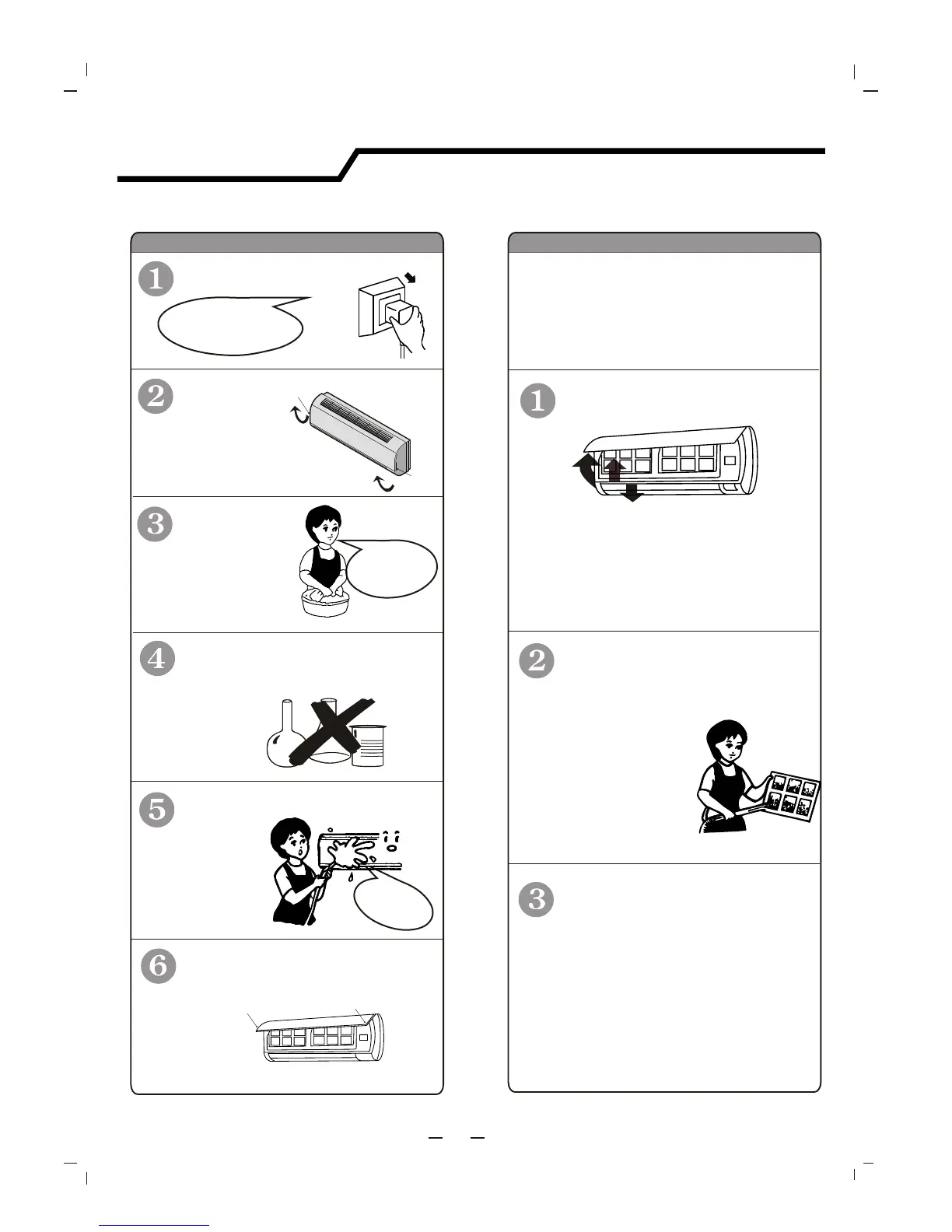
Turn off the appliance
first before disconnecting
from power supply.
It is necessary to clean the air filter
after using it for about 200 hours.
Clean it as follows:
Front panel maintenance Air filter maintenance
Cut off the power supply
Never use volatile substance
such as gasoline or polishing
powder to clean the appliance.
Clean and reinstall the air filter.
Close the front panel again.
sho k!c
ec ri
El
tc
ge
!Dan
rous
Wipe with a soft
and dry cloth.
Use
to clean if the
appliance is very dirty.
slightly moistened
cloth
Never sprinkle water onto the
indoor unit
Reinstall and shut the front panel.
Reinstall and shut the front panel by
pressing position "b" downward.
If the dirt is conspicuous,
clean it with a solution of
.slightly moistened cloth
Stop the appliance and remove
the air filter.
1
2
3
1.Open the front panel.
2.Press the handle of the filter gently
from the front.
3. Grasp the handle and slide out the filter.
soft cloth to
clean it.
Use a dry and
Grasp position "a" and
pull outward to remove the
front panel.
a
a
b
b
29
Maintenance


 To Next Page