EasyManua.ls Logo

Kelvix DMX-26506 - User Manual

Kelvix DMX-26506
2 pages
Print Icon
To Next Page IconTo Next Page
Loading...
1
Connect power supply, DMX signal, and LED lighting strip(s) to the DMX512 decoder as shown below:
2
Once all connections have been made, set
decoder to desired DMX start address:
Power Supply
12-24VDC
LN
AC
RGBWCT, RGBWA or 2 RGB Lighting Strip
Note: Multiple decoders set to the same
DMX address will function in unison.
Note: The DMX-26506 decoder complies
tostandard DMX512 protocol and is
compatible with any third party standard
DMX512 controller.
DMX
CONTROLLER
a) Scan QR code for a time-saving online
conversion tool.
http://www.sabretechnology.co.uk/calc.asp
b) Manual Instructions:
Use DIP Switch to select adress. To set
DMX address, first look at the sideways
numbers printed below switching board
(1, 2, 4,... 256); These are DMX adresses.
To achieve desired address, add up these
values then flip corresponding switches to
“ON” position.
For example, desired DMX address is 40.
The value of switch 6 (DMX address 32) +
the value of switch 4 (DMX address 8) =
DMX value 40. Therefore, move switch 6 and
4 to the “ON” position (see example below).
1 2 3 4 5 6 7 8 9 10
ON
Refer to setup instructions of system’s DMX
controller for completion of setup.
3
Questions/Support | 800-789-3810 | quotes@kelvix.com 072220DM
B- G- R- R- V-V+ V+ V+B- G-
OUTPUT
POWER
DC5V-24V
MAX 16A
POWER/DMX
DMX IN
D+ D-
GND
DMX ADDR AND FUN
DMX OUT
D+ D-
GND
SETUP INSTRUCTIONS
DMX-26506
+24V +24V
R
R
R
G
G
W
WB
B
C
R
G
W
B
C
C
+24V
+24V
R
R
R
G
G
W
W
B
B
C
R
G
W
B
C
C
Question and Answer IconNeed help?

Do you have a question about the Kelvix DMX-26506 and is the answer not in the manual?

Summary

DMX-26506 Setup Instructions

Initial Connection

Connect power supply, DMX signal, and LED lighting strip to the DMX512 decoder.

Set DMX Start Address

Configure the decoder's DMX start address using an online conversion tool or manual DIP switch settings.

DMX-26506 Testing Instructions

Prepare for Testing

Ensure the decoder is connected to the power supply and RGBW or RGB lighting strip.

Test Color Modes

Flip specific DIP switches to test red, green, blue, and white output on the LED strip.

Overview

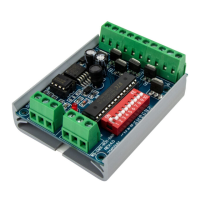
The Kelvix DMX-26506 is a DMX512 decoder designed to control LED lighting strips, including RGBWCT, RGBWA, or 2 RGB configurations. It acts as an interface between a DMX controller and the LED lighting, translating DMX signals into appropriate power outputs to control the color and intensity of the connected LEDs.

Function Description:

The primary function of the DMX-26506 is to receive DMX512 signals from a DMX controller and convert them into power outputs that drive LED lighting strips. This allows for precise control over various lighting parameters such as color (red, green, blue, white, etc.) and potentially color temperature or other advanced features depending on the connected LED strip. The decoder is compatible with standard DMX512 protocol, ensuring interoperability with a wide range of third-party DMX controllers. It supports multiple decoders operating in unison when set to the same DMX address, enabling synchronized control of larger lighting installations.

Important Technical Specifications:

  • Input Voltage: DC 5V-24V
  • Maximum Current: 16A
  • DMX Protocol: DMX512 standard
  • Output Types: Compatible with RGBWCT, RGBWA, or 2 RGB Lighting Strips. The output terminals are labeled for common configurations: G-R-V+B-G-R-V+V+ V-.
  • DMX Input/Output: Features DMX IN and DMX OUT terminals (D+, D-, GND) for daisy-chaining multiple decoders.
  • Power Input: Accepts DC 5V-24V power via screw terminals.
  • DIP Switches: Includes a 10-position DIP switch for setting the DMX start address and a dedicated "FUN" switch for testing color modes.

Usage Features:

The DMX-26506 offers straightforward setup and configuration:

  • Connection:
    • Power Supply: Connects to a 12-24VDC power supply.
    • DMX Signal: Connects to a DMX controller via DMX IN terminals. Multiple decoders can be daisy-chained using DMX IN and DMX OUT.
    • LED Lighting Strip: Connects to the output terminals, matching the strip's wiring configuration (e.g., RGBWCT, RGBWA, or 2 RGB).
  • DMX Address Setting:
    • Manual Method: A 10-position DIP switch is used to set the DMX start address. Each switch corresponds to a specific DMX address value (1, 2, 4, 8, 16, 32, 64, 128, 256). To achieve a desired address, the user adds up the values of the corresponding switches and flips them to the "ON" position. For example, to set address 40, switches 6 (value 32) and 4 (value 8) would be set to "ON".
    • Online Tool: A QR code is provided for a time-saving online conversion tool (http://www.sabretechnology.co.uk/calc.asp) to assist in determining the correct DIP switch settings for a given DMX address.
  • Testing Color Modes:
    • The decoder includes a "FUN" DIP switch. By flipping this switch to the "ON" position, the user can manually test various color outputs without a DMX controller.
    • Specific DIP switches are designated for testing individual colors:
      • Red: Flip switch 1 to "ON".
      • Green: Flip switch 2 to "ON".
      • Blue: Flip switch 3 to "ON".
      • White: Flip switch 7 to "ON".
    • This feature is useful for verifying connections and basic functionality of the LED strip and decoder.
  • Multi-Decoder Operation: Multiple DMX-26506 decoders can be set to the same DMX address to function in unison, allowing for synchronized control of larger or distributed LED lighting systems from a single DMX channel.
  • Compatibility: The decoder is designed to be compatible with any third-party standard DMX512 controller, ensuring flexibility in system integration.

Maintenance Features:

The manual does not explicitly detail maintenance features. However, based on the device type, general maintenance would likely involve:

  • Environmental Considerations: Ensuring the device is installed in a suitable environment, protected from extreme temperatures, moisture, and dust, to prolong its lifespan.
  • Connection Integrity: Periodically checking the screw terminal connections for tightness to prevent power or signal interruptions.
  • Troubleshooting: The testing color modes feature serves as a basic troubleshooting tool to quickly identify if the LED strip or the decoder itself is functioning correctly, independent of the DMX controller.
  • Firmware/Software: As a hardware-focused device, there is no mention of user-upgradable firmware or software, suggesting a "set and forget" operational model once configured.

In summary, the Kelvix DMX-26506 is a robust and user-friendly DMX512 decoder that provides essential functionality for integrating LED lighting strips into DMX-controlled environments. Its clear connection diagrams, dual methods for DMX address setting, and built-in testing features make it accessible for both experienced installers and those new to DMX systems.

Kelvix DMX-26506 Specifications

General IconGeneral
BrandKelvix
ModelDMX-26506
CategoryMedia Converter
LanguageEnglish