POWERoMATE CARE
Always foitow aH saety p ecaut o_ s wher perk>rming maintena ce to _e PoweeMate _
EJectdcal Shock Or Personal iniury Hazard
Disconnect electrical supgly before pe_orm_n9 maintenance to the vacuum cleaner
Fa[iure to do so could result in electrica_ shock or 9erso_a_ [niury from vacuum thanes'
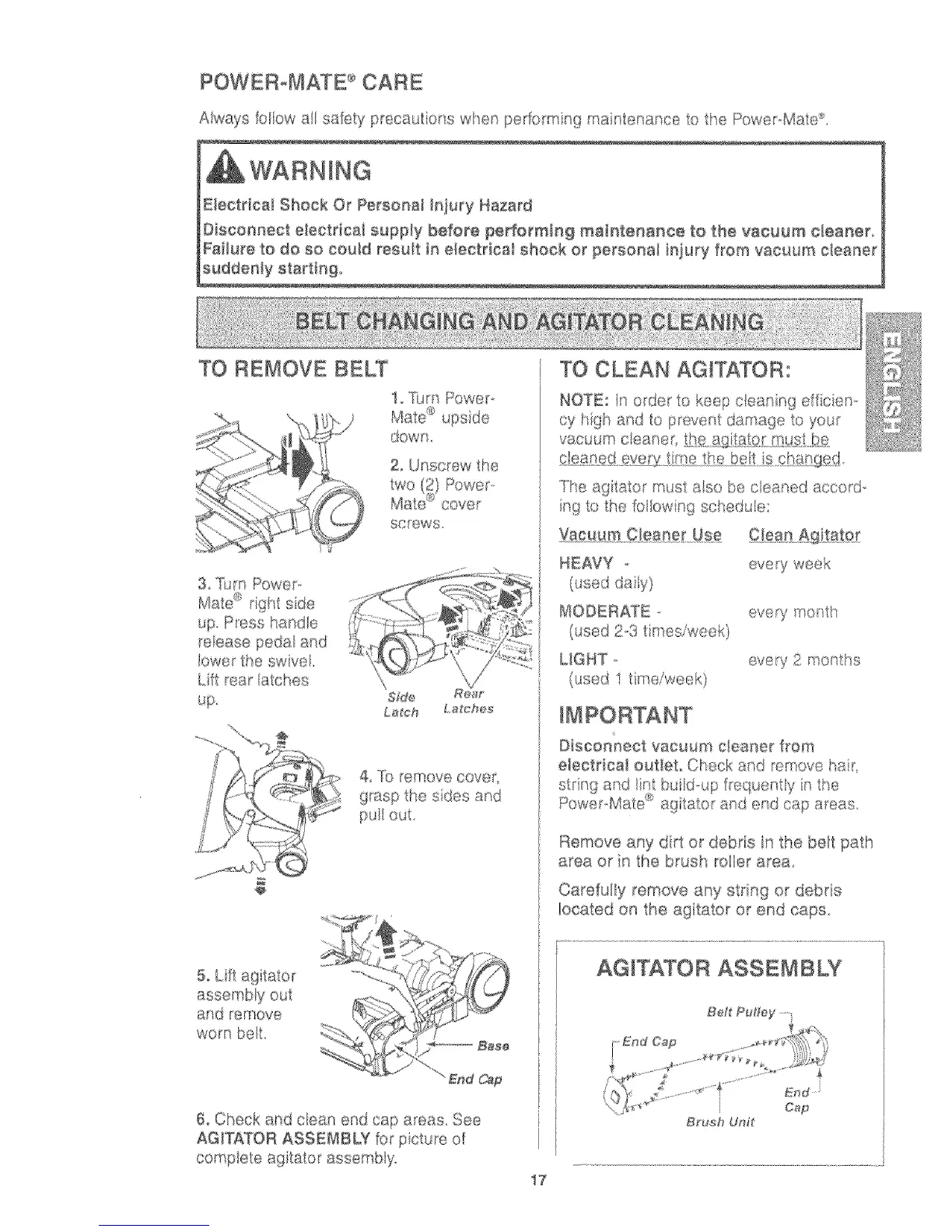
TO REMOVE BELT
2 Unscrew the
screws
3 lhm Powep
Mate e right sde
up Pess hartd e
reease peda and
lower the swve
Lilt rear [atct_es
Sfde Re_r
La_ch L,a£ches
4, ]b remove cover
grasp the sides and
pu_ out
5 Lift agitator
assembly out
and rerTove
worn bell
6, Check and ciean end cap areas, See
AGITATOR ASSEMBLY for p cture of
compete agitator assembiy
17
"TI_,e ,
ag_tat( r Tust ase be creased accorG
ng 1o the lot ow ng scsed _e
HEAVY
(used day)
MODERATE
0,sed 23 t n es/wee9
UGHT
(used 1 time/week/
eve_7 week
every rr_o_th
every 2 mot ths
Bisco_"mect vacuum c_eaner from
electrical out_eL Check anc emove a_,
strng and/nt b ild,,up frequently i_ t_
PowepMate "u_agitato_ an_: end cap areas.
Remove any drt or debris in the be_t path
area or n the brus_ roler area
Ca_efuily remove any strng or debris
located on the ag tator or end caps.
End Cap
I
Brush Un_



 To Next Page