OP
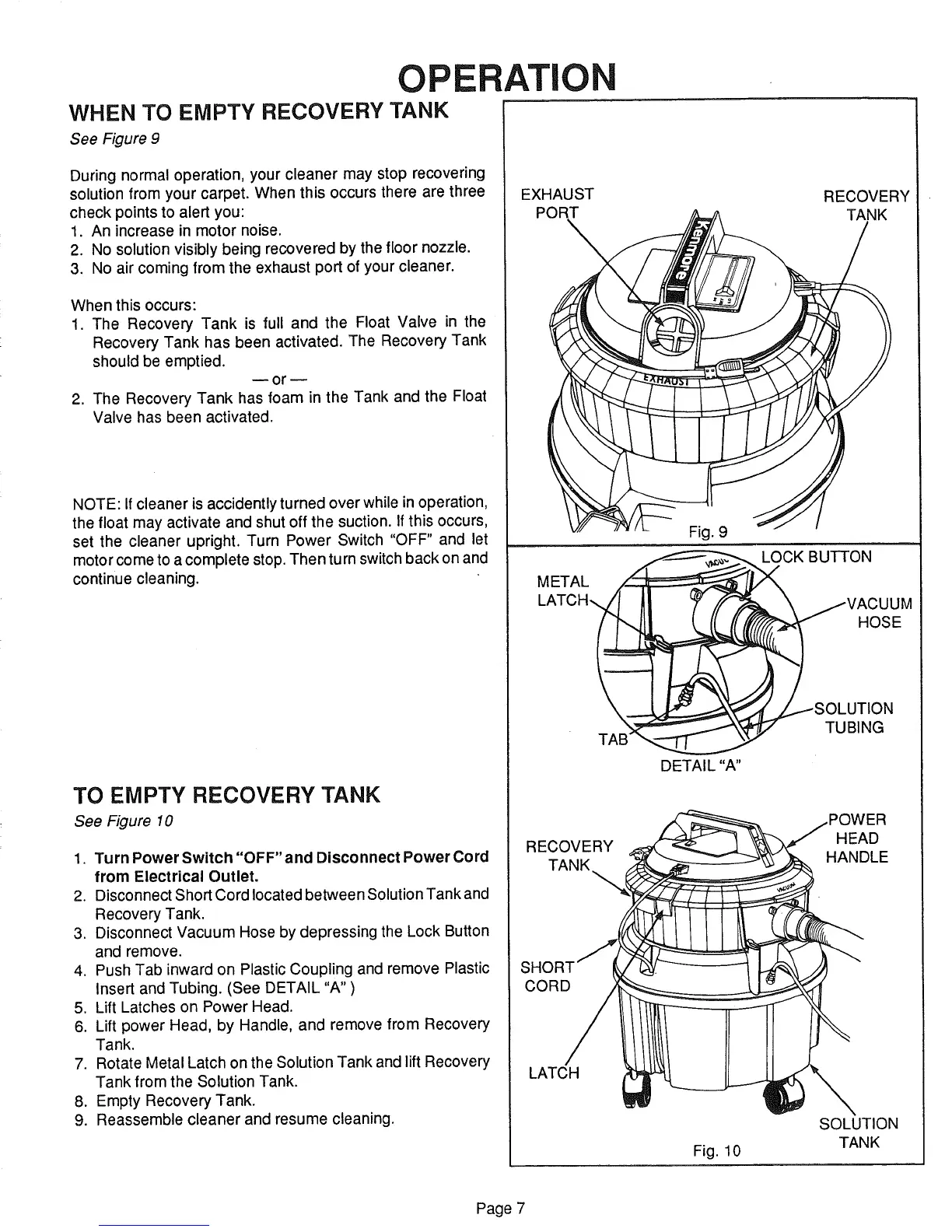
WHEN TO EMPTY RECOVERY TANK
See Figure 9
During normal operation, your cleaner may stop recovering
solution from your carpet. When this occurs there are three
check points to alert you:
1. An increase in motor noise.
2. No solution visibly being recovered by the floor nozzle.
3. No air coming from the exhaust port of your cleaner.
When this occurs:
1. The Recovery Tank is full and the Float Valve in the
Recovery Tank has been activated. The Recovery Tank
should be emptied.
or w
2. The Recovery Tank has foam in the Tank and the Float
Valve has been activated.
NOTE: If cleaner is accidently turned over while in operation,
the float may activate and shut off the suction. If this occurs,
set the cleaner upright. Turn Power Switch "OFF" and let
motor come to a complete stop. Then turn switch back on and
continue cleaning.
TO EMPTY RECOVERY TANK
See Figure 10
1. Turn Power Switch "OFF" and Disconnect Power Cord
from Electrical Outlet,
2. Disconnect Short Cord located between Solution Tank and
Recovery Tank.
3. Disconnect Vacuum Hose by depressing the Lock Button
and remove.
4. Push Tab inward on Plastic Coupling and remove Plastic
Insert and Tubing. (See DETAIL "A" )
5. Lift Latches on Power Head.
6. Lift power Head, by Handle, and remove from Recovery
Tank.
7. Rotate Metal Latch on the Solution Tank and lift Recovery
Tank from the Solution Tank.
8. Empty Recovery Tank.
9. Reassemble cleaner and resume cleaning.
ATIO
EXHAUST RECOVERY
PORT TANK
Fig. 9
METAL _CK BUTTON
,ATOH VA o
TA_ TUBING
DETAIL "A"
RECOVERY HEAD
TANK_ HANDLE
S
CORD
LATCH
Fig. 10
SOLUTION
TANK
Page 7



 To Next Page