ElectronicalJy Controlled Dehumidifier Operating instructions (continued)
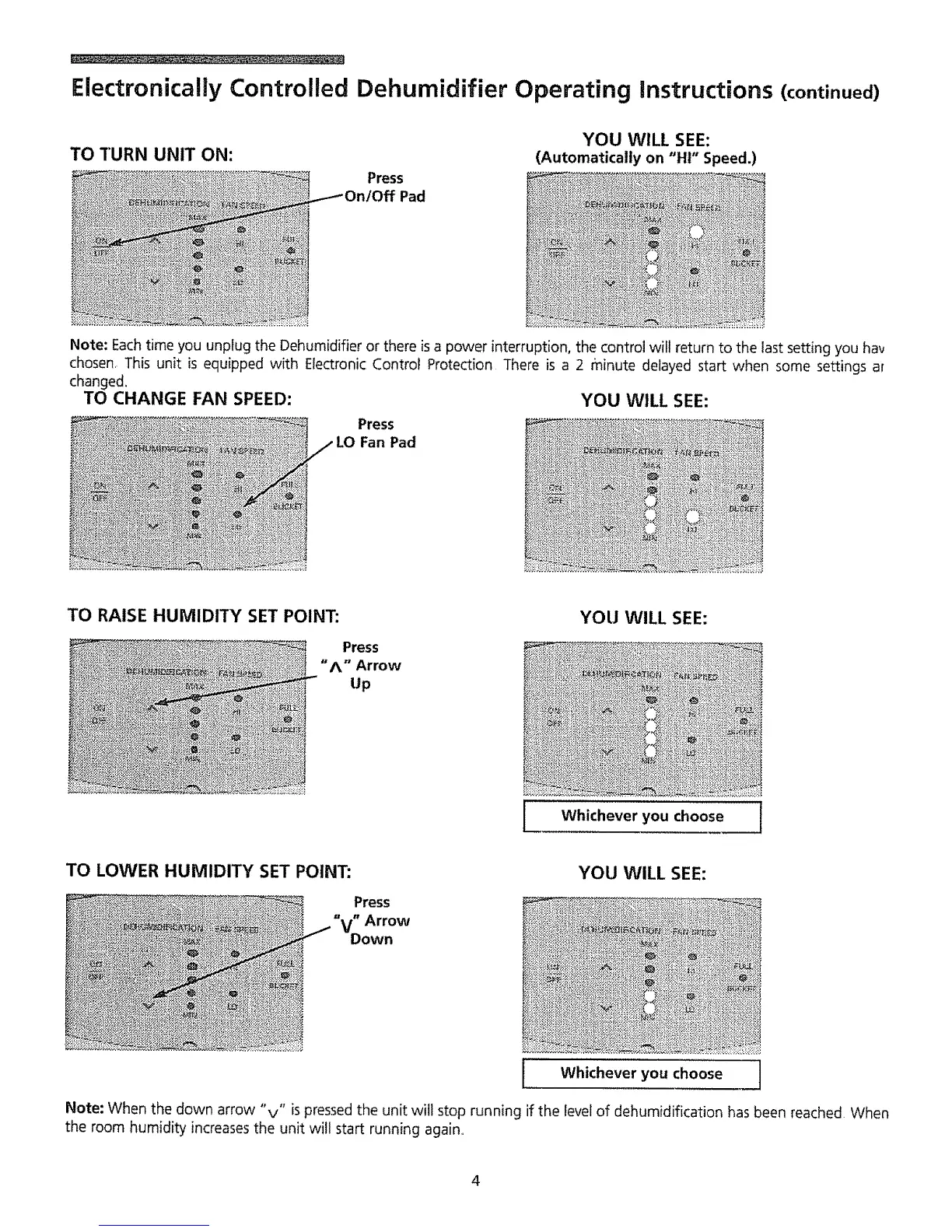
TO TURN UNIT ON:
Press
Pad
YOU WILL SEE:
(Automatically on "HI" Speed.)
Note: Eachtime you unplug the Dehumidifier or there isa power interruption, the control will return to the last setting you hay
chosen This unit is equipped with Electronic Control Protection There is a 2 Pninute delayed start when some settings ar
changed.
TO CHANGE FAN SPEED: YOU WILL SEE:
Press
Fan Pad
TO RAISE HUMIDITY SET POINT:
Press
"A" Arrow
Up
YOU WILL SEE:
1
Whichever you choose
i
TO LOWER HUMIDITY SET POINT:
Press
"V" Arrow
Down
YOU WILL SEE:
,
Note: When the down arrow "v" is pressed the unit will stop running if the level of dehumidification has been reached When
the room humidity increasesthe unit will start running again,,
Whichever you choose
4



 To Next Page