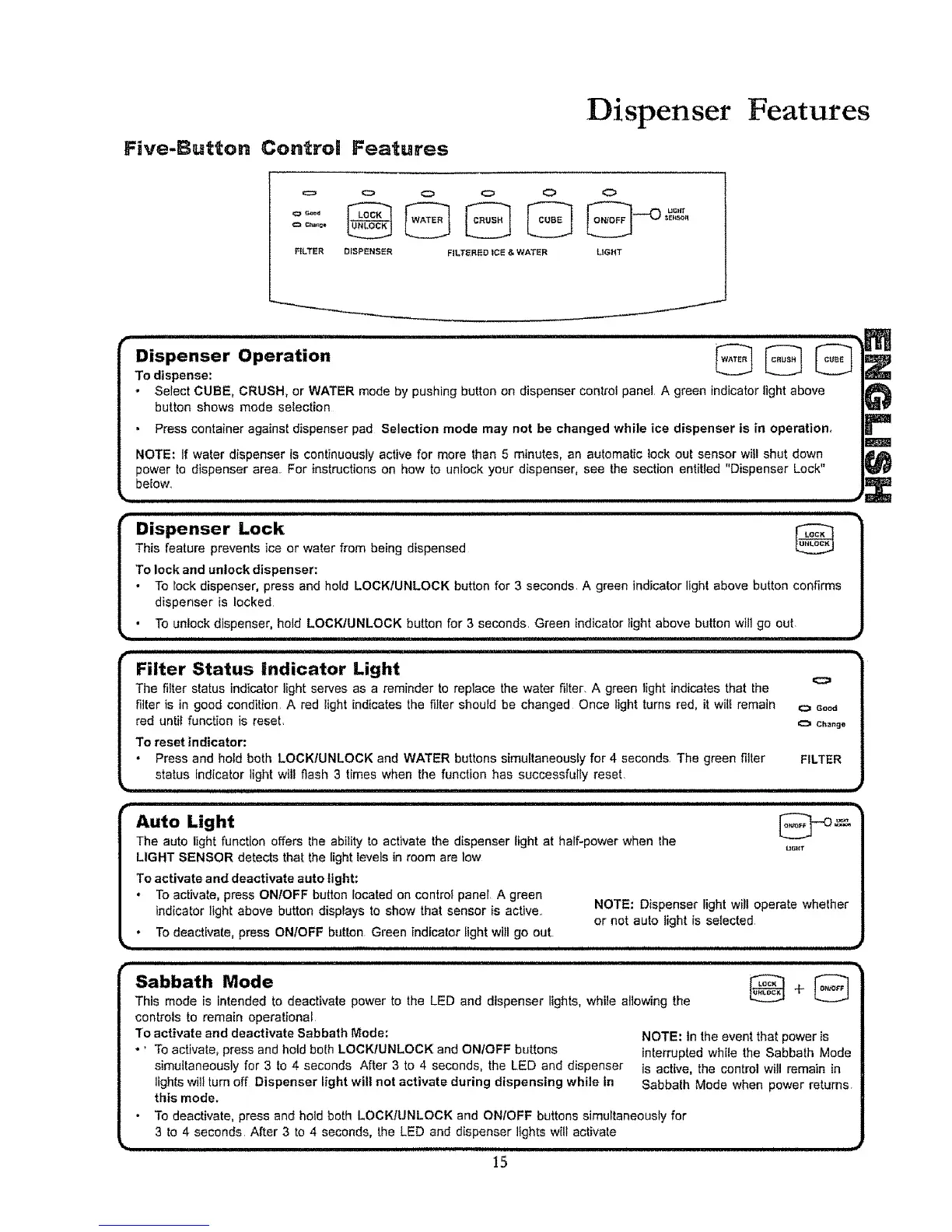
Five-Button Centre! Features
Dispenser Features
G_d
RLTER
DESPENSER FILTERED ICE & WATER LIGHT
Dispenser Operation _
To dispense:
• Select CUBE, CRUSH, or WATER mode by pushing button on dispenser control panel A green indicator light above
button shows mode se{ectien
Press container against dispenser pad Selection mode may not be changed while ice dispenser is in operation,
NOTE: If water dispenser is continuously active for more than 5 minutes, an automatic lock out sensor witl shut down
power to dispenser area. For instructions on how to unlock your dispenser, see the section entitled "Dispenser Lock"
below.,
i i i i n II i nlnulluun
r Dispenser Lock _
This feature prevents ice or water from being dispensed L_
/ To lock and unlock dispenser:
/ To _ock dispenser, press and held LOCK/UNLOCK button for 3 seconds, A green indicator light above button confirms
dispenser is locked
L To unlock dispenser, hold LOCK/UNLOCK button for 3 seconds, Green indicator light above button will go out ..
r Filter Status indicator Light
/ The filter status indicator light serves as a reminder to replace the water tilter. A green light indicates that the
/ titter is in good condition A red light indicates the filter should be changed Once light turns red, it wiii remain o Good
Change
red until function is reset,
/ To reset indicator:
I " Press end hold both LOCK/UNLOCK and WATER buttons simultaneously for 4 seconds. The green filter FILTER
L status Indicator light will flash 3 times when the function has successfully reset.
_1 ilnlnulU nlHl'l ................................................... ,_1
Auto Light _-
The auto light function offers the ability to activate the dispenser Iight at half-power when the .G,,_
LIGHT SENSOR detects that the Iight levels in room are low
o activate and deactivate auto light:
To activate, press ONIOFF button located on control panel A green NOTE: Dispenser light will operate whether
. ind{cator light above button displays to show that sensor is active, or not auto light is se{ected
To deactivate, press ON/OFF button Green indicator light will go out
,
Sabbath Mode
This mode is intended to deactivate power to the LED and dispenser lights, whiJe allowing the
controls to remain operational
To activate and deactivate Sabbath Mode:
• ' To activate, press and hold beth LOCK!UNLOCK and ON/OFF buttons
simultaneously for 3 to 4 seconds After 3 to 4 seconds, the LED and dispenser
lights will turn off Dispenser light will not activate during dispensing while in
this mode.
NOTE: In the event that power is
interrupted while the Sabbath Mode
is active, the control will remain in
Sabbath Mode when power returns,
To deactivate, press and hold both LOCK/UNLOCK and ON/OFF buttons simultaneously for
3 to 4 seconds After 3 to 4 seconds, the LED and dispenser lights witl activate
I5



 To Next Page