23
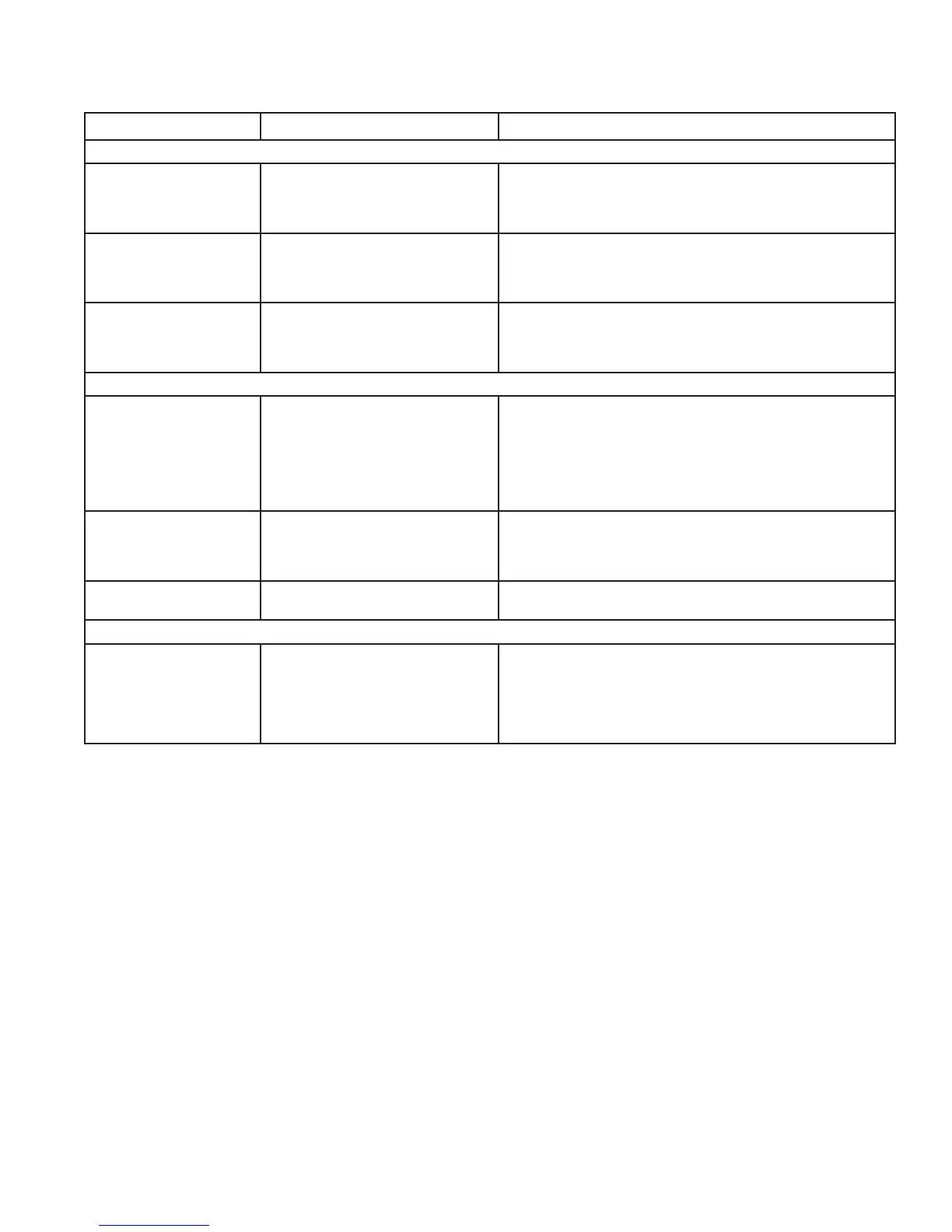
Problem Cause Correction
TEMPERATURES ARE TOO WARM
Freezer/Fresh Food
temperature is too
warm.
• Doors are opened too fre-
quently or too long.
• Door is slightly open.
• Warm air enters the refrigerator whenever the door
is opened. Open the door less often.
• See PROBLEM column OPENING/CLOSING OF
DOORS/DRAWERS.
Freezer temperature is
too warm. Fresh Food
temperature is satisfac-
tory.
• Freezer control is set too
warm.
• Set freezer control to a colder setting. Allow 24
hours for temperature to stabilize.
Fresh Food temperature
is too warm. Freezer
temperature is satisfac-
tory.
• Fresh Food control is set too
warm.
• Set Fresh Food control to a colder setting. Allow 24
hours for temperature to stabilize.
WATER/MOISTURE/FROST INSIDE REFRIGERATOR
Moisture collects on
inside of refrigerator
walls.
• Weather is hot and humid.
• Door is slightly open.
• Door is opened too often or
too long.
• Open containers.
• The rate of frost buildup and internal sweating
increases.
• See PROBLEM column OPENING/CLOSING OF
DOORS/DRAWERS.
• Open door less often.
• Keep containers covered.
Water collects on bot-
tom side of drawer
cover.
• Vegetables contain and give
o moisture.
• It is not unusual to have moisture on the bottom side
of the cover.
• Move humidity control (some models) to lower set-
ting.
Water collects in bot-
tom of drawer.
• Washed vegetables and fruit
drain while in the drawer.
• Dry items before putting them in the drawer. Water
collecting in bottom of drawer is normal.
WATER/MOISTURE/FROST OUTSIDE REFRIGERATOR
Moisture collects on
outside of refrigerator
or between doors.
• Weather is humid.
• Door is slightly open, causing
cold air from inside refriger-
ator to meet warm air from
outside.
• This is normal in humid weather. When humidity is
lower, the moisture should disappear.
• See PROBLEM column OPENING/CLOSING OF
DOORS/DRAWERS.
Before You Call



 To Previous Page