OVEN CONTROL PANEL
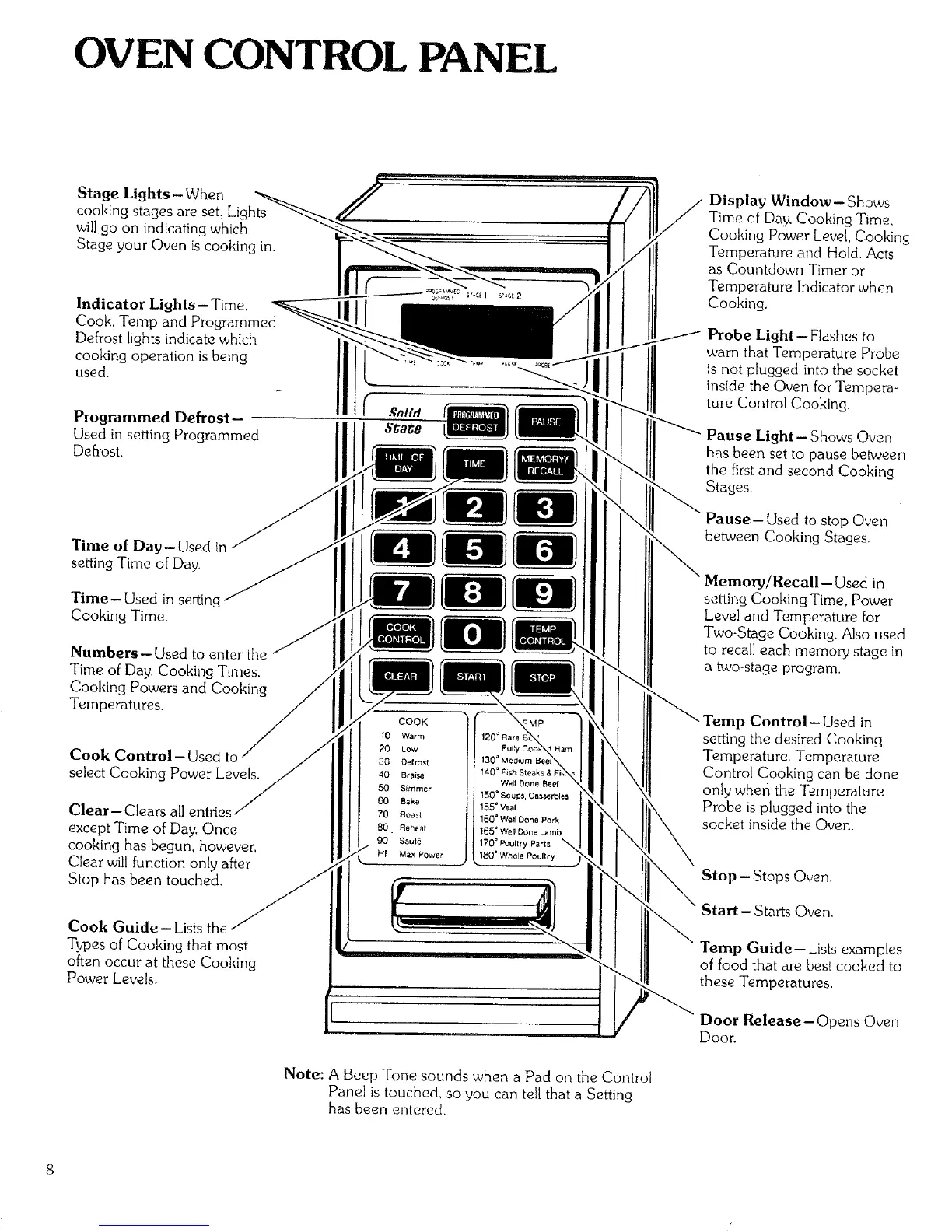
Stage Lights-When
cooking stages are set, Lights
will go on indicating which
Stage your Oven is cooking in.
Indicator Lights- Time,
Cook, Temp and Programmed
Defrost lights indicate which
cooking operation is being
used.
Programmed Defrost-
Used in setting Programmed
DefrosL
Time of Day-Used in
setting Time of Day.
Time-Used in settir
Cooking Time.
Numbers- Used to enter the
Time of Day, Cooking Times,
Cooking Powers and Cooking
Temperatures.
Cook Control-Used to
select Cooking Power Levels.
Clear- Cle
except Time of Day. Once
cooking has begun, however,
Clear will function only after
Stop has been touched.
Cook Guide-Lists the
Types of Cooking that most
often occur at these Cooking
Power Levels.
COOK
10 Warm
20 Low
30 Oefrost
40 Br aisa 1407 Fish SteBks & I
Well Done Beef
50 Simmer 15G _ Soups, Casseroles
60 Bake 155 = Veal
70 Roast 160=Well Done Pork
_. Reheat 165o Well Done Lamb
Saut_ 170 ° _ultry P_rts _,
HI Max Power 180 = Whole Poultry
Display Window - Shows
Time of Day, Cooking Time,
Cooking Power Level, Cooking
Temperature and Hold. Acts
as Countdown Timer or
Temperature Indicator when
Cooking.
Probe Light--Flashes to
warn that Temperature Probe
is not plugged into the socket
inside the Oven for Tempera-
ture Control Cooking.
Pause Light--Shows Oven
has been set to pause between
the first and second Cooking
Stages.
Pause- Used to stop Oven
between Cooking Stages.
setting Cooking Time, Power
Level and Temperature for
Two-Stage Cooking. Also used
to recall each memory stage in
a two-stage program
emp Control-Used in
setting the desired Cooking
Temperature. Temperature
Control Cooking can be done
only wher_ the Temperature
Probe is plugged into the
socket inside the Oven.
Stop- Stops Oven.
Start--Starts Oven.
Temp Guide-- Lists examples
of food that are best cooked to
these Temperatures.
Door Release-Opens Oven
Door.
Note: A Beep Tone sounds when a Pad on the Control
Panel is touched, so you can tell that a Setting
has been entered.



 To Next Page