- 10 -
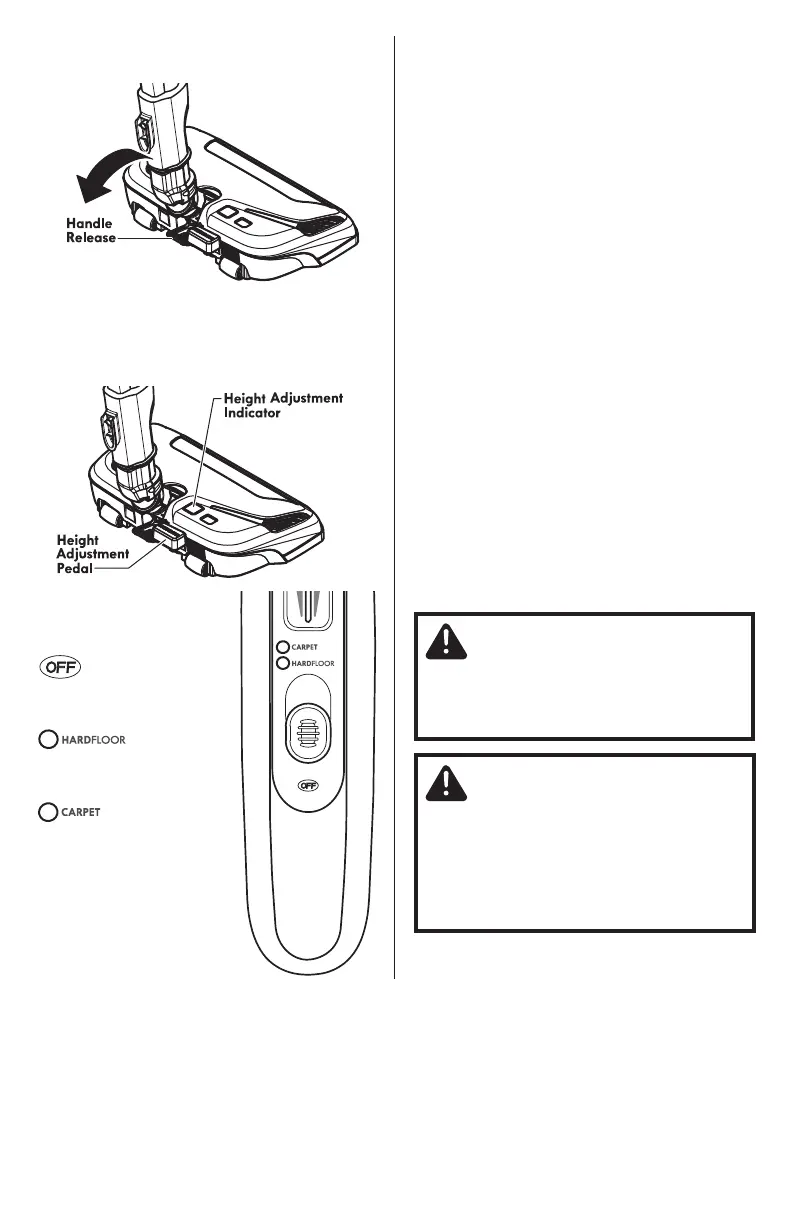
3. Lower wand from upright position by
pressing on the HANDLE RELEASE pedal.
4. Select a pile height setting by pressing
the height adjust pedal on the rear of the
PowerMate
®
. The pile height setting shows on
the indicator.
SUGGESTED PILE HEIGHT
SETTINGS
Attention: Refer to your carpet
manufacturers cleaning recommendations.
Some more delicate carpets may require
that they be vacuumed with the PowerMate
®
agitator turned off to prevent carpet
damage.
For best deep down cleaning, use the XLO
setting. However, you may need to raise the
height to make some jobs easier, such as
scatter rugs and some deep pile carpets,
and to prevent the vacuum cleaner from
shutting off. Suggested settings are:
HI – Shag, deep pile, super-soft, or
ultraplush carpets, and scatter rugs.
MED – Medium to deep pile.
LO – Low to medium pile.
XLO – The preferred setting for many
carpets and also for bare floors.
NOTE: To protect bare floors, place the 3-
way On/Off switch in the HARDFLOOR
position to turn off agitator rotation.
CAUTION
DO NOT leave the PowerMate
®
running in
one spot for any length of time. Damage
to carpet may occur.
5. Select a position on
the handle three-way
On/Off switch.
Turns vacuum cleaner
off.
Turns on the canister
motor only.
Turns on both the
canister and the
PowerMate
®
motors.
Agitator will come on.
CAUTION
Product Damage Hazard
Use care if the PowerMate
®
and wand is
left in the upright position as it may tip
over easily. Property damage can occur if
tipped.



 To Next Page